
TOOLRELIEF DECISION INTELLIGENCE
- Decision
- Use The SaaS Overbilling Epidemic: Why 72% of Your Subscription Fees Are Pure Fiction in 2026 to evaluate the software or technology question investigated on this page before taking the next material action.
- Evidence Basis
- Documented product information, published evidence, comparative analysis, direct observation, and clearly labeled models where applicable.
- Best Used For
- Reducing uncertainty before taking the next material action.
- Decision Boundary
- This page provides independent decision support rather than a guaranteed outcome. Product capabilities, pricing, third-party terms, and operating conditions can change.
SaaS Overbilling Audit: 7 Critical Invoice Leaks to Check Before Renewal
Quick Navigation ✔
ToggleSaaS overbilling rarely starts with one obvious mistake.
It usually starts with small invoice leaks: unused seats, old add-ons, unclear usage charges,
renewal drift, duplicate tools, and AI credits nobody reviews.
Each leak may look minor on its own.
Together, they can turn a clean software stack into a monthly bill nobody can fully explain.
This guide is a practical SaaS overbilling audit.
Use it before renewal to find the charges that deserve a second look before they become normal.
Methodology Note
This guide is based on practical SaaS cost review patterns, public SaaS management research,
and common billing issues teams face when subscriptions grow without clear ownership.
The examples are educational and should be used as audit prompts,
not as claims about every vendor or every invoice.
Your actual SaaS waste depends on team size, usage, contract terms, paid seats, add-ons,
renewal dates, and how often your team reviews the stack.
Where SaaS Invoice Leaks Usually Start
Most SaaS overbilling problems begin when nobody owns the invoice clearly.
A tool may start with a simple monthly plan. Over time, the same subscription can collect extra users,
premium add-ons, higher usage tiers, AI credits, automation limits, integrations, and renewal increases.
The problem is not always fraud or bad intent. In many teams, the issue is lack of visibility.
Common invoice leaks include:
– inactive users that still occupy paid seats;
– usage limits that trigger higher pricing tiers;
– old add-ons that nobody reviews;
– premium integrations that duplicate native features;
– AI credits or automation runs that are not monitored;
– duplicate tools across different teams;
– renewal increases that are accepted too late to negotiate.
This is why SaaS bills can grow even when the team’s actual workflow has not improved.
The 7 Critical Invoice Leaks to Check Before Renewal
1. Unused Paid Seats
Seat-based pricing is one of the most common sources of SaaS waste.
When an employee leaves, changes roles, or stops using a tool, the paid seat may remain active.
Contractors, temporary collaborators, former agencies,
and inactive users can quietly stay inside the billing system for months.
This is not always malicious. In many companies, no single person owns seat cleanup across every SaaS tool.
The result is simple: teams keep paying for access that no longer supports real work.
2. Duplicate Tools Across Teams
SaaS overbilling often happens because different teams buy different tools for the same job.
Marketing may use one analytics tool. Product may use another.
Sales may buy a separate reporting platform.
A founder may keep an older subscription because it still contains historical data.
Each decision may make sense in isolation.
Together, they create software overlap.
The cost is not only the subscription fee.
Duplicate tools also create duplicate data, extra training, inconsistent reporting,
and more renewal dates to manage.
3. Renewal Drift
Renewal drift happens when software prices increase gradually over time while the
team stops comparing cost against value.
A renewal may rise because of new pricing, added users,
changed packaging, currency differences, bundled features, or the end of a promotional discount.
Small increases are easy to ignore.
Over several renewal cycles, they can become a meaningful budget issue.
The best time to catch renewal drift is not at the renewal deadline.
It is 60 to 90 days before the contract renews.
4. Usage-Based Billing Spikes
Usage-based pricing can be fair when the metric is clear, predictable, and easy to verify.
The problem begins when teams cannot easily understand what counts as usage.
API calls, automation runs, AI credits, storage events, workflow triggers, background tasks,
and “active users” may all be measured differently depending on the vendor.
A team may believe it used one amount, while the dashboard shows a higher number and
the invoice reflects a higher tier.
That does not always mean fraud.
Sometimes it means the billing model is too difficult to audit without better logs, alerts,
and internal ownership.
5. Premium Add-Ons Nobody Owns
Some SaaS platforms charge extra for advanced integrations, premium connectors,
AI features, automation limits, or reporting modules.
Those add-ons can be valuable when they solve a real workflow problem.
But they become waste when a team pays for premium features that duplicate functionality already available
in another tool, a native integration, or a lower-cost workflow.
Before accepting an add-on, teams should ask: does this feature replace work, reduce complexity,
or simply create another line item on the invoice?
6. AI Credits and Automation Limits
AI tools often introduce credits, tokens, generation limits, automation runs, and usage tiers.
These can be useful, but they can also make invoices harder to predict.
If nobody reviews usage logs, teams may keep paying for AI features that were tested once, used briefly,
or replaced by another tool.
7. Forgotten Trials and Legacy Subscriptions
Many SaaS costs survive because nobody remembers why the tool was purchased.
A trial becomes a paid plan.
A project ends, but the subscription remains.
A legacy workflow is replaced, but the old tool keeps billing.
These are not always large charges.
But they are easy to miss, and they compound across the stack.
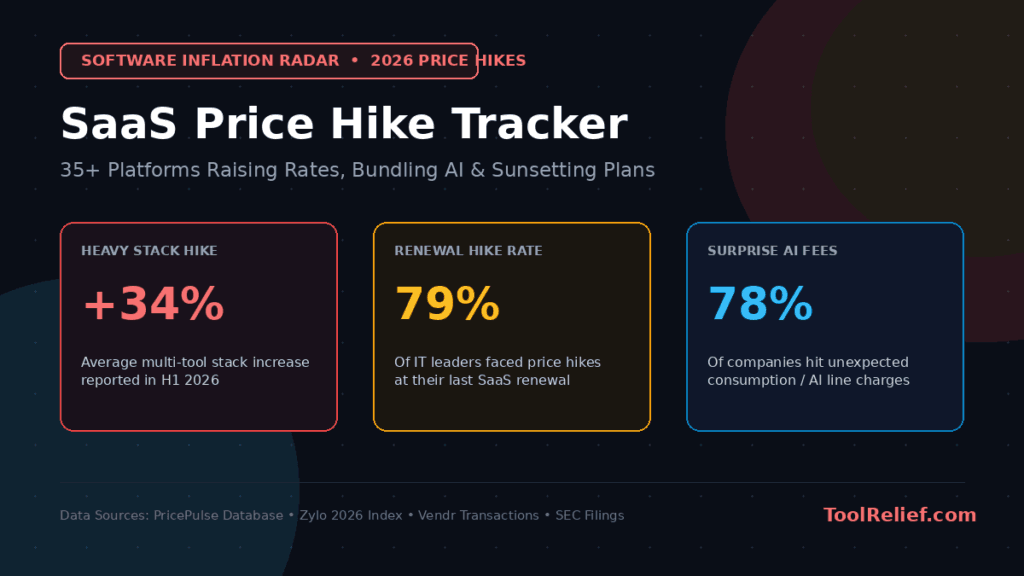
This problem is part of a larger pattern of SaaS cost optimization, where billing, renewals, seats, and usage all need to be reviewed together.
How Much SaaS Waste Is Normal?
There is no universal percentage that applies to every company.
A lean startup with strict tool ownership may have very little SaaS waste. A fast-growing remote team with multiple departments, contractors, AI tools, and annual renewals may have much more.
For practical planning, teams should treat unexplained SaaS spend as a review signal, not as an automatic accusation against the vendor.
The better question is not “what percentage is fake?” The better question is:
Can your team explain every recurring SaaS charge, seat, add-on, and renewal before the invoice arrives?
This is why switching tools feels harder than staying in bad ones.
The Vendor Lock-In Problem Behind SaaS Overbilling
SaaS overbilling becomes harder to fix when switching tools is expensive, risky, or operationally painful.
Vendor lock-in can appear through:
– difficult data exports;
– proprietary workflows;
– complex migration paths;
– premium integrations;
– long contract terms;
– team dependency on a specific interface;
– historical data that is hard to move.
Lock-in does not automatically mean a vendor is acting unfairly. Some tools become sticky because they are genuinely useful.
The problem begins when a team keeps paying more because migration feels harder than review, negotiation, or simplification.
That is why SaaS cost control is not only a finance task. It is also an operational design problem.
Once your business logic lives inside their system, they own you.
The 30-Minute SaaS Overbilling Audit
Use this quick audit before renewals, budget reviews, or major hiring changes.
Step 1 — Compare paid seats with active users
Check whether every paid user still works on the team, still needs the tool, and has used it recently.
Step 2 — Review usage spikes
Look for sudden increases in API calls, storage, AI credits, automation runs, or workflow events. If usage increased, connect it to a real business reason.
Step 3 — Identify inactive workflows and automations
Old automations can continue running in the background even after the original project is no longer active.
Step 4 — Review renewal history
Compare the last 12 to 24 months of invoices. Look for price changes, seat increases, add-ons, and plan upgrades.
Step 5 — Check add-ons and premium integrations
Ask whether each add-on still solves a real problem or whether the same function exists elsewhere in your stack.
Step 6 — Assign an owner to every tool
Every recurring subscription should have one internal owner responsible for usage, renewal timing, and cancellation decisions.
Why SaaS Overbilling Risk May Increase in 2026
SaaS overbilling risk may increase in 2026 because software stacks are becoming more complex.
Three trends matter most:
1. More usage-based and AI-credit pricing
AI tools often introduce credits, tokens, generation limits, automation runs, and usage tiers.
These can be useful, but they also make invoices harder to predict.
2. More tool overlap
As teams adopt AI assistants, workflow tools, analytics platforms, and automation layers,
more tools begin solving overlapping problems.
3. More renewal pressure
As software spending grows, companies face more renewal dates, more contracts, more add-ons,
and more opportunities for small increases to compound.
None of this means every vendor is acting badly. It means teams need better visibility,
ownership, and review habits.
Tools that add a thin AI layer on top of existing APIs and charge 10× more.
To fight SaaS overbilling, teams need more than awareness. ToolRelief’s SaaS cost optimization tools help identify where spend is leaking before renewal season hits.
How to Protect Your SaaS Budget in 2026
A useful SaaS budget strategy is not about cancelling everything.
It is about knowing what each tool does, who owns it, and whether it still earns its place in the stack.
Use this practical playbook:
1. Move toward usage-transparent tools
Prefer vendors that explain billing clearly and provide accessible usage logs.
2. Review seats monthly
Remove inactive users, former contractors, duplicate accounts, and unused paid seats.
3. Audit AI add-ons separately
AI features often create new pricing layers. Review them separately from the base subscription.
4. Build a smaller, clearer stack
Fewer tools usually means fewer invoices, fewer renewal dates, and fewer hidden dependencies.
5. Review renewals quarterly
Do not wait until the renewal deadline. Review major SaaS contracts 60 to 90 days in advance.
6. Document every workflow
If nobody can explain what a tool does, who uses it, and why it matters, it should be reviewed.
What to Ask Your SaaS Vendor Before Renewal
Before renewing a SaaS contract, ask the vendor for a clear billing breakdown.
Useful questions include:
– How many paid seats are active today?
– How many seats have not logged in during the last 30, 60, or 90 days?
– Which add-ons are included in the invoice?
– Which features are being billed separately?
– Did our usage trigger a higher tier?
– Is there a lower plan that still fits our current usage?
– Can we remove unused seats before renewal?
– Can renewal pricing be locked for the next term?
– Can SSO, reporting, or integrations be priced separately instead of bundled into a larger plan?
If the vendor cannot explain the invoice clearly, the subscription needs a deeper review before renewal.
When Not to Cancel a Tool Immediately
Not every expensive tool should be cancelled immediately.
Some SaaS tools are deeply connected to customer data, reporting, sales operations,
support workflows, compliance, or internal knowledge.
Before cancelling a tool, check:
– who owns the tool internally;
– which team depends on it;
– whether important data must be exported;
– whether another tool can replace it safely;
– whether cancellation would break an integration;
– whether the renewal date allows time for migration.
The goal is not panic cancellation. The goal is controlled reduction.
When Not to Cancel a Tool Immediately
Not every expensive tool should be cancelled immediately.
Some SaaS tools are deeply connected to customer data, reporting, sales operations,
support workflows, compliance, or internal knowledge.
Before cancelling a tool, check:
– who owns the tool internally;
– which team depends on it;
– whether important data must be exported;
– whether another tool can replace it safely;
– whether cancellation would break an integration;
– whether the renewal date allows time for migration.
The goal is not panic cancellation. The goal is controlled reduction.
Use ToolRelief Tools to Go Deeper
If this audit shows unexplained SaaS spend, use the related ToolRelief tools to review the problem more clearly.
Run the SaaS Waste Audit Tool
Compare your spend with the SaaS Cost Benchmark Tool
Check upcoming renewal exposure with the SaaS Renewal Risk Calculator
Review all SaaS cost optimization tools
Frequently Asked Questions
What is SaaS overbilling?
SaaS overbilling happens when a company pays more than expected or more than necessary for
software because of unused seats, unclear usage charges, add-ons, renewal increases, duplicate tools,
or billing rules that are not reviewed regularly.
Is SaaS overbilling always intentional?
No. SaaS overbilling is not always intentional. It can happen because of poor internal ownership,
unclear usage metrics, inactive users, forgotten add-ons, or renewal terms that were not reviewed early enough.
How often should companies audit SaaS spending?
Teams should review major SaaS subscriptions at least quarterly,
and they should review important contracts 60 to 90 days before renewal.
Fast-growing teams may need monthly seat and usage reviews.
What is the fastest way to reduce SaaS waste?
The fastest first step is to compare paid seats with active users, remove inactive accounts,
review upcoming renewals, and identify duplicate tools across teams.
Should I cancel tools immediately if I find waste?
Not always. Some tools are deeply connected to workflows, data, or customer operations.
Review ownership, usage, alternatives, and migration risk before cancelling important software.
Final Takeaway
SaaS overbilling is rarely one obvious mistake.
It is usually the result of small decisions that accumulate: unused seats, unclear usage metrics,
old add-ons, duplicate tools, renewal drift, and software that no longer has a clear owner.
The solution is not panic cancellation. The solution is visibility.
If your team can explain every paid seat, every add-on, every usage spike, and every renewal date,
your SaaS stack becomes easier to control.
If you cannot, the next step is a structured SaaS waste audit.
Sources & References
This article is based on public SaaS management research, IT asset management research,
and practical software cost-control analysis.
– Zylo SaaS Management Index:
Zylo’s SaaS management research reports significant SaaS license waste and highlights the need for stronger license and renewal management.
– Flexera 2025 State of ITAM Report:
Flexera’s IT asset management research highlights challenges around IT visibility, SaaS waste, software license complexity, and cost optimization.
– Gartner IT Spending Forecast 2026:
Gartner forecasts worldwide IT spending to reach $6.15 trillion in 2026, showing continued pressure on technology budgets and the need for disciplined software spending.
– ToolRelief Methodology:
Our editorial process explains how ToolRelief evaluates SaaS tools, software cost patterns, AI tools, and workflow complexity.
 Read this article on Flipboard:
[Here]
Written by Waleed Al-Qasem
Founder of ToolRelief.
I write about the intersection of technology, remote work, and human productivity.
My mission is to help teams eliminate digital noise and get back to doing deep, meaningful work.
If your workflow feels heavier with AI…
You don’t need another tool.
You need less.
Explore ToolRelief to simplify your stack and regain control.