Inactive Seats
88- Users show little or no activity
- Login data has not been reviewed
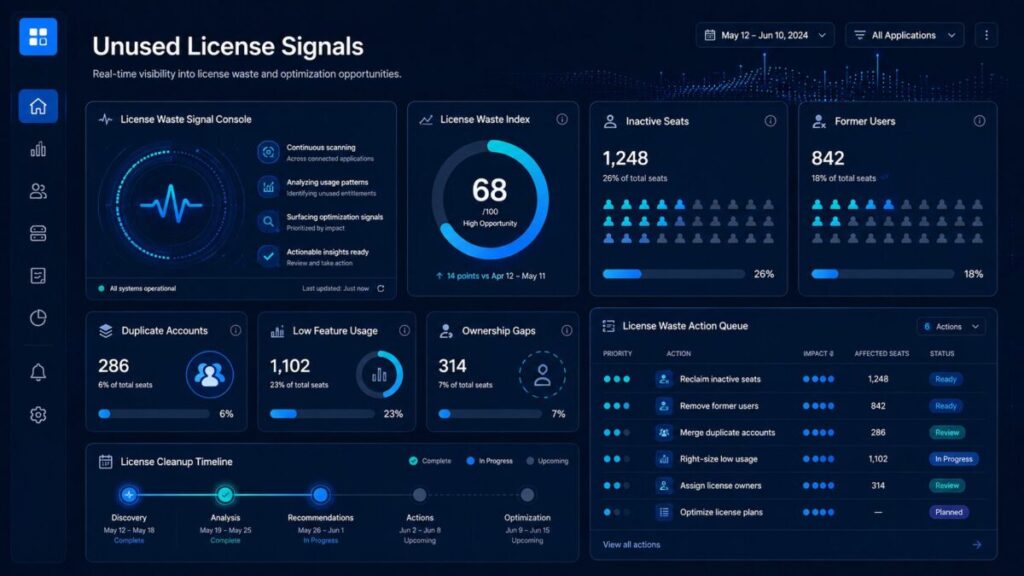
help teams identify software seats, accounts, roles, and paid features that may no longer be producing enough value.
These signals can appear when users become inactive, former employees keep access, duplicate accounts exist, guest users are counted incorrectly,
paid features are rarely used, or no clear owner is responsible for license cleanup.
Start with the License Waste Signal Console, review the active signals, then use the related ToolRelief tools to estimate unused license cost,
check renewal timing, and decide whether seats should be kept, reclaimed, downgraded, or removed.
ToolRelief Unused License Model
Use this planning model to review inactive seats, former users, duplicate accounts, low feature usage, unclear owners, and renewal waste before paying for another software cycle.
License Waste Signal Console
5 unused license signals visible
Sample signal model
ToolRelief unused license model
Cleanup cadence
Seat ownership
Decision matrix
user is active, workflow is valuable, seat is justified
user is inactive, role changed, or access is no longer needed
paid features are unused or lower tier fits
former user, duplicate account, or no business owner exists
License cleanup review
If several license waste signals are active, review users, owners, and usage before approving another SaaS renewal or expanding paid seats.
This license waste console is a ToolRelief planning model, not live vendor data, financial advice, legal advice, procurement advice, or official vendor analysis. Confirm current seat assignments, usage exports, admin roles, contract terms, renewal dates, cancellation windows, and vendor billing rules directly before making software license decisions.
ToolRelief Signal Screens
Choose the right ToolRelief calculator or template based on the software spend signal you need to review.
Review ToolRelief research paths for pricing evidence, renewal risk, AI subscription waste, and SaaS waste patterns.
Start with the pages that explain the ToolRelief system, spend signals, audit path, and software cost vocabulary.
ToolRelief is building software spend visibility assets for founders, operators, finance teams, and small business owners.
Advertising or partnership placement does not imply sponsorship, endorsement, or formal partnership unless clearly stated.
ToolRelief is independent. Listings and links are editorial navigation unless a sponsorship or partnership is clearly disclosed.
For broader software cost warning signs across renewals, AI tool overlap, pricing evidence, vendor review gaps,
and unused seats, visit the Software Spend Signals Center.
If your unused license signals are concentrated around inactive users, former team members, duplicate accounts, unclear owners,
or low feature usage, use the Unused SaaS License Cost Calculator before approving another renewal.
If several license waste signals are active at the same time, consider a SaaS audit before expanding paid seats or renewing the same plan.
ToolRelief’s unused license models are designed for practical planning, not legal, financial, procurement, privacy,
or vendor-specific advice.
Confirm current seat assignments, usage exports, admin roles, contract terms, renewal dates, cancellation windows,
and vendor billing rules directly before making software license decisions.
are warning signs that a company may be paying for software seats that are inactive, duplicated, poorly assigned, or no longer needed.
These signals often appear before SaaS renewals, especially when former users still hold access, paid features are rarely used, guest roles are unclear,
or no team owner is responsible for license cleanup.
Reviewing unused license signals before renewal helps teams reclaim seats, reduce avoidable SaaS waste, compare plan tiers,
and make cleaner software spend decisions.

ToolRelief uses essential technologies to operate this website. With your permission, we also use analytics, embedded media, and other optional technologies to understand usage, improve content, and measure performance. Choose Accept all, Reject optional, or Manage preferences. You can change your choice at any time.