
TOOLRELIEF DECISION INTELLIGENCE
- Decision
- Use VPN Subscription Review Checklist | Before You Buy to verify the important conditions that should be checked before commitment, implementation, renewal, or another material action.
- Evidence Basis
- A structured verification checklist based on the decision conditions and risk signals documented on this page.
- Best Used For
- Checking whether the important decision conditions have been considered before commitment or implementation.
- Decision Boundary
- This page provides independent decision support rather than a guaranteed outcome. Product capabilities, pricing, third-party terms, and operating conditions can change.
VPN Subscription Review Checklist
A VPN subscription can look simple at checkout, but the real decision is not just the discount.
Before you buy, renew, or switch VPN providers, use this VPN Subscription Review Checklist to review renewal pricing, privacy claims, device limits, security features, support quality, cancellation rules, and long-term fit.
This page is not a list of the best VPNs.
It is a practical review checklist for deciding whether a VPN subscription still makes sense before you commit.
Some VPN plans look cheap because they require long commitments.
Others raise the effective cost at renewal, limit device usage, restrict important features,
or make privacy claims that users do not fully review before buying.
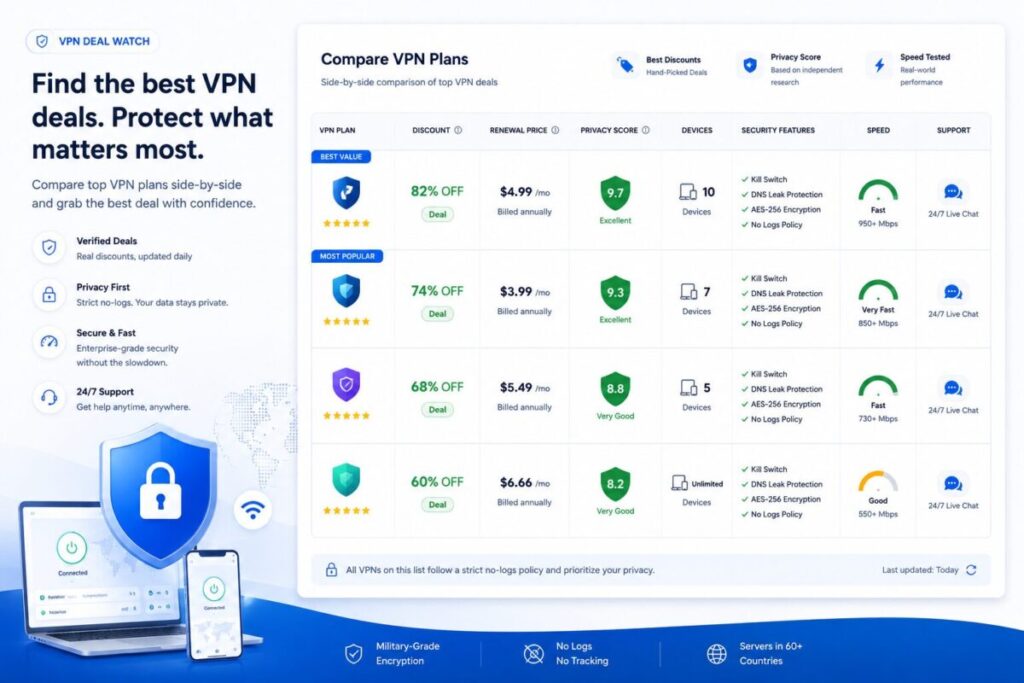
This VPN Deal Watch helps you review VPN discounts before you subscribe.
Use it to compare price, renewal terms, privacy posture, device limits, security features, support, and long-term value.
A VPN should not be treated as a random coupon purchase.
It is part of your privacy, security, and remote-work tool stack.
For a deeper remote-work angle, compare this page with Best VPN for Remote Teams before choosing a long VPN plan.
For a broader security path, review the Cybersecurity Hub before treating any VPN deal as a complete solution.
For broader software discovery, explore ToolRelief’s Software Offer Signals, Software Trends Signals, Software Templates, and Software Checklists,ToolRelief Updates
What This VPN Subscription Review Checklist Helps You Check
This VPN Deal Watch helps you answer practical questions before buying or renewing a VPN plan:
- Is the VPN discount real or mostly marketing?
- What will the plan cost after the first term?
- How long is the commitment?
- How many devices are included?
- Does the VPN support the platforms you use?
- Are privacy claims clear?
- Is there a no-logs policy?
- Are security features included?
- Is business or team usage supported?
- Is support strong enough if something breaks?
A VPN deal is only useful if it still makes sense after the discount ends.
Why VPN Deals Can Be Misleading
VPN companies often advertise large discounts, especially on annual or multi-year plans.
The first price can look attractive, but that price may not reflect the full decision.
A VPN deal can become less attractive when:
- renewal pricing is unclear
- the discount requires a long plan
- refunds are limited
- device limits are too restrictive
- speed is inconsistent
- business use is not supported
- privacy policies are hard to evaluate
- important features require higher tiers
- support is slow
- cancellation is confusing
The goal is not to avoid VPN discounts.
The goal is to understand what you are actually buying.
Modern security risks are broader than VPN access alone, which is why the Cloudflare 2026 Threat Report Cybersecurity Guide is useful when reviewing privacy, infrastructure, and vendor exposure.
VPN Deal Watch Checklist
Use this checklist before buying, renewing, or switching VPN services.
1. First-Term Price
Start with the advertised price.
Check:
- monthly price
- annual price
- multi-year price
- coupon terms
- limited-time restrictions
- trial period
- money-back guarantee
- payment options
A low first-term price can be useful, but it should not be the only reason to buy.
2. Renewal Price
The renewal price is often the real price.
Ask:
- What does the VPN cost after the discount ends?
- Is renewal automatic?
- Is the renewal price clearly shown?
- Can you cancel easily?
- Will the plan renew monthly, yearly, or multi-year?
- Does the provider notify users before renewal?
If renewal pricing is difficult to find, treat the deal as higher risk.
3. Plan Length
Many VPN deals are tied to long subscriptions.
Review:
- one-month plans
- annual plans
- two-year plans
- three-year plans
- cancellation terms
- refund windows
- upgrade rules
A long VPN plan can lower the monthly cost, but it also increases commitment risk.
4. Device Limits
A VPN deal should match how many devices you actually use.
Check support for:
- laptops
- phones
- tablets
- browsers
- routers
- smart TVs
- work devices
- family or team devices
A cheaper VPN may not be cheaper if you need more devices than the plan allows.
5. Platform Support
Make sure the VPN works where you need it.
Review support for:
- Windows
- macOS
- iOS
- Android
- Linux
- browser extensions
- routers
- travel devices
- remote-work setups
If your work depends on specific devices, platform support matters more than the discount.
6. Privacy Claims
VPN marketing often uses strong privacy language. Review the details.
Ask:
- Is there a no-logs policy?
- Has the policy been independently audited?
- Is the company clear about jurisdiction?
- Is data collection explained?
- Are payment and account details minimized?
- Is the privacy policy understandable?
A VPN is a privacy tool, so privacy claims should be easy to review.
7. Security Features
Security features should not be vague.
Look for:
- kill switch
- DNS leak protection
- strong encryption
- split tunneling
- multi-hop options
- threat blocking
- malware or tracker blocking
- secure protocols
- account protection
For broader security review, compare VPN decisions with your Cybersecurity Tool Stack Checklist.
A VPN is only one layer of protection, so review it alongside your Cybersecurity Tool Stack Checklist before treating it as a complete security solution.
8. Speed and Reliability
A VPN that is cheap but slow may create workflow problems.
Check:
- server locations
- connection speed
- streaming or work compatibility
- latency
- uptime
- mobile reliability
- crowded server complaints
- independent speed tests where available
Speed matters more if you use video calls, remote work tools, large downloads, or cloud apps.
9. Remote Work Fit
A VPN deal may be personal, professional, or both.
Ask:
- Is business use allowed?
- Can multiple team members use it?
- Are admin controls available?
- Is centralized billing available?
- Are dedicated IP options available?
- Is support suitable for work use?
- Does it fit your remote team security needs?
For teams, a consumer VPN deal may not be the same as a business-ready VPN decision.
10. Support and Cancellation
Support and cancellation terms matter before renewal.
Check:
- live chat
- email support
- help center quality
- response time
- refund process
- cancellation steps
- account deletion steps
- renewal notifications
A deal is weaker if support is difficult when billing or connection problems happen.
For a deeper remote-work angle, compare this page with Best VPN for Remote Teams before choosing a long VPN plan.
VPN Deal Scorecard
Score each area from 0 to 5.
| Area | Question | Score |
|---|---|---|
| First Price | Is the initial discount clearly useful? | 0–5 |
| Renewal Price | Is the long-term cost clear? | 0–5 |
| Plan Length | Is the commitment reasonable? | 0–5 |
| Device Limits | Does the plan cover your devices? | 0–5 |
| Platform Support | Does it work on your systems? | 0–5 |
| Privacy | Are privacy claims clear and credible? | 0–5 |
| Security | Are important security features included? | 0–5 |
| Speed | Is performance likely to fit your use case? | 0–5 |
| Remote Work Fit | Does it support personal or team needs? | 0–5 |
| Support | Are support, refunds, and cancellation clear? | 0–5 |
Maximum score: 50
VPN Deal Score Interpretation
0–20: High-Risk Deal
The VPN discount may hide weak renewal terms, unclear privacy claims, limited support, or poor fit for your devices.
21–35: Basic Deal
The VPN may be acceptable for simple personal use, but review renewal pricing, features, and privacy details before buying.
36–44: Strong Candidate
The VPN deal looks reasonable if the provider matches your privacy, speed, device, and support needs.
45–50: Excellent Deal
The deal appears strong across cost, privacy, features, support, and flexibility. Still verify renewal terms before committing.
Common VPN Deal Mistakes
Mistake 1: Buying Only Because the Discount Looks Large
A large discount does not automatically mean strong value.
Review the renewal price and plan length.
Mistake 2: Ignoring Privacy Details
A VPN is a privacy product.
If the privacy policy, logging position, jurisdiction, or audit history is unclear, the deal needs closer review.
Mistake 3: Choosing a Long Plan Too Early
A multi-year VPN plan can be cheaper per month, but it can become frustrating if speed, support, or app quality disappoints.
Mistake 4: Forgetting Device Limits
A VPN may advertise a low price but limit the number of devices or require higher tiers for full coverage.
Mistake 5: Treating Personal VPNs Like Team Security Tools
A personal VPN deal may not provide the controls, visibility, billing, support, or policy features a team needs.
Mistake 6: Ignoring Cancellation Rules
Before subscribing, check how cancellation works.
A deal is weaker if cancellation is confusing or renewal reminders are unclear.
Modern security risk is broader than VPN access alone, which is why the Cloudflare 2026 Threat Report Cybersecurity Guide is useful when reviewing privacy, infrastructure, and vendor exposure.
When a VPN Deal Makes Sense
A VPN deal may make sense when:
- the renewal price is clear
- the plan length is reasonable
- your devices are covered
- privacy claims are understandable
- key security features are included
- support is easy to reach
- the refund window is fair
- the VPN fits your travel, remote-work, or privacy needs
- you understand what happens after the discount ends
The best VPN deal is not always the cheapest.
It is the one that fits your actual risk, workflow, and budget.
When to Avoid a VPN Deal
Avoid or delay a VPN deal when:
- renewal pricing is hidden
- privacy claims are vague
- the plan requires a long commitment
- support reviews are weak
- your devices are not fully supported
- the refund policy is unclear
- business use is unsupported
- important features are locked behind higher plans
- cancellation terms are confusing
A VPN should reduce risk, not create another subscription problem.
VPN Deals and Tool Stack Cost
VPN subscriptions can become part of a larger tool stack problem.
A team may pay for VPNs, password managers, endpoint security, cloud storage, SaaS apps, AI tools, device management, and monitoring.
If these tools are not reviewed together, cost and overlap can grow quietly.
Use SaaS Cost Optimization Tools when reviewing recurring software expenses beyond the VPN itself, especially if VPN,
password manager, endpoint security, AI tools, and cloud apps are all renewing separately.
For simple cost checks, use Business Calculators to compare whether a VPN discount is still worthwhile after renewal pricing and plan length are included.
If your team is reviewing broader security tools, use the Cybersecurity Tool Stack Checklist to identify overlap, gaps, and ownership issues.
VPN Deal Review Workflow
Use this workflow before subscribing:
- Save the advertised VPN deal.
- Check the renewal price.
- Review the plan length.
- Confirm device and platform support.
- Read the privacy claims.
- Check security features.
- Review refund and cancellation rules.
- Compare at least two alternatives.
- Decide whether the plan is personal-use or team-ready.
- Choose: buy, test, wait, or avoid.
ToolRelief VPN Deal Watch Decision
After scoring the deal, choose one action.
Buy
The VPN deal is clear, affordable, privacy-aware, and fits your devices and usage.
Test
The VPN looks promising, but you should test speed, apps, support, and workflow fit before committing long term.
Wait
The discount is interesting, but the plan length, renewal price, or privacy details need more review.
Avoid
The deal has unclear pricing, vague privacy claims, weak support, or does not fit your actual use case.
How ToolRelief Uses VPN Deal Signals
ToolRelief treats VPN discounts as tool decision signals, not just coupons.
A VPN deal can connect to:
- privacy decisions
- security stack reviews
- remote-work costs
- software subscription waste
- affiliate opportunities
- buyer guides
- deal watch pages
- tool comparison frameworks
That is part of The ToolRelief System: turning tool, deal, security, and market signals into practical decision support.
Need Help Reviewing Your Security and Software Stack?
A VPN deal can affect privacy, cost, remote-work security, and recurring software spend.
ToolRelief helps users compare tools, reduce waste, review software decisions, and identify better next steps before committing to another subscription.
Request a review through Contact ToolRelief if you want help thinking through your software, privacy, security, or tool stack decisions.
FAQ
What is VPN Deal Watch?
VPN Deal Watch is a practical way to review VPN discounts, renewal prices, privacy claims, device limits, security features, support,
and plan risks before buying.
Are VPN deals worth it?
VPN deals can be worth it when the renewal price, privacy policy, device support, security features, and cancellation terms are clear.
What should I check before buying a VPN deal?
Check the renewal price, plan length, device limits, platform support, privacy claims, no-logs policy, security features, refund window,
and cancellation rules.
Is the cheapest VPN deal the best?
Not always. A cheap VPN may have weak support, unclear renewal pricing, limited features, poor speed,
or privacy claims that need more review.
Why does VPN renewal pricing matter?
Many VPN discounts apply only to the first term.
Renewal pricing helps you understand the real long-term cost of the subscription.
Should I buy a multi-year VPN plan?
Only if you understand the renewal price, refund policy, privacy posture, app quality, speed,
and support. Long plans can save money but increase commitment risk.
Can a VPN help remote teams?
A VPN can support some remote-work privacy and access needs, but teams may need stronger controls, admin features, device policies,
and security processes.
Does a VPN replace cybersecurity tools?
No. A VPN is only one part of a security stack.
It does not replace password managers, MFA, endpoint protection, backups, monitoring, or security policies.
How does ToolRelief evaluate VPN deals?
ToolRelief evaluates VPN deals by price, renewal risk, privacy claims, security features, support, device fit, remote-work usefulness,
and total tool stack impact.
Should I compare VPN deals with other security tools?
Yes. VPNs should be reviewed as part of a broader security and software stack, especially for remote teams and SaaS-heavy businesses.