Updated: August 22, 2026
MCP Security: Risks and Controls for AI Agents in 2026
Quick Navigation ✔
ToggleMCP security is becoming a business security issue, not just a developer concern.
The Model Context Protocol can give AI agents standardized access to tools, files, databases, APIs, cloud services, business applications, and other systems. That is exactly what makes MCP useful. It is also what makes an unsafe connection potentially much more consequential than a bad AI response.
The most useful security question is not simply, “Is MCP secure?”
Which agent can reach which MCP server, which tools can that server expose, what data can those tools access, and what actions can happen without a human approving them?
That is the trust problem teams need to solve before MCP becomes part of a production workflow.
In May 2026, the U.S. National Security Agency published dedicated security guidance for AI-driven automation using MCP after noting that real-world adoption had accelerated across business, finance, legal, software development, and other environments. In June, Microsoft Incident Response documented an MCP tool-poisoning attack pattern involving a financial workflow. Then on July 28, the MCP project released a major protocol revision with authorization hardening and other architectural changes.
This guide turns those developments into a practical decision model for teams deploying AI agents today.
Quick Answer: What Does MCP Security Require?
A secure MCP deployment requires more than authenticating a user or connecting to a trusted-looking server.
Teams need to control seven separate trust boundaries:
- Agent identity — which client or agent is making the request?
- Server trust — why should the MCP server be trusted?
- Tool trust — which capabilities does the server expose, and have they changed?
- Permission scope — what is each tool actually allowed to access?
- Data exposure — what sensitive information can enter or leave the workflow?
- Action authority — what can happen automatically and what requires approval?
- Change and audit control — can the organization detect changes and reconstruct what happened?
ToolRelief calls this the MCP Trust Boundary Model.
If a production team cannot answer those seven questions, it has not fully mapped the risk created by the connection.
What Is MCP Security?
MCP security is the set of controls used to protect the relationship between AI applications, MCP clients, MCP servers, tools, authorization systems, business data, and downstream services.
MCP allows an AI application to discover and invoke external capabilities through a standardized protocol. Those capabilities may be relatively harmless, such as searching public documentation, or highly sensitive, such as querying a customer database, accessing internal files, reading cloud infrastructure data, or changing a production system.
That distinction changes the risk model.
An AI model generating an incorrect answer is one problem. An agent using a legitimate tool to take an incorrect or manipulated action is another.
MCP security becomes critical at the point where an AI system moves from producing information to accessing systems and taking actions.
Why MCP Security Matters More in 2026
MCP is moving rapidly into real production environments.
The July 28, 2026 MCP specification introduced a stateless protocol core, header-based routing, authorization hardening, cacheable list responses, a formal extensions framework, and other changes designed for larger and more scalable deployments.
The MCP maintainers also reported enormous SDK adoption, showing that the protocol is no longer a niche experiment inside a small developer community.
Security guidance is expanding at the same time.
The NSA's Artificial Intelligence Security Center published MCP-specific security design considerations on May 20, 2026. Microsoft Incident Response followed with a practical MCP tool-poisoning attack pattern on June 30.
The significance is straightforward:
MCP is becoming infrastructure. Infrastructure needs identity, access control, change control, monitoring, and clearly defined trust boundaries.
The ToolRelief MCP Trust Boundary Model
A useful MCP review should follow the path an action takes instead of treating the MCP server as one trusted box.
1. Agent Identity
Start with the entity making the request.
It could be:
- an employee-controlled AI client;
- a coding agent;
- an enterprise assistant;
- a background automation agent;
- a customer-facing AI application;
- or another automated service.
An MCP server should not assume that every connected client deserves identical authority.
For protected HTTP deployments, the current MCP authorization model treats MCP servers as OAuth resource servers and MCP clients as OAuth clients. The authorization architecture also emphasizes resource-specific permissions and least-privilege scope selection.
Decision question: Can you identify the client or agent behind a tool call and enforce the permissions that apply to that identity?
If the answer is no, logging the activity later does not solve the original trust problem.
2. MCP Server Trust
A server is not trustworthy simply because it connects successfully or appears in a registry.
Before approving an MCP server, determine:
- who publishes it;
- who maintains it;
- how updates are distributed;
- where the server runs;
- which dependencies it uses;
- which credentials it can access;
- which network destinations it can reach;
- and whether its exposed tools can change without review.
This becomes especially important with third-party MCP servers because the server may sit inside an agent environment that also includes trusted internal systems.
A compromised external capability can therefore create risk beyond the server itself.
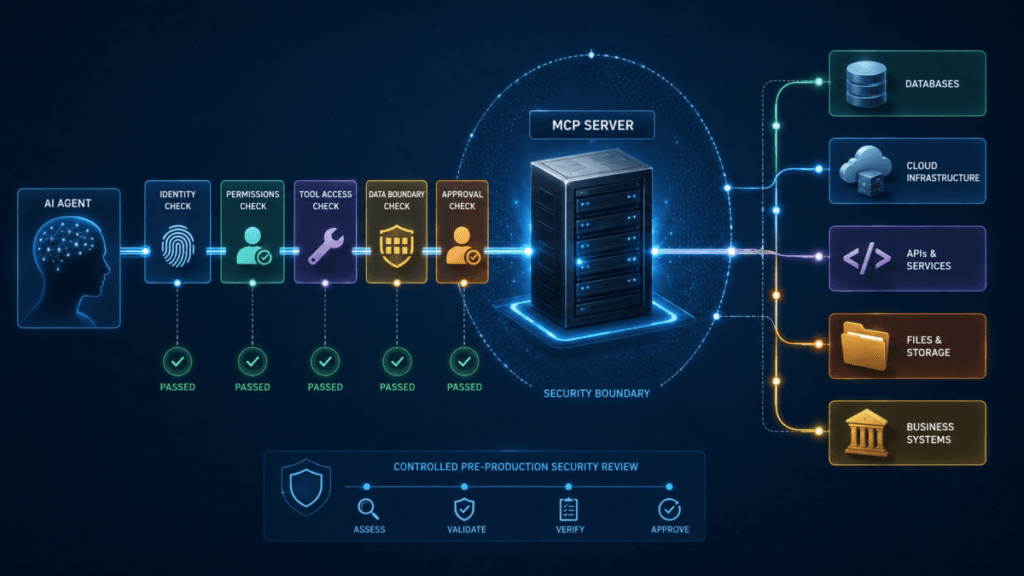
If your team is preparing a deployment now, use the MCP Server Security Checklist before the connection reaches production.
3. Tool Trust
MCP introduces a particularly important security issue: tools are more than executable functions.
They also include descriptions and metadata that help the model understand what the tool does and when it should be used.
That information can influence agent behavior.
The MCP specification warns clients to treat tool annotations as untrusted unless they come from trusted servers. Microsoft similarly recommends treating tool descriptions and tool responses as untrusted input and reviewing meaningful changes before they are accepted into sensitive environments.
Do not approve only the server. Approve the server, the tools it exposes, and the authority behind those tools.
For each important MCP tool, record at least:
| Control | What to Record |
|---|---|
| Tool name | The exact exposed capability |
| Publisher or server | Where the tool originates |
| Business purpose | Why the organization needs it |
| Read or write | Whether the tool can change state |
| Data access | Files, databases, email, cloud, CRM, or other systems |
| Required permissions | The minimum scopes or privileges needed |
| Sensitive outputs | PII, secrets, financial data, customer data, or source code |
| Human approval | Actions that require confirmation |
| Last review | When the tool definition and behavior were last checked |
| Change owner | Who is responsible for approving updates |
4. Permission Scope
One of the easiest ways to create unnecessary MCP risk is to give an agent more authority than its task requires.
The current MCP authorization design supports narrow permissions and incremental authorization when additional access becomes necessary.
The operating principle should be simple:
Start narrow. Expand access only when a legitimate operation actually requires it.
An agent that needs to read a customer record does not automatically need permission to modify it.
An agent that needs application logs does not automatically need infrastructure administration access.
A workflow that checks an invoice does not automatically need permission to update bank details.
The agent's prompt is not a replacement for an authorization boundary.
5. Token and Authorization Boundaries
Authentication establishes identity. Authorization determines what that identity is allowed to do.
Current MCP security guidance specifically warns against token passthrough, where an MCP server accepts a token that was issued for another resource and passes it downstream.
That pattern can weaken audience restrictions and make accountability more difficult.
A production review should verify:
- the token issuer;
- the intended audience;
- expiration;
- resource binding;
- the client identity;
- approved scopes;
- and whether downstream systems receive appropriate credentials of their own.
MCP does not replace the need for strong credential hygiene.
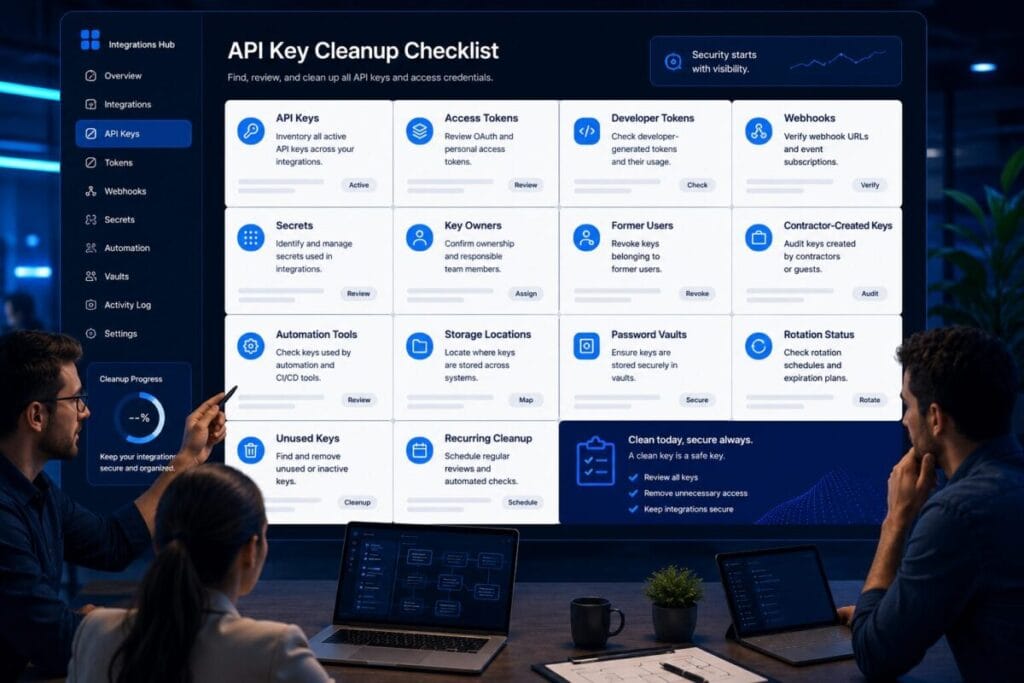
Use ToolRelief's OAuth App Review Checklist to review connected application permissions, and the API Key Cleanup Checklist when stale or poorly owned technical credentials are part of the same environment.
MCP Tool Poisoning Changes the Trust Model
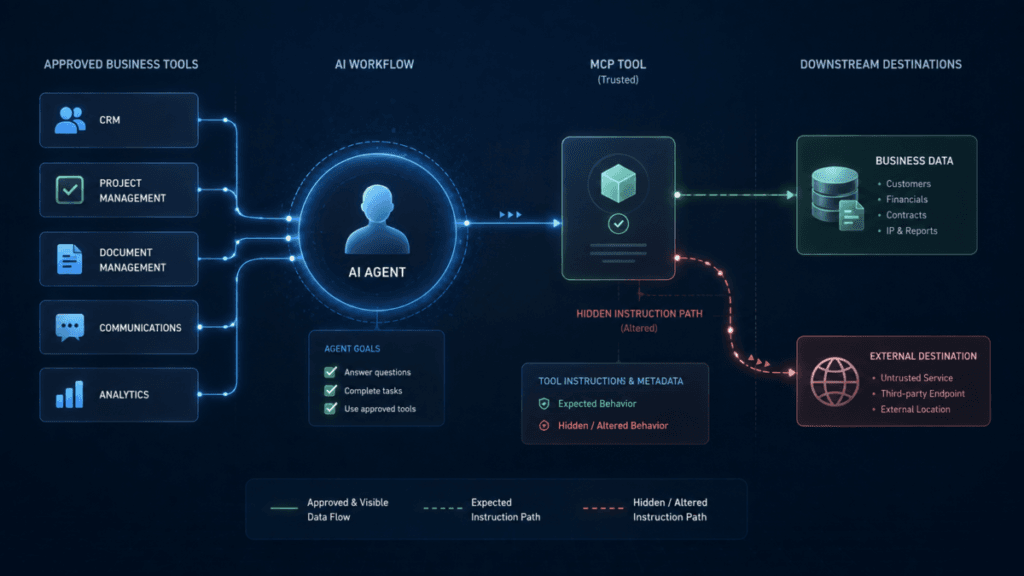
MCP tool poisoning is one of the clearest examples of why an approved server should not automatically remain trusted forever.
Microsoft Incident Response described a 2026 finance workflow in which a third-party MCP server had already been approved for production. A later change modified the tool description while keeping the tool familiar enough to avoid attracting obvious attention.
The malicious metadata could then influence the agent while the agent was operating around other trusted systems and legitimate user permissions.
The individual systems did not necessarily need to be compromised.
The weakness existed in the trust relationship between them.
This matters because tool metadata is not merely decorative documentation when a model uses that information to decide which capability to invoke.
Treat the following as security-relevant changes:
- a new tool;
- a removed tool;
- a changed tool description;
- a changed input schema;
- a changed output schema;
- new permissions;
- new external destinations;
- new package dependencies;
- a change from read behavior to write behavior.
For a deeper look at this threat pattern, read MCP Tool Poisoning: How Trusted AI Tools Can Leak Data.
Protect the Data Boundary, Not Just the Connection
A legitimate tool can still expose too much information.
Instead of asking only whether an agent can access a system, ask:
What information could enter the model context or leave the organization because this tool was called?
That could include:
- customer records;
- source code;
- API credentials;
- private documents;
- employee information;
- contracts;
- internal email;
- financial records;
- database results;
- cloud and infrastructure metadata.
If a tool can return sensitive information, document four things:
what it can return → who can invoke it → where the response goes → what happens after the agent receives it
Do not assume the AI context is a neutral holding area for sensitive data.
Separate Read Access From Action Authority
Reading information and changing information should not be treated as equivalent permissions.
Higher-risk MCP tools may be able to:
- delete records;
- change infrastructure;
- send external messages;
- publish content;
- modify permissions;
- create users;
- start financial transactions;
- retrieve secrets;
- or execute code.
The MCP specification recommends keeping a human capable of denying tool invocations and making tool use visible to users.
A practical control hierarchy looks like this:
Low-Risk Actions
These may be suitable for automatic execution when identity and scopes are controlled.
- searching public documentation;
- retrieving non-sensitive status data;
- performing deterministic calculations.
Moderate-Risk Actions
These may require stronger logging, constrained permissions, or policy enforcement.
- reading internal files;
- querying business systems;
- summarizing private business records.
High-Risk Actions
These generally deserve explicit approval or additional security gates.
- deletion;
- payments;
- production configuration changes;
- secret retrieval;
- external communications;
- permission changes.
The objective is not to make employees approve every single tool call. The objective is to prevent consequential actions from occurring merely because an agent inferred that they were useful.
This is closely related to the broader risks ToolRelief examines in its guide to AI coding agent risks and destructive actions.
Local MCP Servers Still Create a Security Boundary
“Local” does not mean harmless.
A local MCP server may run with the permissions available to a user's workstation and could potentially reach:
- local files;
- environment variables;
- developer credentials;
- command-line tools;
- local applications;
- network resources;
- cloud accounts.
Teams should therefore know what process is being installed, which identity it runs under, what packages it depends on, and what destinations it can reach.
Treat a local MCP server like code entering the user's trust boundary, not like a browser bookmark.
MCP Can Inherit Traditional Web and Infrastructure Risks
MCP creates a new integration model, but it does not make older security problems disappear.
Current MCP security guidance discusses risks such as server-side request forgery during authorization discovery and related flows.
Remote MCP infrastructure should therefore still apply conventional controls such as:
- validating endpoints;
- restricting unnecessary outbound access;
- protecting internal and cloud metadata ranges;
- using TLS;
- controlling redirects;
- monitoring abnormal requests;
- and refusing to trust arbitrary destinations supplied by untrusted parties.
New AI infrastructure does not invalidate established network-security principles.
Stateful Workflows Need Authorization Too
The July 2026 MCP revision moved the protocol core toward stateless request and response behavior, but applications can still maintain workflow state through explicit handles and application-level mechanisms.
Those handles should be treated as identifiers, not as proof that the caller is authorized to use the underlying resource.
This matters for workflows involving:
- browser sessions;
- shopping carts;
- transaction objects;
- database operations;
- long-running jobs;
- multi-stage automation.
A secure system verifies both:
the resource or handle is valid
and
the current caller is authorized to use it.
Change Control Is Part of MCP Security
A one-time approval is not enough for an integration that can change after deployment.
Re-review an MCP server when:
- the publisher changes;
- ownership changes;
- the package version changes materially;
- the server endpoint changes;
- the authorization model changes;
- new tools appear;
- tool descriptions change;
- requested permissions expand;
- a tool changes from read-only to write-capable;
- new sensitive systems become reachable.
This turns MCP approval from a one-time installation decision into an ongoing change-management process.
MCP Security Controls: Practical Decision Matrix
| Risk | Minimum Control |
|---|---|
| Unknown MCP server | Verify publisher, ownership, provenance, and update path |
| Excessive access | Use least-privilege scopes and separate read from write authority |
| Sensitive tool | Require confirmation or a policy gate for consequential actions |
| Tool metadata changes | Version, detect, review, and reapprove significant changes |
| Untrusted output | Validate or sanitize data before it is reused by the agent |
| Token misuse | Validate issuer, audience, expiration, resource, and scope |
| Token passthrough | Do not accept credentials issued for a different resource |
| Local MCP server | Restrict identity, filesystem, credential, and network access |
| Third-party MCP server | Use explicit trust review and isolated credentials |
| State or workflow handle | Recheck authorization on sensitive requests |
| Hidden tool activity | Centralize logging and traceability |
| Unapproved MCP server | Maintain inventory, ownership, and governance controls |
Do You Need MCP Security Tools or a Gateway?
Not every MCP deployment needs another security product.
A tightly controlled environment with one approved server, one trusted client, narrow permissions, limited data access, and no destructive tools may be manageable through existing identity, endpoint, network, and application controls.
A dedicated security layer becomes more relevant when an organization has:
- multiple MCP servers;
- multiple agents or clients;
- third-party servers;
- sensitive business data;
- regulated environments;
- centralized policy requirements;
- tool-level access rules;
- or enterprise audit requirements.
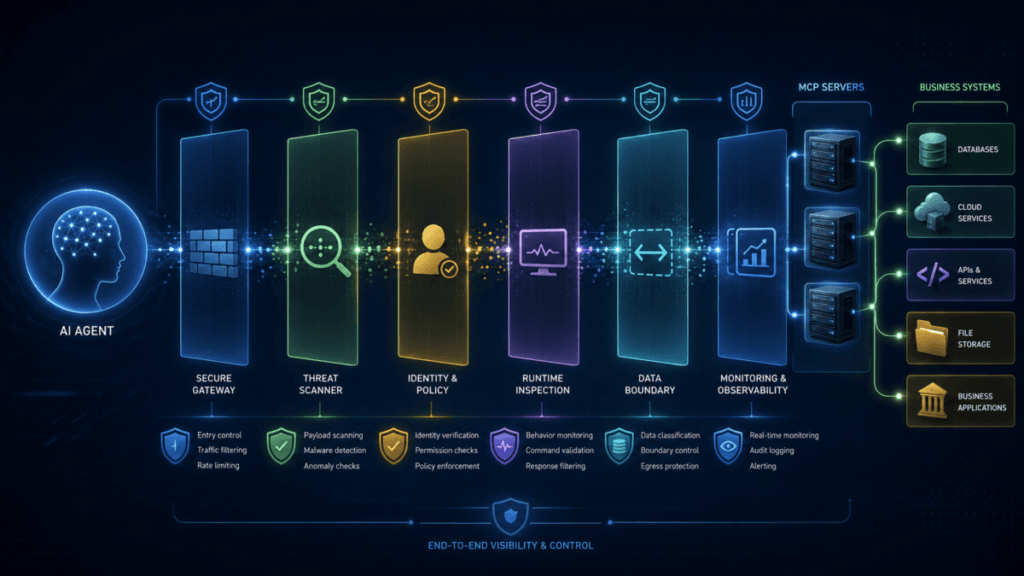
The commercial category is already beginning to separate into MCP gateways, security scanners, runtime controls, identity and authorization layers, DLP, registries, and observability products.
Before buying one, determine which trust boundary you are actually trying to control.
Our dedicated guide to MCP Security Tools: How to Evaluate Gateways and Scanners explains the differences between those product categories and what each one is designed to solve.
You can also use the ToolRelief Software Decision Finder when the question has moved from understanding the risk to evaluating a software route.
MCP Security Review: Seven Questions Before Production
1. Who is the agent?
Can you identify the client, business owner, and identity behind the request?
2. Why do you trust the server?
Do you know who publishes, hosts, maintains, and updates it?
3. Which tools are exposed?
Do you know what each tool can read, change, transmit, or execute?
4. What is the minimum required permission?
Can read-only and write-capable operations be separated?
5. What data can cross the boundary?
Could secrets, PII, financial data, customer information, source code, or private files enter the workflow?
6. Which actions require a human?
Can high-impact operations happen without deliberate approval?
7. Will you know when something changes?
Are server versions, tools, permissions, calls, and meaningful metadata changes visible and auditable?
If your team cannot confidently answer one of these questions, that missing answer identifies the next control to fix.
What To Do Before Connecting an MCP Server to Production
Step 1: Inventory the MCP servers.
List every server used by employees, developers, applications, and agents.
Step 2: Inventory the tools.
Record what each tool can access and whether it can modify state.
Step 3: Review authorization.
Verify identities, token audiences, resource boundaries, and minimum required scopes.
Step 4: Separate sensitive environments.
Do not give experimental or unverified integrations the same credential and network context as critical production systems.
Step 5: Add human control where consequences are high.
Payments, deletion, secrets, permission changes, and production modifications deserve stronger gates.
Step 6: Establish change review.
Previously approved tools should not silently gain new authority.
Step 7: Log what matters.
Your team should be able to determine which agent invoked which tool, under which identity, and what happened next.
For a deployment-focused version of this workflow, use the MCP Server Security Checklist Before Production.
How This Fits Into a Larger AI Security Review
MCP is only one part of the connected AI environment.
An organization may also need to review OAuth applications, API keys, agent permissions, SaaS access, endpoint controls, data-loss protections, and destructive automation paths.
ToolRelief's Cybersecurity Hub connects these security decisions across the wider software stack.
The goal is not to build an isolated MCP security program. It is to make MCP part of the same identity, access, data, and change-control system used for the rest of the business.
Final Decision
MCP can make AI agents dramatically more capable because it gives them a standardized path to real tools, systems, and data.
That capability is also why MCP security must be treated as a trust-boundary problem rather than a simple configuration checkbox.
Before production, know:
- the agent;
- the server;
- the tool;
- the permission;
- the data;
- the action;
- and what has changed since the last review.
If those seven pieces are visible and controlled, MCP becomes much easier to evaluate as infrastructure instead of treating every connection as either automatically safe or automatically dangerous.
Continue the MCP Security Cluster
This guide is the foundation of ToolRelief's MCP security cluster. Continue with the specific decision that matches your deployment:
- MCP Server Security Checklist Before Production — for teams preparing to connect or deploy a server.
- MCP Tool Poisoning: How Trusted AI Tools Can Leak Data — for understanding one of the most important MCP-specific trust attacks.
- MCP Security Tools: How to Evaluate Gateways and Scanners — for teams comparing commercial and infrastructure controls.
Sources and Verification
Information reviewed: August 22, 2026.
Primary research for this guide includes the Model Context Protocol 2026-07-28 specification and security guidance, the U.S. National Security Agency Artificial Intelligence Security Center's May 20, 2026 MCP security guidance, Microsoft Incident Response research published June 30, 2026, and current Microsoft MCP implementation security documentation.
MCP is evolving quickly. Teams deploying production systems should verify protocol behavior, authorization requirements, and vendor-specific controls against the current documentation before implementation.
TOOLRELIEF DECISION INTELLIGENCE
- Decision
- Use MCP Security: Risks and Controls for AI Agents in 2026 to evaluate the software or technology question investigated on this page before taking the next material action.
- Evidence Basis
- Documented product information, published evidence, comparative analysis, direct observation, and clearly labeled models where applicable.
- Best Used For
- Reducing uncertainty before taking the next material action.
- Decision Boundary
- This page provides independent decision support rather than a guaranteed outcome. Product capabilities, pricing, third-party terms, and operating conditions can change.