
- Decision
- Use SaaS Inventory Template to turn the decision process covered on this page into a repeatable operating workflow.
- Evidence Basis
- A reusable operating structure derived from the workflow, decision criteria, and governance requirements documented on this page.
- Best Used For
- Standardizing a repeatable decision, review, tracking, or governance process.
- Decision Boundary
- This page provides independent decision support rather than a guaranteed outcome. Product capabilities, pricing, third-party terms, and operating conditions can change.
Start with inventory before cutting SaaS costs
Most SaaS cleanup work starts with one simple question: what tools are we actually paying for?
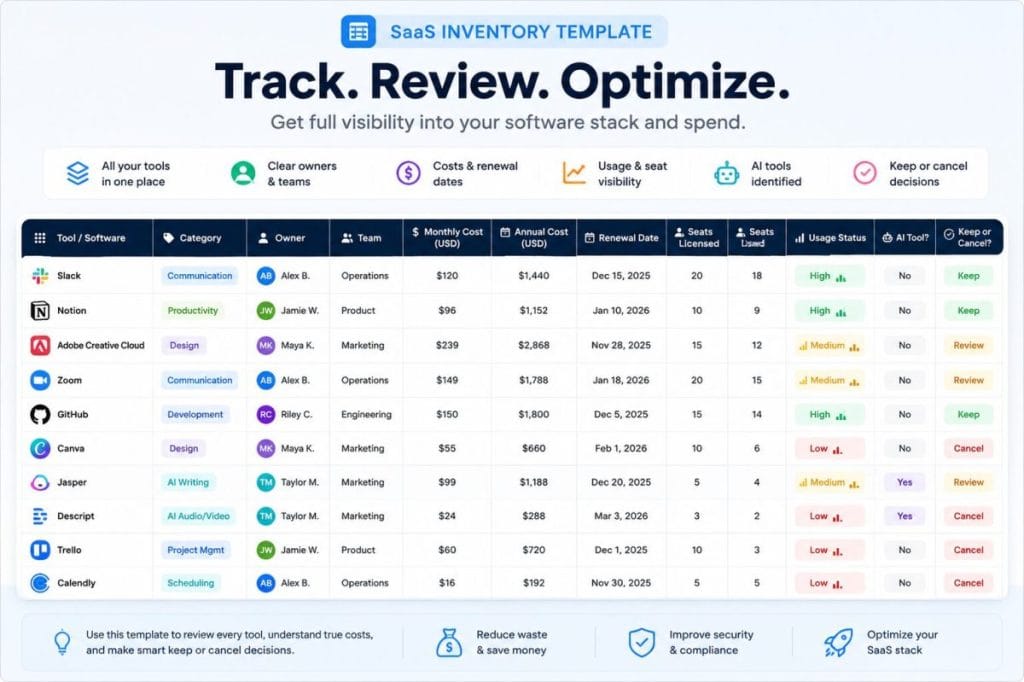
This SaaS inventory template helps you list your software subscriptions, owners, departments, monthly costs, annual costs,
renewal dates, seats, usage status, AI tools, overlap risk, and keep/cancel/consolidate decisions in one place.
Use it as a lightweight software stack inventory, SaaS subscription tracker, renewal tracker,
or internal review sheet before running a SaaS waste score, preparing a renewal review, or deciding which tools need cleanup.
What This SaaS Inventory Template Helps You Capture
A SaaS inventory is the control layer your software stack usually does not have.
This template helps you capture the details that matter before you cut tools, renew contracts, or run a deeper SaaS audit:
Tool name and category
Internal owner or team
Monthly or annual cost
Number of paid seats
Active usage status
Renewal date or billing cycle
Risk notes, overlap, or unclear ownership
Keep, cut, consolidate, or review decision
The goal is to turn a messy list of subscriptions into a usable operating view.
Once your stack is visible, it becomes much easier to spot unused seats, duplicate tools, renewal pressure, and software nobody clearly owns.
SaaS Inventory Template
Copy a simple SaaS inventory template to track every tool in your software stack: owners, costs, renewals, users, usage status, AI tools, and keep/cancel/consolidate decisions.
No login. No workspace connection. No email required to copy.
Copy this SaaS inventory template
Use this template to create a single source of truth for your software stack before reviewing costs, renewals, unused licenses, or tool overlap.
Copy as a spreadsheet-ready table or download a local CSV file.
| Tool Name | Category | Owner | Department | Monthly Cost | Annual Cost | Renewal Date | Billing Cycle | Users / Seats | Usage Status | AI Tool? | Overlap Risk | Decision | Notes |
|---|---|---|---|---|---|---|---|---|---|---|---|---|---|
| Example CRM | CRM | Sales Lead | Sales | $99 | $1,188 | 2026-09-15 | Annual | 8 | Active | No | Medium | Keep | Review before renewal |
| Example AI Writer | AI Writing | Marketing Lead | Marketing | $49 | $588 | 2026-07-01 | Monthly | 3 | Underused | Yes | High | Review | Check usage before renewal |
| Example Project Tool | Project Management | Ops Lead | Operations | $120 | $1,440 | 2026-11-20 | Annual | 12 | Active | No | Medium | Keep | Compare with other project tools |
| Example Design Tool | Design | Creative Lead | Creative | $75 | $900 | 2026-08-10 | Annual | 5 | Unknown | No | Unknown | Review | Confirm active users |
| Example Automation Tool | Automation | Ops Lead | Operations | $39 | $468 | 2026-10-05 | Monthly | 2 | Underused | No | High | Consolidate | Check overlap with existing tools |
Paste into Google Sheets, Excel, Notion, Airtable, or an internal tracker.
What this template helps you organize
Software ownership
Know who owns each tool and who should approve changes.
Recurring cost
Track monthly and annual cost in one place.
Renewal dates
Avoid reviewing tools only after they renew.
Seat and usage visibility
Identify tools with unclear usage or unused seats.
AI subscription tracking
Separate AI tools from the rest of the stack when needed.
How to use the SaaS inventory template
List every paid software tool
Start with finance records, browser bookmarks, team expense reports, and known department tools.
Assign an owner
Every tool should have one person responsible for usage, renewal, and decision-making.
Add cost and renewal data
Include monthly cost, annual cost, and renewal date where available.
Mark usage status
Use simple labels: active, underused, unused, unknown.
Make a decision
Choose keep, cancel, consolidate, review, or unknown.
Run a waste check after inventory
Once the template is filled, use the SaaS Waste Score Report to identify risk signals.
SaaS inventory fields included
- Tool Name
- The software tool or internal product label.
- Category
- The tool type, such as CRM, design, AI writing, or automation.
- Owner
- The person responsible for usage, renewal, and decisions.
- Department
- The team or function that primarily uses the tool.
- Monthly Cost
- The current monthly subscription cost.
- Annual Cost
- The yearly cost or annualized monthly spend.
- Renewal Date
- The next known renewal or review date.
- Billing Cycle
- Monthly, annual, quarterly, or another billing cadence.
- Users / Seats
- The number of assigned users or paid seats.
- Usage Status
- Active, underused, unused, or unknown.
- AI Tool?
- Marks whether the subscription is an AI tool.
- Overlap Risk
- Low, medium, high, or unknown tool overlap risk.
- Decision
- Keep, cancel, consolidate, review, or unknown.
- Notes
- Context for renewal reviews, usage checks, or next steps.
Next step after your inventory: check your SaaS waste signals
Once you have listed your tools, costs, owners, seats, renewals, and usage status, use the SaaS Waste Score Report to identify where your stack may need review.
Turn your inventory into a cleanup plan
The Hidden SaaS Waste Playbook helps you review unused tools, overlapping subscriptions, unclear ownership, renewal risk, and AI subscription sprawl after your SaaS inventory is complete.
When this template is useful
- Before a SaaS renewal review
- Before an annual planning cycle
- Before cutting software costs
- Before consolidating overlapping tools
- Before reviewing AI subscriptions
- Before using the SaaS Waste Score Report
- Before contacting ToolRelief for help
FAQ
What is a SaaS inventory template?
A SaaS inventory template is a simple spreadsheet-style tracker for listing the software tools your team pays for, who owns each tool, what it costs, when it renews, how many users or seats it has, and whether the tool should be kept, canceled, consolidated, or reviewed.
Is this the same as a SaaS waste calculator?
No. This page is a template, not a calculator. It does not calculate a score or estimate savings. It helps you organize your software stack before using a score report, audit tool, or internal review process.
Do I need to connect my workspace?
No. The template does not connect to Google Workspace, Microsoft 365, Slack, accounting tools, or any SaaS apps. You can copy or download it and fill it manually.
Can I use this as a SaaS subscription tracker?
Yes. The template includes monthly cost, annual cost, renewal date, billing cycle, owner, seats, and usage status, so it can also work as a lightweight SaaS subscription tracker.
Should AI tools be tracked separately?
Not always. This template includes an AI Tool? field so you can identify paid AI tools inside the same inventory. If your team has many AI subscriptions, you can filter the template by that field and review them separately.
What should I do after filling out the template?
Start with tools marked Unknown, Underused, Unused, High Overlap Risk, or Review. Then use the SaaS Waste Score Report or Hidden SaaS Waste Playbook to decide what to review first.
Build your SaaS inventory before your next renewal
Start by copying the template. Then use the SaaS Waste Score Report or Hidden SaaS Waste Playbook when you are ready to review waste signals and cleanup priorities.
Want to estimate the cost of unused seats after building your inventory?
Use the unused SaaS license cost calculator to estimate directional license waste for one tool at a time.
Use the template before making software decisions
The purpose of this template is not to replace a full SaaS audit.
It gives your team a cleaner starting point before reviewing renewals, unused seats, duplicate tools,
unmanaged AI subscriptions, or unclear ownership.
Once your inventory is filled, you can quickly see which tools need a decision: keep, cancel, consolidate, review, or investigate further.
This makes the template useful before renewal planning, budget reviews, annual planning, software cleanup, AI subscription reviews,
and internal cost reduction discussions.
Want help reviewing the inventory?
Once your SaaS inventory is filled out, the next step is deciding what the list actually means.
Look for tools with unclear ownership, high seat counts, low usage, upcoming renewals, duplicate jobs,
or AI subscriptions that do not have a clear purpose.
Request a free SaaS Waste Review if you want help turning the inventory into a short list of tools to check first.
How ToolRelief approaches SaaS inventory reviews
ToolRelief treats SaaS inventory work as a practical first step, not a final audit.
This template is designed to help teams organize visible information about their software stack before making decisions about unused tools,
renewal risk, overlapping subscriptions, AI tools, unclear ownership, and keep/cancel decisions.
The template does not connect to your workspace, read invoices, verify actual usage, detect inactive users automatically,
or calculate guaranteed savings.
It is a manual planning resource for founders, finance teams, operations teams, agencies,
and small companies that want a clearer view of their SaaS stack before taking action.
Important note
This page is educational and operational in nature.
It should not be treated as financial, legal, procurement, security, tax, or accounting advice.
The SaaS inventory template is provided as a starting point for internal review.
Any cancellation, renewal, consolidation, or purchasing decision should be reviewed by the appropriate person or team inside your organization.
ToolRelief does not guarantee savings, detect actual software usage, verify account activity, or audit your contracts through this template.
Next step after your SaaS inventory
After you copy or download the SaaS inventory template, start by filling in the tools you already know your team pays for.
Then review anything marked unknown, underused, high overlap risk, review, cancel, or consolidate.
When your inventory is ready, use the SaaS Waste Score Report to check your waste signals,
or read the Hidden SaaS Waste Playbook to turn your inventory into a practical cleanup process.
Created by ToolRelief
ToolRelief creates practical resources for teams that want to understand software spend, reduce SaaS waste, review AI subscriptions,
and make better decisions before renewals.
This SaaS inventory template is part of ToolRelief’s lightweight approach to software stack visibility, SaaS cost awareness,
and practical cleanup planning.
If your workflow feels heavier with AI…
You don’t need another tool.
You need less.
Explore ToolRelief to simplify your stack and regain control.