
TOOLRELIEF DECISION INTELLIGENCE
- Decision
- Use Why SaaS Is So Expensive: 7 Hidden Cost Drivers to evaluate the software or technology question investigated on this page before taking the next material action.
- Evidence Basis
- Documented product information, published evidence, comparative analysis, direct observation, and clearly labeled models where applicable.
- Best Used For
- Reducing uncertainty before taking the next material action.
- Decision Boundary
- This page provides independent decision support rather than a guaranteed outcome. Product capabilities, pricing, third-party terms, and operating conditions can change.
Why SaaS Is So Expensive (And How to Reduce Your Costs in 2026)
Quick Navigation ✔
ToggleIntroduction
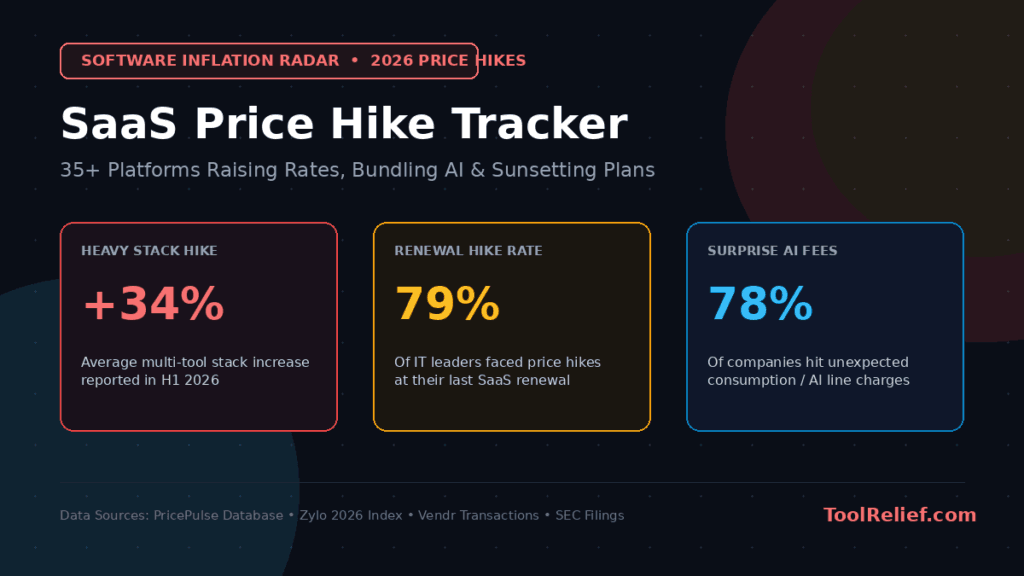
If you feel like you’re paying more for software every year, you’re not imagining it.
SaaS costs are quietly increasing — and most businesses don’t notice until it’s too late.
What starts as a simple monthly subscription often turns into a complex stack of tools,
hidden costs, and overlapping features.
In this guide, you’ll learn:
Why SaaS has become so expensive
Where the hidden costs are
How to reduce your software expenses without breaking your workflow
This often happens when teams keep adding tools without reviewing decisions (see
> The Problem Isn’t Your SaaS Stack — It’s How Decisions Enter It)
Quick answer
SaaS feels expensive because the price you see is usually not the full cost of the software.
The real cost often comes from extra seats, annual renewals, add-ons, usage limits, AI features, admin plans,
SSO upgrades, and tools that keep billing long after the team stops using them heavily.
A single subscription may look reasonable.
The problem starts when dozens of tools renew at different times, each with its own seats, owners, pricing model,
and hidden friction.
Why SaaS Feels Cheap at First
Most SaaS tools are designed to feel affordable in the beginning.
You see:
Low monthly pricing
Free trials
Easy onboarding
But over time:
You add more tools
Teams grow
Costs multiply
What felt cheap becomes expensive.
Why SaaS Is So Expensive Before Teams Notice the Waste
Why SaaS is so expensive becomes clearer when you separate the list price from the operational cost.
A tool may look affordable at $20 per user per month, but the real expense grows when the vendor requires minimum seats,
charges separately for advanced features, adds usage-based fees, or locks security controls behind a higher tier.
For small teams, the problem is not one expensive subscription.
It is the combination of several “reasonable” tools that each add a small layer of waste.
By the time finance reviews the stack, the team is often paying for duplicate features, inactive users,
and renewals that no longer match actual usage.
The Hidden Costs of SaaS: Why SaaS Is So Expensive
1. Tool Overlap
Many companies use multiple tools that do the same thing.
Example:
2 project management tools
3 communication tools
You’re paying twice for the same outcome.
This is a common issue in teams dealing with tool overload (read
> Tool Overload Isn’t a Productivity Problem)
2. Per-User Pricing
Most SaaS tools charge per user.
As your team grows:
Costs increase automatically
Even inactive users may still be billed
3. Feature Bloat
You often pay for features you never use.
Tools keep adding features…
But you only use 20% of them.
4. Integration Complexity
More tools = more integrations
That leads to:
More setup time
More maintenance
More hidden costs
Why SaaS is so expensive is rarely explained by the monthly subscription price alone.
The real cost comes from seat minimums, unused licenses, renewal timing, feature paywalls,
and overlapping tools that quietly expand after the first purchase.
The easiest way to see whether these hidden costs are becoming a real problem is to calculate your SaaS Waste Score.
It helps separate normal software spending from waste caused by unused seats,
duplicate tools, AI subscriptions, and renewal pressure.
Why SaaS Gets Expensive After the First 90 Days
Most SaaS tools do not feel expensive on day one.
That is why teams keep adding them.
A $12 monthly subscription feels harmless.
A $29 per-user plan feels reasonable.
A free trial feels like there is no risk at all.
But SaaS rarely becomes expensive because of one big purchase.
It becomes expensive through accumulation.
One tool becomes five.
Five tools become twelve.
A few users become an entire team.
A temporary subscription becomes a permanent line item no one reviews.
This is where many founders and small teams lose control.
The real danger is not the price shown on the pricing page.
The real danger is the cost that appears after the tool becomes part of the workflow.
Once a tool enters your company, it creates more than a bill.
It creates habits.
It creates dependencies.
It creates data scattered across another platform.
It creates another place your team has to check before making a decision.
That is why SaaS costs are not only financial.
They are operational.
A tool might cost $30 per month, but if it creates confusion, duplicates work,
or adds another approval layer, the real cost is much higher.
This is where SaaS becomes quietly expensive.
Not because the software is bad.
But because the team never decides when a tool should be removed.
In my experience, most software waste does not come from reckless spending.
It comes from “reasonable” decisions that were never reviewed again.
Someone adds a tool to solve a small problem.
Another person adds a second tool because the first one is missing one feature.
A team lead adds a dashboard because reporting feels unclear.
Then six months later, nobody remembers why half the stack exists.
The company is not paying for software anymore.
It is paying for forgotten decisions.
This is why reducing SaaS costs should not start with asking:
“Which tool is cheapest?”
It should start with a better question:
“Which tools are still earning their place?”
A good SaaS stack should be simple enough that every tool has a clear job.
If a tool does not save time, reduce confusion, improve output, or support a real workflow,
it is probably not a tool anymore.
It is digital clutter.
And digital clutter has a cost.
It slows decisions.
It increases context switching.
It makes teams feel busy without making them more effective.
This is why SaaS is so expensive for many companies in 2026.
Not because software prices are rising only.
But because most teams are paying for complexity they no longer notice.
If you want to move from understanding why SaaS is expensive to actually reducing the waste, start with these SaaS cost optimization tools.
How to Reduce SaaS Costs (Practical Steps)
1. How to Audit Your SaaS Stack in 30 Minutes
List every tool you’re paying for.
Ask:
Do we still use this?
Does it solve a real problem?
2. Remove Overlapping Tools
If two tools do the same job:
Keep one
Remove the other
3. Limit Access
Not every team member needs every tool.
Reduce:
Unused seats
Unnecessary access
4. Use Free Alternatives When Possible
Many tools have strong free versions.
You don’t always need premium plans.
But free tools can also create hidden costs over time (see
> The Hidden Cost of Free Tools)
5. Focus on Fewer, Better Tools
More tools ≠ better productivity
Simpler stack = better results
For a broader library of cost-control guides, explore the full SaaS cost optimization archive.
The Biggest Mistake)
Trying to fix SaaS costs by adding more tools.
This makes things worse.
This is the same principle explained in
> AI Tools for Beginners
What to check next
If SaaS pricing feels too expensive, do not start by cutting random tools.
Start by finding where the cost is coming from.
List your tools, owners, seats, costs, and renewal dates.
Then check which tools have unused seats, overlapping jobs, or renewal risk.
If several problems show up at once, a SaaS Audit can help you review the full stack before the next billing cycle.
A Better Approach
Instead of asking:
“What tool should we add?”
Ask:
“What tool can we remove?”
Final Thoughts
SaaS isn’t expensive because tools are bad.
It’s expensive because complexity grows silently.
The solution isn’t more tools.
It’s better decisions.
Written by Waleed Al-Qasem
Founder of ToolRelief.
I write about the intersection of technology, remote work, and human productivity.
My mission is to help teams eliminate digital noise and get back to doing deep, meaningful work.
If your workflow feels heavier with AI…
You don’t need another tool.
You need less.
Explore ToolRelief to simplify your stack and regain control.