The 7-Day AI Tool Cleanup Playbook
AI tools can create value quickly.
They can also create subscription clutter quickly.
A founder tests one AI assistant.
A marketer adds a writing tool.
A developer uses a coding assistant.
A sales operator adds a meeting summary tool.
A designer tests an image generator.
An operations lead adds an automation tool.
Each tool may have a reason.
But after a few weeks or months, the team may not know which AI tools are active, who owns them, which tools overlap,
which ones renew soon, and which subscriptions should remain paid.
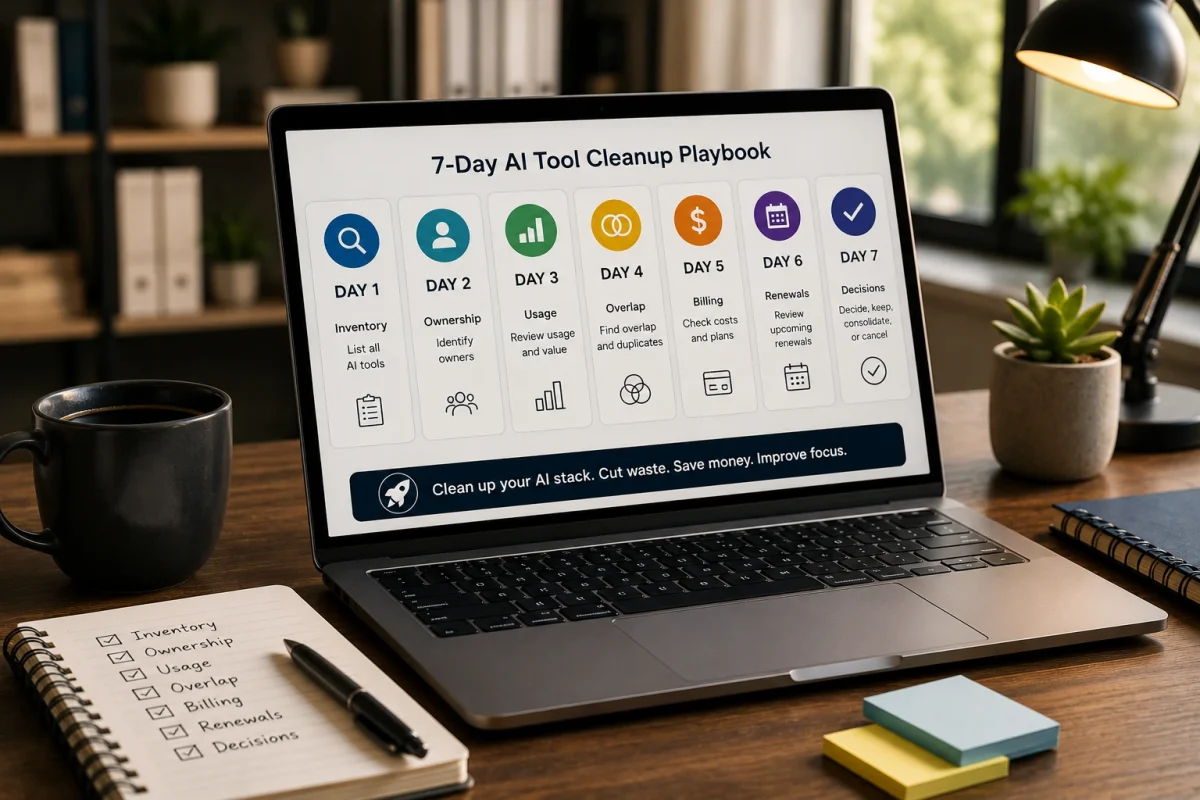
This ToolRelief playbook gives small teams a practical 7-day process for cleaning up AI tools without blocking useful AI adoption.
How the 7-Day AI Tool Cleanup Playbook Works
This AI tool cleanup playbook gives small teams a 7-day process to review AI tools, subscriptions, overlap, owners, billing, renewals,
and cleanup decisions.
What This Playbook Helps You Fix
This playbook helps review:
- overlapping AI tools
- unused AI subscriptions
- experimental tools that were never reviewed
- scattered personal billing
- unclear AI tool ownership
- role confusion
- duplicate AI writing tools
- duplicate research tools
- duplicate meeting tools
- AI add-ons inside existing SaaS platforms
- AI tools with no renewal owner
- AI subscriptions that no longer support a current workflow
The goal is not to cancel every AI tool.
The goal is to make the AI stack intentional.
Who Should Use This Playbook?
This playbook is useful for:
- founders
- operators
- marketing teams
- agencies
- remote teams
- small SaaS teams
- AI-heavy teams
- contractor-heavy teams
- teams using several paid AI tools
- teams unsure which AI subscriptions are still needed
If your team uses several AI tools but does not have a clear owner, workflow map, or review date for each one,
this playbook is a good starting point.
The Core ToolRelief View
AI subscription waste is not a reason to avoid AI.
It is a reason to manage AI tools deliberately.
A useful AI tool should have:
- a clear owner
- a clear workflow
- active usage
- known billing
- known renewal timing
- limited overlap
- a keep, cut, consolidate, or review-later decision
If a paid AI tool cannot answer those questions, it deserves review.
The 7-Day Cleanup Structure
Use this structure:
| Day | Focus | Goal |
|---|---|---|
| Day 1 | Inventory | List every paid AI tool |
| Day 2 | Ownership | Assign an owner to each tool |
| Day 3 | Workflow | Map each tool to a job |
| Day 4 | Usage | Check active usage |
| Day 5 | Overlap | Identify duplicate tools |
| Day 6 | Billing and renewals | Find costs and renewal dates |
| Day 7 | Decision | Keep, cut, consolidate, downgrade, or review later |
Day 1: Build the AI Tool Inventory
Start by listing every AI tool the team pays for or uses for work.
Include:
- general AI assistants
- AI writing tools
- AI coding assistants
- AI meeting note tools
- AI research tools
- AI image generators
- AI video tools
- AI automation tools
- AI presentation tools
- AI add-ons inside existing SaaS platforms
- AI tools paid through personal cards
- AI tools reimbursed as expenses
- AI tools used by contractors
Do not worry if the list is imperfect.
The purpose of Day 1 is visibility.
Questions to Ask
- Which AI tools are paid?
- Which AI tools are free but used for work?
- Which AI tools are personal accounts?
- Which AI tools are company-paid?
- Which AI tools are reimbursed?
- Which AI tools are used by contractors?
- Which AI tools are add-ons inside existing tools?
Output
A simple list of AI tools.
Day 2: Assign an Owner to Each AI Tool
Every paid AI tool should have an owner.
The owner does not need to be the only user.
The owner is responsible for knowing:
- why the tool exists
- who uses it
- what workflow it supports
- what it costs
- whether it overlaps with another tool
- whether it should renew
- whether it should be kept, cut, consolidated, downgraded, or reviewed later
Questions to Ask
- Who requested this tool?
- Who uses it most?
- Who pays for it?
- Who can cancel it?
- Who knows whether it still matters?
- Who should decide whether it stays?
Warning Signal
If no one owns a paid AI tool, it is a review candidate.
Output
Each AI tool should have one named owner or be marked as “owner unclear.”
Day 3: Map Each Tool to a Workflow
A paid AI tool should support a real workflow.
Examples of workflows:
- content drafting
- blog outlining
- coding support
- meeting summaries
- customer follow-ups
- sales emails
- research summaries
- image generation
- documentation
- internal automation
- spreadsheet support
- presentation creation
- social content
- support replies
The question is not only:
“Does someone like this tool?”
The better question is:
“What job does this tool perform?”
Questions to Ask
- What workflow does this tool support?
- Which role uses it?
- Is the workflow current?
- Is this workflow important?
- Does another tool already support the same workflow?
- Was this tool used for a temporary project?
- Would the team choose this tool again today?
Output
Each AI tool should be mapped to at least one workflow.
If no workflow is clear, mark it for review.
Day 4: Check Active Usage
Now review whether each tool is actually being used.
Look for:
- active users
- inactive users
- last login
- project use
- weekly usage
- monthly usage
- contractor usage
- team adoption
- abandoned experiments
- tools used only once or twice
Usage does not need to be perfect.
But the team should know whether the tool is part of real work or just part of the billing stack.
Questions to Ask
- Who used this tool in the last 30 days?
- Is it used weekly?
- Is it used only during projects?
- Was it added for one experiment?
- Is anyone depending on it?
- Does the owner still use it?
- Would work break if it disappeared?
Output
Mark each tool:
- active
- occasional
- experimental
- inactive
- unclear
Day 5: Identify AI Tool Overlap
This is the most important day.
AI tools often overlap.
Look for overlap across:
- writing
- research
- coding
- meeting notes
- images
- presentations
- automation
- customer communication
- document summaries
- social content
- reporting
Overlap is not automatically bad.
But it must be explainable.
Questions to Ask
- Do two tools create similar outputs?
- Do multiple tools support the same role?
- Does a general AI assistant cover the same workflow?
- Does an existing platform already include this AI feature?
- Do contractors use separate AI tools for the same work?
- Can one tool replace two?
- Is the overlap justified?
Output
Mark each tool:
- unique workflow
- acceptable overlap
- possible overlap
- strong overlap
- consolidate candidate
Day 6: Review Billing and Renewals
Now check the money and timing.
For each AI tool, record:
- monthly cost
- annual cost
- billing owner
- card or account used
- renewal date
- cancellation deadline
- plan level
- number of users
- whether it is personal or company-paid
- whether it is reimbursed
- whether it is an add-on inside another platform
Questions to Ask
- What does this tool cost?
- Who pays for it?
- Is it monthly or annual?
- When does it renew?
- Can it be downgraded?
- Can it be cancelled easily?
- Is it attached to a personal account?
- Is it part of another SaaS platform?
Output
Each AI tool should have a cost and renewal status.
If cost or renewal is unknown, mark it as a risk.
Day 7: Decide Keep, Cut, Consolidate, Downgrade, or Review Later
On the final day, make decisions.
Do not try to create a perfect AI policy.
Start with practical actions.
Keep
Keep the tool if it has:
- active usage
- clear owner
- clear workflow
- justified cost
- limited overlap
- known renewal timing
Cut
Cut the tool if it has:
- no clear owner
- no active usage
- no current workflow
- strong overlap
- unclear value
- expired experiment purpose
Consolidate
Consolidate if:
- two tools do similar work
- one platform can replace another
- a general AI assistant covers the workflow
- a team plan is better than scattered individual accounts
- AI add-ons duplicate separate subscriptions
Downgrade
Downgrade if:
- the tool is useful but over-plan
- fewer users need access
- the team needs only occasional use
- a lower tier covers the workflow
Review Later
Use review later if:
- usage is unclear
- the owner needs more time
- a project is still active
- the tool is being tested
- the team needs data before deciding
Output
Create a final action table:
| Tool | Owner | Workflow | Usage | Overlap | Decision | Deadline |
|---|---|---|---|---|---|---|
| AI Tool A | Marketing | Content drafts | Active | Possible overlap | Keep / review | 30 days |
| AI Tool B | Founder | Research | Occasional | Strong overlap | Consolidate | 7 days |
| AI Tool C | Design | Campaign visuals | Project-based | Unique | Review later | After campaign |
Common AI Cleanup Mistakes
Avoid these mistakes:
- cancelling tools without checking workflow impact
- keeping tools only because they are cheap
- ignoring personal AI accounts used for work
- forgetting AI add-ons inside existing SaaS tools
- treating all overlap as bad
- ignoring contractor AI tools
- ignoring renewal dates
- reviewing only the most expensive AI tools
- failing to assign an owner
- letting experiments become permanent subscriptions
The cleanup should create clarity, not block useful AI adoption.
Example Cleanup Scenario
A small team reviews its AI stack.
It finds:
- one general AI assistant
- one AI writing tool
- one AI coding assistant
- one AI meeting note tool
- one AI image tool
- one AI research tool
- one AI add-on inside a project management platform
- one contractor using a separate AI writing tool
After review, the team discovers:
- two tools overlap on writing
- the meeting note tool has low usage
- the research tool was added for one project
- the coding assistant is actively used
- the image tool is campaign-based
- nobody owns the AI stack
This scenario is educational. It is not a private customer case study.
The point is not to cancel everything.
The point is to assign owners, identify overlap, and decide which tools deserve to remain paid.
AI Tool Cleanup Checklist
Use this checklist during the 7-day cleanup.
Inventory
- List all paid AI tools
- Include personal accounts
- Include reimbursed tools
- Include contractor tools
- Include AI add-ons
- Include annual plans
Ownership
- Assign tool owner
- Confirm billing owner
- Confirm cancellation owner
- Confirm workflow owner
Workflow
- Identify primary workflow
- Identify role served
- Identify business purpose
- Mark temporary experiments
Usage
- Check active users
- Check last 30 days
- Check project-based usage
- Check inactive tools
- Check contractor usage
Overlap
- Compare writing tools
- Compare research tools
- Compare meeting tools
- Compare image tools
- Compare coding tools
- Compare automation tools
- Check built-in AI features
Billing
- Record monthly cost
- Record annual cost
- Record renewal date
- Check cancellation deadline
- Check personal vs company billing
- Check downgrade options
Decision
- Keep
- Cut
- Consolidate
- Downgrade
- Assign owner
- Review later
Recommended ToolRelief Workflow
Use this order:
- AI Subscription Waste Calculator
Estimate possible waste from overlapping or unnecessary AI subscriptions. - AI Tool Stack Builder
Plan a leaner AI stack by role, workflow, and budget. - SaaS Waste Audit Tool
Review AI tools as part of the wider software stack. - SaaS Renewal Risk Calculator
Check whether AI tools are renewing before review. - SaaS Waste Score Report
Start here if AI tools are part of a broader SaaS waste concern.
Related ToolRelief Reading
- SaaS Cost Intelligence Library
- AI Subscription Waste: A ToolRelief Research Note
- Tool Experiment: AI Subscription Waste Across 6 Roles
- Founder Research Note: What AI Tool Overlap Taught Me About Modern SaaS Waste
- How ToolRelief Uses AI Without Publishing Unverified Claims
- The Keep / Cut / Consolidate SaaS Framework
Methodology Note
This page is a ToolRelief playbook based on AI subscription waste analysis, realistic small-team operating scenarios,
internal tool review logic, and editorial analysis.
It does not represent legal advice, financial advice, private customer data, guaranteed savings, or a market-wide statistical study.
ToolRelief separates playbooks from source-backed claims, educational scenarios, pricing-page observations,
internal tool experiments, founder research notes, and editorial interpretation.
Last updated: May 30, 2026
Last Updated on June 6, 2026