Updated: August 22, 2026
MCP Server Security Checklist: 15 Controls Before Production
Quick Navigation ✔
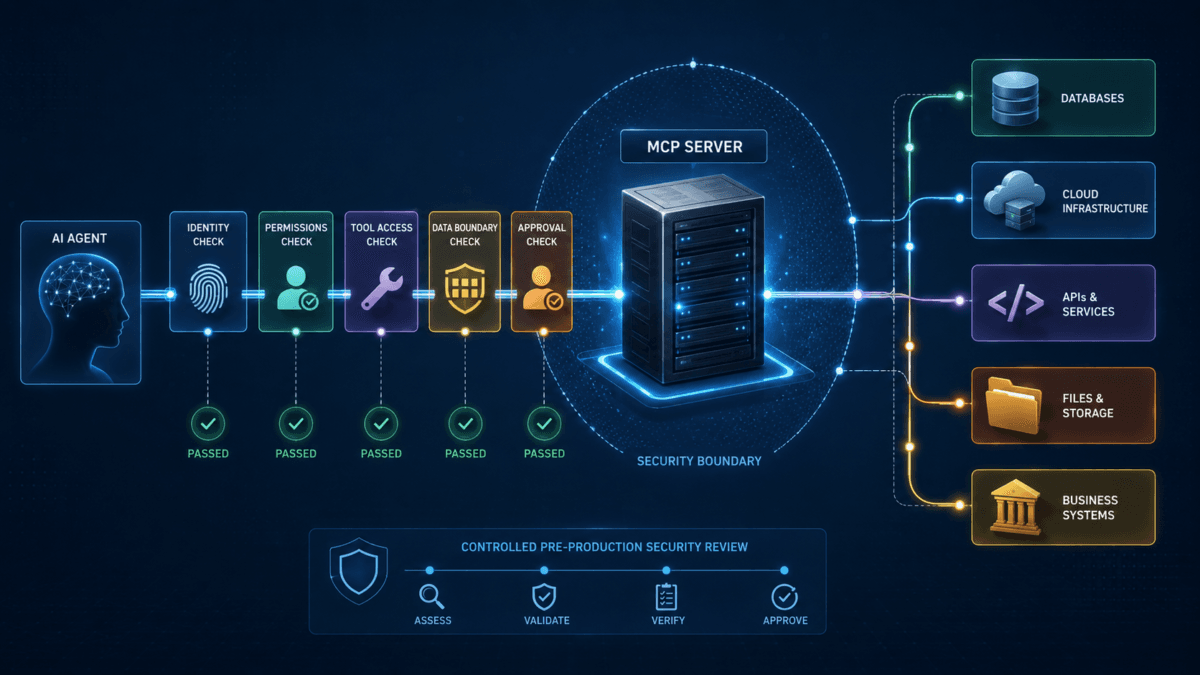
ToggleThis MCP server security checklist is designed for teams that are about to connect an AI agent to a real MCP server, business system, database, API, cloud environment, or internal tool.
The goal is simple: find dangerous trust assumptions before the connection reaches production.
A server can authenticate correctly and still expose too much data. A legitimate tool can still have excessive permissions. A previously approved server can still change its tool metadata. And a local MCP server can still inherit powerful workstation or cloud credentials.
If you need the underlying security model first, start with MCP Security: Risks and Controls for AI Agents in 2026. This page is the operational companion: a production gate you can work through item by item.
Quick Answer: What Should You Check Before Deploying an MCP Server?
Before production, verify all 15 controls:
- Assign a clear server owner and business purpose.
- Verify the publisher, package, endpoint, and update path.
- Inventory every exposed MCP tool.
- Separate read-only tools from write or destructive tools.
- Reduce permissions to the minimum required.
- Validate authentication tokens correctly.
- Prevent unsafe token passthrough.
- Isolate local and third-party MCP servers.
- Restrict unnecessary network access.
- Protect secrets and sensitive tool outputs.
- Require approval for consequential actions.
- Treat tool descriptions and responses as untrusted input.
- Monitor changes to tools, schemas, permissions, and dependencies.
- Log enough activity to reconstruct tool calls.
- Test revocation, failure, and incident response before launch.
A production deployment should not pass this MCP server security checklist because the server is popular, convenient, or technically functional. It should pass because each trust boundary has an owner and an enforceable control.
MCP Server Security Checklist: 15 Production Controls
1. Assign a Clear Owner and Business Purpose
Every production MCP server needs an identifiable owner.
Record:
- the business owner;
- the technical owner;
- the security owner or reviewer;
- the agents or clients allowed to connect;
- the business process the server supports;
- and what would break if the server were disabled.
This sounds administrative, but it becomes critical when a tool changes, credentials need to be revoked, or suspicious activity appears later.
Production gate: Do not approve an MCP server that nobody clearly owns.
2. Verify the Publisher, Package, Endpoint, and Update Path
Do not treat an MCP server as trusted simply because its name resembles a legitimate service.
Verify the actual source.
- Who publishes it?
- Is there an identifiable organization or maintainer?
- Where does the package come from?
- Which endpoint will the client reach?
- How are updates delivered?
- Is there a security contact?
- Can ownership of the package or domain change?
Microsoft's current MCP security guidance specifically recommends verifying publishers and update paths for third-party servers before placing them beside trusted servers or enterprise resources.
Where a vendor operates an official first-party MCP server for its own platform, compare that option with community-maintained alternatives before granting production access.
Production gate: You should know exactly which code and endpoint your agent is trusting.
3. Inventory Every MCP Tool the Server Exposes
Approving a server without reviewing its tools is incomplete.
Build an inventory containing:
| Field | What to Record |
|---|---|
| Tool name | Exact MCP tool identifier |
| Purpose | What business task it performs |
| Input | What data the tool accepts |
| Output | What the tool can return |
| Systems reached | APIs, databases, files, SaaS apps, cloud resources, or other destinations |
| Read/write | Whether it only reads or can change state |
| Required permissions | Scopes, roles, or credentials required |
| Sensitive data | Whether secrets, PII, financial data, or confidential information may appear |
| Approval requirement | Whether a human must confirm execution |
Do not assume the list is permanent. MCP tool catalogs can change as servers and packages evolve.
4. Separate Read-Only Tools From Write and Destructive Tools
One of the highest-leverage controls is distinguishing observation from action.
A tool that retrieves status information should not automatically carry the same trust level as a tool that can:
- delete records;
- modify infrastructure;
- create users;
- change permissions;
- send messages;
- publish content;
- execute code;
- or initiate transactions.
Where possible, use a read-only server or expose only the specific tools required for the task.
Microsoft's Azure MCP Server, for example, exposes controls for read-only operation and for limiting which tools are available to clients.
Production gate: A workflow that only needs visibility should not receive mutation authority.
5. Reduce MCP Server Permissions to Least Privilege
An agent should receive the minimum access required to complete its defined task.
Review:
- OAuth scopes;
- cloud roles;
- database permissions;
- filesystem access;
- service accounts;
- API permissions;
- network destinations;
- and administrative privileges.
Do not compensate for poorly scoped permissions with prompt instructions such as “do not modify anything.”
A prompt is behavioral guidance. A permission boundary is an enforceable security control.
The current MCP authorization model also supports requesting narrow scopes and expanding them when an operation legitimately requires more authority.
Production gate: If the agent does not need a permission for its current job, remove it.
6. Validate Every Authorization Token
For protected remote MCP deployments, token validation should be explicit rather than assumed.
Verify at least:
- issuer;
- audience;
- expiration;
- required claims;
- resource binding;
- and authorized scopes.
The July 2026 MCP specification includes additional authorization hardening, including issuer validation. Microsoft's current implementation guidance also recommends validating issuer, audience, and expiry before allowing tool execution.
A token issued for Service A should not automatically be accepted by MCP Server B.
For a wider review of app permissions and authorization relationships, use ToolRelief's OAuth App Review Checklist.
7. Prevent Unsafe Token Passthrough
Current MCP security guidance explicitly warns against token passthrough.
This happens when an MCP server receives a token intended for another service and forwards or reuses it downstream instead of maintaining the correct resource and audience boundaries.
That can weaken:
- audience restrictions;
- accountability;
- service-level access controls;
- and incident investigation.
Prefer credentials that are intentionally issued for the resource receiving them.
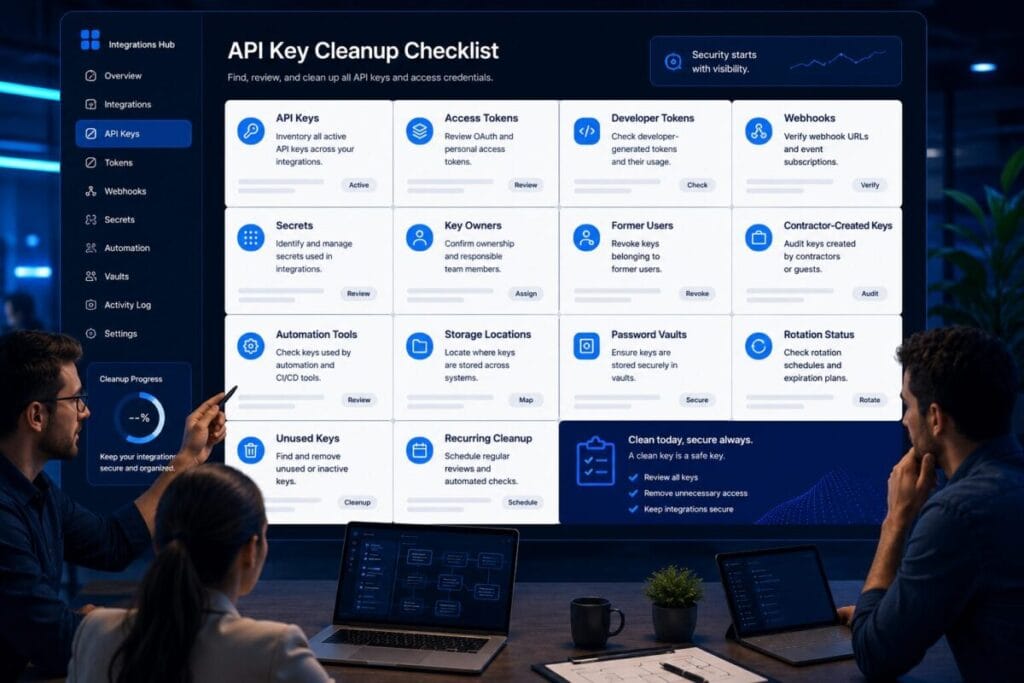
If your environment has accumulated old API keys or unmanaged service credentials, pair this review with ToolRelief's API Key Cleanup Checklist.
8. Isolate Local and Third-Party MCP Servers
A local MCP server may inherit access from the developer or employee account running it.
That could include:
- local files;
- SSH material;
- environment variables;
- developer tokens;
- cloud credentials;
- command-line tools;
- and internal network resources.
Microsoft recommends running local MCP servers from trusted workstations or restricted containers and limiting their filesystem and network access.
Third-party servers deserve similar separation.
Do not allow an unverified server to casually share the same credentials, filesystem context, or network reach as a trusted enterprise MCP server.
Production gate: A server should only inherit the environment it genuinely needs.
9. Restrict Network Access and SSRF Paths
MCP environments can inherit traditional web risks such as server-side request forgery.
Where appropriate:
- restrict unnecessary outbound traffic;
- validate discovered endpoints;
- protect private address ranges;
- protect cloud metadata endpoints;
- use TLS;
- validate certificates;
- control redirects;
- and reject unexpected destinations.
Microsoft also recommends failing closed when an MCP server certificate cannot be verified rather than allowing users to bypass the warning.
Production gate: The server should not be able to reach arbitrary internal or external destinations simply because a request contains a URL.
10. Protect Secrets and Sensitive Tool Outputs
Review both what a tool consumes and what it returns.
Sensitive outputs may include:
- passwords;
- API keys;
- connection strings;
- private keys;
- customer information;
- employee information;
- financial data;
- source code;
- internal documents.
Ask four questions:
- Can this tool retrieve sensitive data?
- Does the agent genuinely need that data?
- Will the result enter the model context?
- Could the result be logged, forwarded, or exposed to another tool?
Sensitive information should not move through an AI workflow merely because a technically valid tool call can retrieve it.
11. Require Human Approval for Consequential Actions
Human confirmation is most useful when the consequence of a wrong action is materially higher than the cost of asking for approval.
Examples include:
- retrieving secrets;
- deleting data;
- changing production infrastructure;
- making payments;
- sending external communications;
- creating privileged accounts;
- changing access permissions.
The MCP tools specification recommends keeping users able to deny tool invocations, and Microsoft uses user confirmation for operations that may expose sensitive information such as credentials and secrets.
Microsoft explicitly warns against disabling those confirmation protections in production environments that handle untrusted input.
Production gate: Decide which actions require human approval before the agent encounters them.
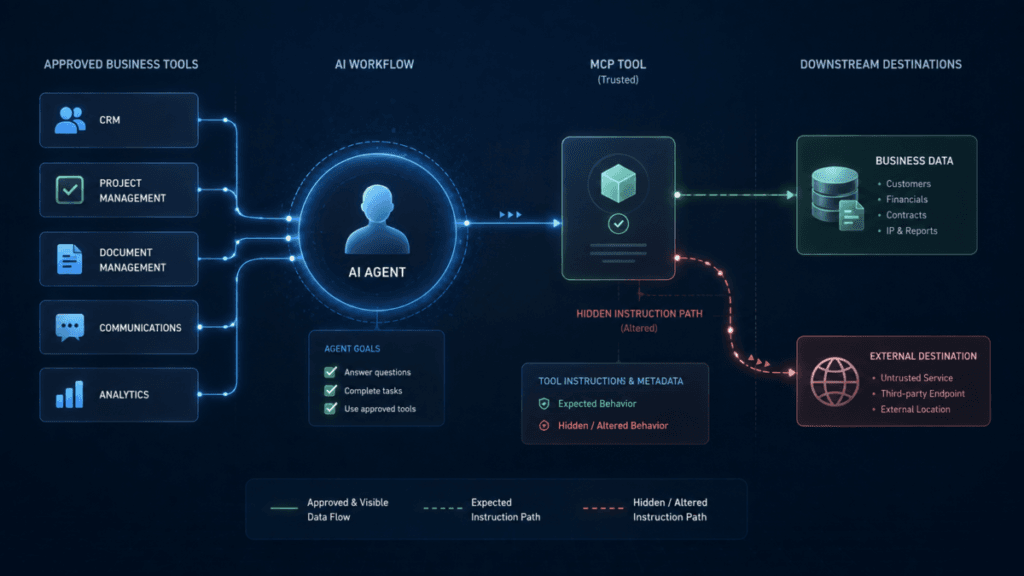
12. Treat Tool Descriptions and Tool Responses as Untrusted Input
Tool metadata can influence an AI agent's behavior.
That makes descriptions, schemas, annotations, and tool responses part of the security surface.
Review them with the same skepticism you would apply to other untrusted inputs.
Where appropriate:
- review tool definitions before approval;
- pin known-good schemas;
- validate returned data;
- sanitize content before reuse in agent context;
- and detect unexpected metadata changes.
This is one of the reasons MCP tool poisoning deserves a separate threat review.
A tool can remain visually familiar while the context used by the model to understand that tool has changed.
13. Put Tool and Server Changes Through Change Control
Approval should not last forever regardless of what changes underneath it.
Trigger a security review when:
- the server publisher changes;
- the package source changes;
- the endpoint changes;
- new tools appear;
- tool descriptions change materially;
- input or output schemas change;
- permissions expand;
- a read-only tool becomes write-capable;
- dependencies change materially;
- or additional sensitive systems become reachable.
Microsoft recommends treating tool schema changes like dependency changes and requiring re-approval when significant metadata updates occur.
Production gate: A trusted server today should not be able to become a materially different server tomorrow without review.
14. Log Enough Activity to Reconstruct MCP Tool Calls
Logging should answer operational security questions, not simply prove that requests occurred.
For sensitive environments, aim to reconstruct:
- which agent or client initiated the request;
- which identity was used;
- which MCP server received it;
- which tool was called;
- when the call occurred;
- which policy or approval applied;
- whether the operation succeeded;
- and what downstream system was affected.
The July 2026 MCP architecture also improves infrastructure-level traceability through standardized routing and tracing mechanisms.
Be careful not to turn security logging into a second data leak. Avoid retaining secrets or sensitive tool outputs unnecessarily.
15. Test Revocation, Failure, and Incident Response
The final control is easy to skip: prove that you can stop the workflow.
Before production, test:
- revoking the agent's credentials;
- revoking the server's access;
- removing a dangerous tool;
- blocking the MCP endpoint;
- rotating compromised credentials;
- recovering from a failed or partial action;
- identifying recent tool calls;
- and determining which systems may have been affected.
A control that only works when everything behaves normally is not enough for a production AI integration.
Production gate: Your team should know how to contain the connection before it needs to contain an incident.
MCP Server Security Checklist: Production Gate Table
| Control | Pass Condition |
|---|---|
| Ownership | Business and technical owners are documented |
| Publisher trust | Package, publisher, endpoint, and update path are verified |
| Tool inventory | Every exposed tool is documented |
| Read/write separation | Mutation authority exists only where required |
| Least privilege | Roles and scopes match the actual task |
| Token validation | Issuer, audience, expiry, and claims are checked |
| Token boundaries | No unsafe cross-resource token passthrough |
| Isolation | Untrusted servers cannot inherit unnecessary credentials or access |
| Network controls | Unexpected destinations and internal resources are restricted |
| Sensitive data | Secrets and private outputs have explicit handling rules |
| Human approval | High-impact actions have an appropriate confirmation gate |
| Tool context | Descriptions, schemas, and responses are treated as untrusted input |
| Change control | Material server and tool changes trigger review |
| Logging | Important calls are attributable and traceable |
| Incident readiness | Access can be revoked and affected activity can be investigated |
When Should an MCP Server Fail the Security Review?
Do not move an MCP server into production if any critical control remains unresolved.
Red flags include:
- unknown or unverifiable publisher;
- no clear owner;
- unnecessary administrator privileges;
- shared credentials across trusted and untrusted servers;
- unrestricted filesystem or network access;
- tools that can perform destructive actions without approval;
- sensitive outputs with no handling policy;
- tool definitions that can change silently;
- tokens accepted without audience validation;
- no useful activity logs;
- no practical way to revoke the connection.
A failed review does not always mean the server must be abandoned.
It means the unresolved risk needs a control before production.
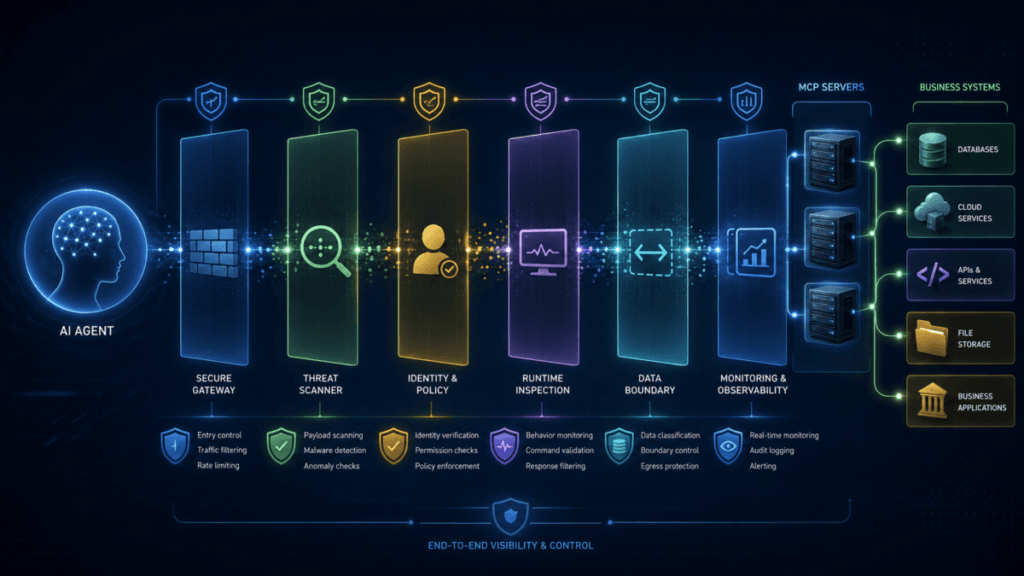
Do You Need an MCP Gateway, Scanner, or Runtime Security Layer?
Completing this checklist may expose a gap that configuration alone does not solve.
For example, an organization with dozens of servers and multiple agents may need centralized:
- server discovery;
- tool inventory;
- policy enforcement;
- identity-aware access control;
- runtime inspection;
- data-loss controls;
- change detection;
- or audit visibility.
That does not automatically mean you need a dedicated MCP product.
First identify the missing control. Then determine whether your existing identity, network, cloud, endpoint, SIEM, or DLP stack can enforce it.
If it cannot, continue to MCP Security Tools: How to Evaluate Gateways and Scanners before adding another security product to the stack.
Where This Checklist Fits in the MCP Security Cluster
This page is the deployment control layer of ToolRelief's MCP security research.
- MCP Security: Risks and Controls for AI Agents in 2026 — understand the complete trust model.
- MCP Tool Poisoning: How Trusted AI Tools Can Leak Data — examine the threat created by malicious or changed tool context.
- MCP Security Tools: How to Evaluate Gateways and Scanners — evaluate the commercial control layer.
For adjacent connected-software risks, use the ToolRelief Cybersecurity Hub or review the Cybersecurity Tool Stack Checklist.
Final MCP Server Security Checklist Decision
An MCP server is ready for production only when the organization understands more than whether the connection works.
You should know:
- who owns it;
- who publishes it;
- which tools it exposes;
- which systems those tools reach;
- which permissions they carry;
- which data can cross the boundary;
- which actions require approval;
- how changes are detected;
- how activity is investigated;
- and how access can be stopped.
Use this MCP server security checklist as a production gate, not as a paperwork exercise. The goal is to remove hidden authority before an AI agent begins using that authority at machine speed.
Sources and Verification
Information reviewed: August 22, 2026.
This checklist was developed using the Model Context Protocol 2026-07-28 specification and security guidance, NSA guidance on MCP security design for AI-driven automation published May 20, 2026, and Microsoft guidance for securing MCP server deployments.
- Model Context Protocol — 2026-07-28 Specification Release
- Model Context Protocol — Security Best Practices
- NSA — MCP Security Design Considerations
- Microsoft — Secure Your Azure MCP Server Deployment
MCP is changing quickly. Recheck the current protocol specification and the documentation for the specific server, client, identity provider, and security controls in your environment before production deployment.
TOOLRELIEF DECISION INTELLIGENCE
- Decision
- Use MCP Server Security Checklist: 15 Controls Before Production to verify the important conditions that should be checked before commitment, implementation, renewal, or another material action.
- Evidence Basis
- A structured verification checklist based on the decision conditions and risk signals documented on this page.
- Best Used For
- Checking whether the important decision conditions have been considered before commitment or implementation.
- Decision Boundary
- This page provides independent decision support rather than a guaranteed outcome. Product capabilities, pricing, third-party terms, and operating conditions can change.