TOOLRELIEF DECISION INTELLIGENCE
- Decision
- Use OAuth App Review Checklist to verify the important conditions that should be checked before commitment, implementation, renewal, or another material action.
- Evidence Basis
- A structured verification checklist based on the decision conditions and risk signals documented on this page.
- Best Used For
- Checking whether the important decision conditions have been considered before commitment or implementation.
- Decision Boundary
- This page provides independent decision support rather than a guaranteed outcome. Product capabilities, pricing, third-party terms, and operating conditions can change.
OAuth App Review Checklist
Quick Navigation ✔
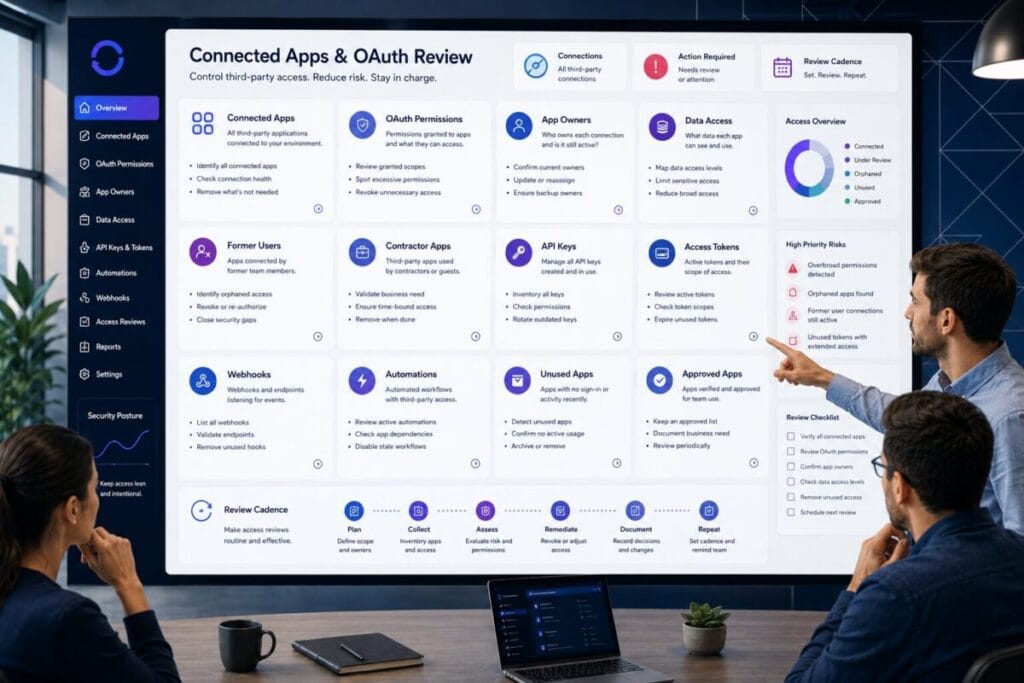
ToggleUse this OAuth app review checklist before approving more integrations, API keys, automations, browser extensions, or third-party app access.
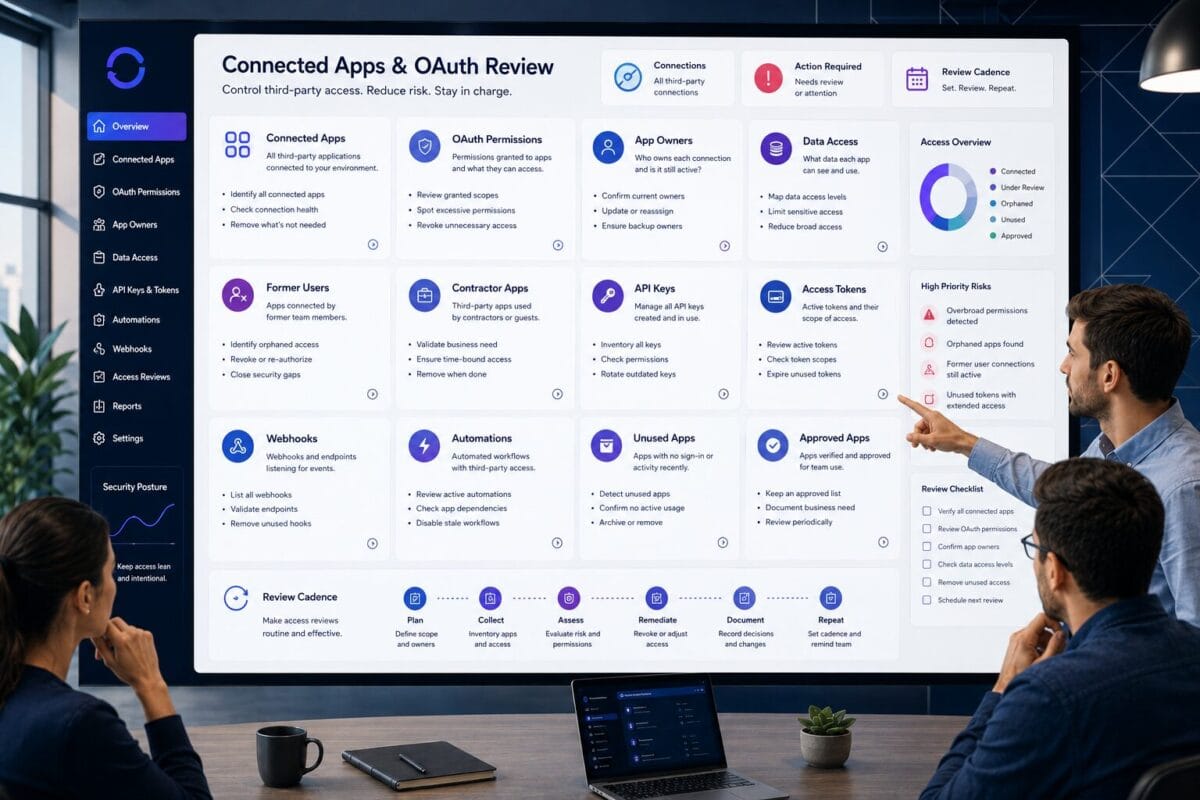
OAuth apps and connected third-party apps can keep access alive after users leave. A former employee, contractor, agency user, or vendor may no longer appear in a normal user list, but an app, token, API key, webhook, or automation they connected may still have access.
Decision Snapshot
Review app owners, approvers, permissions, scopes, data access, former-user apps, contractor-created apps, API keys, tokens, webhooks, and unused connected apps.
The goal is not to remove every integration. The goal is to identify what is connected, who owns it, what it can access, whether it is still needed, and when it should be reviewed again.
Review connected apps before approving more integrations, API keys, automations, or third-party access.
OAuth apps, tokens, webhooks, and automations can remain active after users leave.
Review scopes, data access, read/write/export permissions, and app ownership.
Remove unknown or unused apps, but keep approved integrations with clear owners and review dates.
Who Should Use This OAuth App Review Checklist
This OAuth app review checklist is for small teams, remote teams, lean operators, solo founders, small businesses, agencies, and internal managers who use many SaaS tools without a recurring connected app review process.
Teams with connected third-party apps
Use it if your team has OAuth apps, browser extensions, reporting connectors, CRM integrations, email or calendar integrations, file access integrations, or automation tools.
Teams with API keys and automations
Use it when your team has API keys, access tokens, webhooks, spreadsheet syncs, workflow automations, or app-to-app connections that nobody reviews regularly.
Teams cleaning former-user access
Use it when former employees, contractors, agencies, or vendors may have created apps, integrations, tokens, API keys, or automations that still run.
This is not a buying guide. It is not a SaaS management platform article. It is not a vendor roundup. It is a connected app access review asset for teams that need to understand which OAuth apps, integrations, tokens, and automations still have access to their SaaS tools.
The OAuth App Review Checklist
The purpose of this OAuth app review checklist is to make connected app access visible. A normal user access review asks who can log in. A stronger connected app review asks what apps are connected, who approved each app, what permissions each app has, and whether the access should be kept, limited, transferred, removed, or reviewed again.
OAuth App Review Checklist: List Connected OAuth Apps
OAuth app review checklist inventory items
- [ ] List connected OAuth apps.
- [ ] List connected third-party apps.
- [ ] List browser extensions with SaaS access.
- [ ] List reporting connectors.
- [ ] List automation tools.
- [ ] List CRM integrations.
- [ ] List email and calendar integrations.
- [ ] List file storage integrations.
- [ ] List project management integrations.
- [ ] List finance, billing, or analytics integrations.
- [ ] List apps connected to admin or security settings.
- [ ] Mark apps connected to sensitive data.
- [ ] Mark apps with unknown ownership.
- [ ] Mark apps that have not been reviewed recently.
Why it matters
You cannot review connected app exposure if you do not know which apps are connected. OAuth apps, connected apps, integrations, and browser extensions often sit inside SaaS settings panels that small teams rarely review.
What small teams often miss
Small teams often miss old OAuth apps, browser extensions, reporting connectors, spreadsheet syncs, calendar tools, email plugins, CRM add-ons, automation workflows, analytics integrations, file-sharing connectors, and apps connected by former users or external users.
Next action
Create a connected app inventory with app name, connected tool, approver, owner, permissions, data access, business need, removal decision, and review date.
Identify Who Approved Each App
Checklist items for OAuth app approvers and owners
- [ ] Identify who approved each connected app.
- [ ] Identify who installed or connected each app.
- [ ] Identify who currently owns each app.
- [ ] Identify whether the approver still works with the team.
- [ ] Identify whether the app was approved by an employee, contractor, agency, vendor, or admin.
- [ ] Identify whether approval was temporary or permanent.
- [ ] Identify whether the app was approved for a specific project.
- [ ] Identify whether the business need still exists.
- [ ] Assign a current internal owner where needed.
- [ ] Mark apps with unknown approvers for review.
Why it matters
Approval history helps the team understand whether a connected app still has a legitimate business reason. An app approved by a former employee, old contractor, agency user, or unknown admin may still be useful, but it should not remain active without a current owner.
What small teams often miss
Small teams often treat connected apps as set-and-forget. Someone connects an app during setup, testing, migration, reporting, support, or automation work. The project ends, the person leaves, and the app remains connected.
Next action
For every connected app, answer: “Who owns this app now?” If nobody owns it, put it into a review or removal queue.
Review App Permissions and Scopes
Checklist items for OAuth permissions and scopes
- [ ] Review each app’s permissions and scopes.
- [ ] Identify apps with read access.
- [ ] Identify apps with write access.
- [ ] Identify apps with delete access.
- [ ] Identify apps with export access.
- [ ] Identify apps with admin-level access.
- [ ] Identify apps that can invite users.
- [ ] Identify apps that can manage files.
- [ ] Identify apps that can read email or calendar data.
- [ ] Identify apps that can access customer records.
- [ ] Identify apps that can change settings.
- [ ] Identify apps with permissions broader than the business need.
- [ ] Mark broad-scope apps for review.
Why it matters
The app name is not enough. The permissions and scopes matter more. A small app can have broad access, and a familiar app can have more permission than the team expects.
What small teams often miss
Small teams often approve apps based on the brand, feature, or convenience, then forget to review scopes. They may not realize an app can read files, write records, export data, modify calendars, access customer records, sync email, or change settings.
Next action
For each app, document the highest-impact permission it has. If the permission is broader than the business need, review whether the app should be limited, removed, transferred, or reapproved.
Review Data Access Level
Checklist items for OAuth app data access
- [ ] Review what data each app can access.
- [ ] Identify apps that can access email.
- [ ] Identify apps that can access calendars.
- [ ] Identify apps that can access files.
- [ ] Identify apps that can access customer data.
- [ ] Identify apps that can access CRM records.
- [ ] Identify apps that can access billing or finance data.
- [ ] Identify apps that can access analytics or reports.
- [ ] Identify apps that can access internal documentation.
- [ ] Identify apps that can access project data.
- [ ] Identify apps that can sync data outside the original tool.
- [ ] Identify apps that can export or replicate data.
- [ ] Mark apps with sensitive data access for owner review.
Why it matters
Data access determines exposure. Two apps may both appear as connected apps, but one may only read a calendar while another can access customer records, files, billing data, or internal documentation.
What small teams often miss
Small teams often review whether an app is useful but not what data it touches. That makes it hard to decide whether the app should stay, be removed, or be reviewed more often.
Next action
Assign a data access level to every connected app: low, medium, high, or unknown. Treat unknown access as something to review.
Review Apps Created by Former Users
Checklist items for former-user OAuth cleanup
- [ ] Identify apps approved by former employees.
- [ ] Identify apps approved by former admins.
- [ ] Identify apps connected by former contractors.
- [ ] Identify apps connected by former agency users.
- [ ] Identify apps connected by old vendor support users.
- [ ] Identify apps connected during old projects.
- [ ] Identify apps connected during migration or setup work.
- [ ] Check whether the app still works after the user left.
- [ ] Check whether the app has a current owner.
- [ ] Remove apps that are no longer used.
- [ ] Transfer ownership where the app is still needed.
- [ ] Document the decision to keep, remove, or review later.
Why it matters
OAuth apps and connected apps can outlive the user who created them. A former employee may be removed from the SaaS tool, but the app they connected may still appear in the system.
What small teams often miss
Small teams often offboard the person but forget their connected apps. They may remove the account, close the laptop, transfer files, and still leave behind old OAuth apps, API tokens, spreadsheet syncs, or automations.
Next action
During every offboarding review, ask what apps, integrations, tokens, or automations the person created or approved.
Review Apps Connected by Contractors or Agencies
Checklist items for contractor and agency connected apps
- [ ] Identify apps connected by contractors.
- [ ] Identify apps connected by agencies.
- [ ] Identify apps connected by freelancers.
- [ ] Identify apps connected by vendors or consultants.
- [ ] Identify whether the external work is still active.
- [ ] Identify whether the app is still needed.
- [ ] Identify whether the app has an internal owner.
- [ ] Identify whether the app can access customer data, files, email, CRM, billing, or reports.
- [ ] Identify whether the agency staff changed after app approval.
- [ ] Remove external apps that are no longer needed.
- [ ] Transfer ownership of needed apps to an internal owner.
- [ ] Document the business reason for keeping any external app.
Why it matters
Contractor and agency-connected apps can create long-term access paths. The contractor may have been added for a project, or an agency may have connected a reporting tool that still has access after the work ends.
What small teams often miss
Small teams often review contractor user accounts but not contractor-created connected apps. They may remove the contractor from the workspace while leaving their automation, connector, or OAuth app active.
Next action
For every external user offboarding event, review connected apps created by that user or group. Do not assume removing the person removes the app.
Review Automation and Integration Tools
Checklist items for automation and integration access
- [ ] List automation tools connected to SaaS apps.
- [ ] List workflows that move data between apps.
- [ ] List reporting syncs.
- [ ] List CRM-to-email automations.
- [ ] List spreadsheet syncs.
- [ ] List billing or finance automations.
- [ ] List form-to-database automations.
- [ ] List project management automations.
- [ ] Identify who owns each automation.
- [ ] Identify what each automation can read or write.
- [ ] Identify whether the automation is still used.
- [ ] Remove or disable unused automations.
- [ ] Transfer ownership of active automations.
- [ ] Document the review date.
Why it matters
Automations often continue running after the person who built them leaves. They may move data, copy records, update fields, trigger emails, create tasks, or sync information between tools.
What small teams often miss
Small teams often think of automations as workflow tools, not access paths. But an automation may have permission to read, write, export, or sync sensitive data.
Next action
Create an automation review list with workflow, connected apps, owner, data access, current use, and whether to remove, transfer, or keep it.
Review API Keys, Tokens, and Webhooks
Checklist items for API and OAuth review
- [ ] List API keys used by critical SaaS tools.
- [ ] List access tokens.
- [ ] List refresh tokens where visible.
- [ ] List webhook URLs.
- [ ] List developer tokens.
- [ ] List API secrets stored in password managers or documents.
- [ ] Identify who created each key, token, or webhook.
- [ ] Identify what each key or token can access.
- [ ] Identify whether each key or token is still used.
- [ ] Revoke unused API keys.
- [ ] Rotate keys that may be known by former users.
- [ ] Replace ownerless keys with owned keys where needed.
- [ ] Document the owner and review date for active keys.
Why it matters
Not all connected access appears as an OAuth app. API keys, tokens, webhooks, and developer credentials can also keep access alive.
What small teams often miss
Small teams often review app dashboards but miss API keys, developer tokens, webhook URLs, refresh tokens, automation secrets, integration credentials, keys stored in documents, and keys stored in password vaults.
Next action
Create a key and token register with key or token, tool, creator, owner, access level, current use, and whether to rotate, revoke, or keep it.
Remove Unused or Unknown Apps
Checklist items for unused OAuth app removal
- [ ] Remove apps that are no longer used.
- [ ] Remove apps with no owner.
- [ ] Remove apps with unknown business need.
- [ ] Remove duplicate integrations.
- [ ] Remove apps connected by former users if no longer needed.
- [ ] Remove apps connected by former contractors if no longer needed.
- [ ] Remove apps with broad permissions and unclear purpose.
- [ ] Remove test apps from old projects.
- [ ] Remove browser extensions that no longer need access.
- [ ] Remove abandoned automations.
- [ ] Revoke unused tokens and API keys.
- [ ] Document what was removed and when.
Why it matters
The goal is not to remove every integration. Useful integrations can stay. The problem is unused, unknown, ownerless, or over-permissioned access.
What small teams often miss
Small teams often keep unknown apps because removing them feels risky. Unknown apps should not stay unknown forever. They should be assigned an owner, tested, documented, limited, or removed.
Next action
Sort every app into one of four decisions: keep, limit, transfer owner, or remove. Unknown apps should move into a review queue.
Assign Owners to Approved Connected Apps
Checklist items for connected app ownership
- [ ] Assign an owner to every approved connected app.
- [ ] Assign a backup owner for critical integrations.
- [ ] Confirm the owner understands the business need.
- [ ] Confirm the owner understands the app’s permissions.
- [ ] Confirm the owner knows what data the app can access.
- [ ] Confirm the owner can approve continued use.
- [ ] Confirm the owner can remove or transfer the app if needed.
- [ ] Assign an internal owner for contractor-created apps.
- [ ] Assign an internal owner for agency-created apps.
- [ ] Document the next review date.
Why it matters
Approved apps still need ownership. An app can be useful and still risky if nobody owns it. Ownership turns a connected app from a forgotten access path into a managed integration.
What small teams often miss
Small teams often treat approval as permanent. But connected apps change, teams change, data changes, roles change, vendors change, and permissions may expand.
Next action
No connected app should remain approved without an owner and review date. If an app is important enough to keep, it is important enough to own.
Document Business Need and Risk Level
Checklist items for connected app documentation
- [ ] Document the business need for each connected app.
- [ ] Document the app owner.
- [ ] Document the app approver if known.
- [ ] Document the connected SaaS tool.
- [ ] Document the permissions or scopes.
- [ ] Document the data access level.
- [ ] Document whether the app can write, export, delete, or sync data.
- [ ] Document whether the app was created by a former user.
- [ ] Document whether the app was created by a contractor or agency.
- [ ] Document the decision: keep, limit, transfer, remove, or review later.
- [ ] Document the next review date.
Why it matters
Documentation prevents teams from relying on memory. A connected app that looks confusing today will look even more confusing six months from now if nobody documents why it exists, who owns it, and what it can access.
What small teams often miss
Small teams often review the app once but do not record the decision. That means the same app becomes a mystery again during the next review.
Next action
For every connected app, write: “This app is connected to ____ because ____; owner is ____; next review date is ____.”
Set a Recurring OAuth App Review Cadence
Checklist items for recurring OAuth app review
- [ ] Set a recurring OAuth app review cadence.
- [ ] Review connected apps monthly or quarterly for critical SaaS tools.
- [ ] Review apps after employee offboarding.
- [ ] Review apps after contractor or agency offboarding.
- [ ] Review apps before approving more integrations.
- [ ] Review apps before major SaaS migrations.
- [ ] Review apps after role changes.
- [ ] Review apps after billing or ownership changes.
- [ ] Review apps before connecting automation tools.
- [ ] Review API keys, tokens, and webhooks on the same cadence.
- [ ] Document removals, transfers, and continued approvals.
- [ ] Schedule the next review before closing the current one.
Why it matters
OAuth app exposure changes over time. New apps are approved, users leave, contractors connect tools, agencies change staff, automations are created, API keys are generated, and browser extensions are installed.
What small teams often miss
Small teams often review connected apps only after something breaks or during a rushed offboarding event. A lighter recurring review is easier than a large emergency cleanup later.
Next action
Set a recurring review schedule for critical SaaS tools. For many small teams, monthly or quarterly review is enough.
OAuth App Exposure Score
Use this score to decide whether OAuth app exposure is controlled or needs cleanup. A low score does not mean every OAuth app is dangerous. It means connected app access is not clear enough yet.
0 = Not reviewed
The area has not been reviewed, ownership is unclear, or connected app exposure is unknown.
1 = Partially controlled
The area has been reviewed, but gaps, exceptions, or unclear ownership remain.
2 = Reviewed / controlled
The area is reviewed, documented, owned, and controlled enough for current operations.
Score: 0 / 1 / 2
Score: 0 / 1 / 2
Score: 0 / 1 / 2
Score: 0 / 1 / 2
Score: 0 / 1 / 2
Score: 0 / 1 / 2
Score: 0 / 1 / 2
Score: 0 / 1 / 2
Score: 0 / 1 / 2
Score: 0 / 1 / 2
16–20
OAuth app exposure is controlled. Connected apps, owners, permissions, data access, keys, and recurring review are clear enough for current operations.
9–15
OAuth app exposure needs cleanup. Some review work is done, but gaps remain before approving more apps.
0–8
High connected app exposure; review before approving more apps. Pause new connected app approvals until basic visibility and ownership are reviewed.
When OAuth App Access Is High Risk
OAuth app access is higher risk when an app has broad permissions, no owner, unknown business need, or access tied to former users or external collaborators.
High-risk does not always mean the app should be removed immediately. It means the app should not remain unreviewed.
What to Remove Before Approving More Connected Apps
Before approving more connected apps, integrations, browser extensions, or automations, review what should be removed first.
Do not approve more connected access into a messy environment. First identify what is connected, what it can access, who owns it, and whether it should stay.
Former Employee OAuth App Cleanup Checklist
Use this section when an employee leaves, changes roles, or no longer owns connected app access.
- [ ] List OAuth apps approved by the former employee.
- [ ] List connected third-party apps created by the former employee.
- [ ] List API keys created by the former employee.
- [ ] List tokens created by the former employee.
- [ ] List webhooks created by the former employee.
- [ ] List automations owned by the former employee.
- [ ] List reporting connectors owned by the former employee.
- [ ] Review what each app or connection can access.
- [ ] Confirm whether each app is still needed.
- [ ] Transfer ownership of needed apps.
- [ ] Revoke unused apps.
- [ ] Revoke unused API keys.
- [ ] Rotate keys or secrets if needed.
- [ ] Replace personal credentials inside active workflows.
- [ ] Document the new owner and review date.
- [ ] Schedule a follow-up connected app review.
Former employee app cleanup should be part of SaaS offboarding. Removing the user account is not always enough if the person created apps, automations, tokens, API keys, or integrations.
Contractor and Agency Connected App Checklist
Use this section when a contractor, freelancer, agency user, vendor, consultant, or external collaborator connected apps or integrations.
- [ ] List apps connected by the contractor or agency.
- [ ] List integrations created for the project.
- [ ] List automation workflows created by the external user.
- [ ] List API keys or tokens created by the external user.
- [ ] List browser extensions or add-ons used during the project.
- [ ] Confirm whether the project is still active.
- [ ] Confirm whether the app is still needed.
- [ ] Confirm whether the app has an internal owner.
- [ ] Confirm what data the app can access.
- [ ] Remove apps that are no longer needed.
- [ ] Transfer ownership of needed apps.
- [ ] Revoke unused API keys or tokens.
- [ ] Replace contractor credentials inside active workflows.
- [ ] Review other apps connected by the same agency or vendor.
- [ ] Document the removal or transfer decision.
- [ ] Schedule a follow-up review.
Contractor and agency connected app access should be reviewed even when the user account has already been removed. The connection may remain after the person leaves.
Service Categories Mentioned in This Checklist
This section is not a ranking and not a vendor list. These are service categories that may appear during a practical OAuth app and connected app review.
Password Managers
Examples only: 1Password, Bitwarden.
This category appears because API secrets, shared credentials, recovery credentials, and admin passwords may be stored inside password manager vaults.
ZTNA / Zero Trust Access Platforms
Examples only: Cloudflare Zero Trust, Twingate.
This category may appear when some SaaS or app-level access is controlled through identity-aware policies, app-level access rules, or contractor access controls.
Business VPN / Managed VPN Platforms
Example only: NordLayer.
This category may appear when some integration or admin workflows still depend on controlled remote or private access.
Hardware Security Keys
Example only: YubiKey.
This category may appear when OAuth approval, admin access, or high-risk connected app ownership depends on stronger MFA.
SaaS Access Review / Integration Ownership Workflow
No vendor pitch needed now.
This category appears because OAuth app review is often an ownership and recurring review problem.
Offboarding / OAuth Cleanup Workflow
No vendor pitch needed now.
This category appears because former users, contractors, agencies, and old vendors may leave connected apps, tokens, API keys, webhooks, and automations behind.
Where This Fits Inside ToolRelief
This asset is part of ToolRelief’s External Service Demand Engine. It supports users who need to review OAuth apps, connected third-party apps, integrations, API keys, tokens, webhooks, automations, and leftover connected app access.
SaaS admin exposure
SaaS offboarding
Contractor access review
Broader remote access cleanup
App-level access readiness
VPN replacement review
Model comparison
Replacement paths
Current VPN review
Security routing
Software trend monitoring
Device context
Parent decision system
Review OAuth Apps Before Approving More Connected Third-Party Access
Use ToolRelief’s SaaS Admin Access Exposure Checklist and SaaS Admin Offboarding Checklist to decide which connected apps, permissions, API keys, tokens, and integrations should be removed, owned, reviewed, or kept.