TOOLRELIEF DECISION INTELLIGENCE
- Decision
- Use Contractor Access Security Checklist to verify the important conditions that should be checked before commitment, implementation, renewal, or another material action.
- Evidence Basis
- A structured verification checklist based on the decision conditions and risk signals documented on this page.
- Best Used For
- Checking whether the important decision conditions have been considered before commitment or implementation.
- Decision Boundary
- This page provides independent decision support rather than a guaranteed outcome. Product capabilities, pricing, third-party terms, and operating conditions can change.
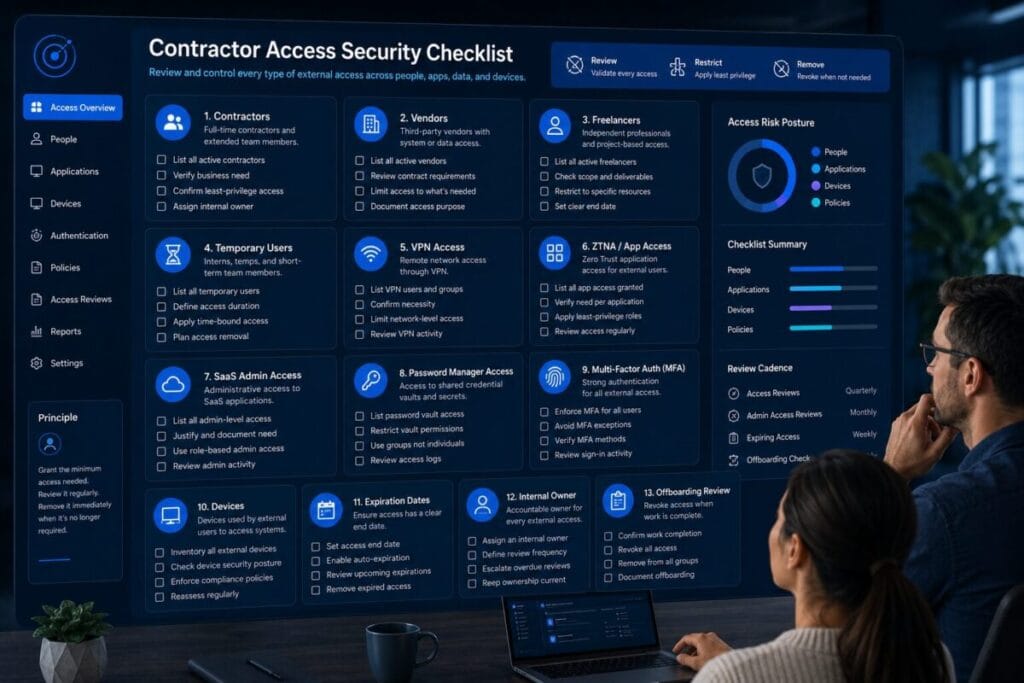
Contractor Access Security Checklist
Quick Navigation ✔
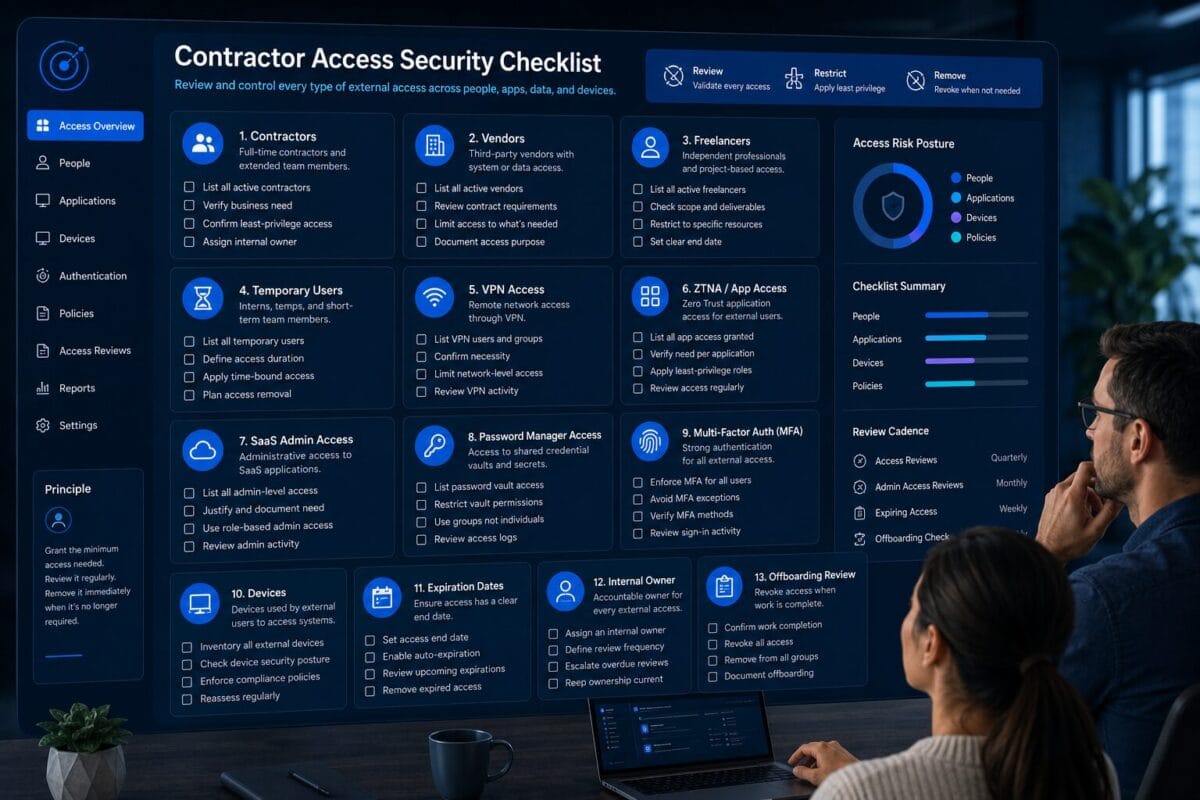
ToggleUse this contractor access security checklist before granting access to contractors, freelancers, agencies, consultants, vendors, temporary users, or external collaborators.
Contractor access should not be treated the same as employee access. Contractors often need narrower access, shorter access windows, clearer ownership, and cleaner offboarding.
Decision Snapshot
Before granting access, define the scope, internal owner, expiration date, MFA requirements, device expectations, SaaS access, password manager access, and offboarding steps.
The goal is simple: grant only the access needed, review it while the work is active, and remove it when the work ends.
Review scope, owner, expiration, MFA, devices, SaaS access, and offboarding before granting access.
Contractor access should not automatically match employee access.
Grant only what is needed, then review access while the work is active.
Offboarding should remove VPN, ZTNA, SaaS, password, file, and admin access.
Who Should Use This Contractor Access Security Checklist
This contractor access security checklist is for small teams, remote teams, lean operators, solo founders, small businesses, agencies, and managers who work with external people but do not have a heavy enterprise access-management process.
Teams using outside contributors
Use it for freelancers, contractors, agencies, consultants, vendors, temporary users, external developers, bookkeeping support, IT support providers, virtual assistants, and remote collaborators.
Teams granting access to work systems
Use it before giving access to VPN, ZTNA, SaaS apps, admin dashboards, password manager vaults, files, CRM, code repositories, analytics, or internal documentation.
Teams cleaning old external access
Use it when old contractor accounts, temporary users, vendor permissions, or forgotten SaaS access may still be active.
This is not a vendor roundup. It is not a comparison article. It is not a generic remote access explainer. It is an operational checklist for granting, limiting, reviewing, and removing contractor access.
The Contractor Access Security Checklist
The purpose of this contractor access security checklist is to help small teams avoid one of the most common access mistakes: a contractor is added quickly, given too much access, and then forgotten after the work ends.
Contractor access should follow a simple lifecycle: identify the contractor, define the work, grant only needed access, set an owner and expiration date, review access during the work, and remove access when the work ends.
Contractor Access Security Checklist: Identify Every Contractor and External User
Contractor access security checklist inventory items
- [ ] List every active contractor.
- [ ] List every freelancer with access.
- [ ] List every agency user with access.
- [ ] List every consultant with access.
- [ ] List every vendor or support provider with access.
- [ ] List every temporary user.
- [ ] Identify external users with admin access.
- [ ] Identify external users with VPN or ZTNA access.
- [ ] Identify external users with SaaS app access.
- [ ] Identify external users with password manager access.
- [ ] Mark which contractors are still active.
- [ ] Mark which contractors should be removed.
Why it matters
You cannot secure contractor access if you do not know who has it. Small teams often add external users quickly during projects, then lose track of why they were added and whether they still need access.
What small teams often miss
Small teams often remember current contractors but forget old freelancers, former agency users, vendor support accounts, shared external logins, temporary users, external users inside project tools, contractors with admin rights, and contractors inside password manager vaults.
Next action
Create a single contractor access list with contractor name, company or role, access granted, internal owner, start date, review date, end date, and status.
Define Access Scope Before Granting Access
Checklist items for contractor access scope
- [ ] Define access scope before granting access.
- [ ] Write down what work the contractor needs to complete.
- [ ] Identify the apps, files, systems, or dashboards required.
- [ ] Identify what the contractor should not access.
- [ ] Decide whether access should be read-only, edit, admin, or temporary.
- [ ] Avoid granting broad access for convenience.
- [ ] Document why each access permission is needed.
- [ ] Confirm the access scope with the internal owner.
- [ ] Define the date when access should be reviewed or removed.
Why it matters
Contractor access should be tied to a defined job. If the work is narrow, the access should be narrow too.
What small teams often miss
Small teams often grant access based on speed. They add someone to a workspace, copy access from a previous contractor, or allow a shared login even when the contractor only needs a small part of the system.
Next action
Before adding a contractor, write: “This contractor needs access to ____ for ____ until ____.” If that sentence is unclear, do not grant access yet.
Separate Contractor Access From Employee Access
Checklist items for separating contractor access
- [ ] Create separate access groups for contractors where possible.
- [ ] Avoid adding contractors to default employee groups.
- [ ] Avoid giving contractors broad internal workspace access by default.
- [ ] Separate contractor permissions from employee permissions.
- [ ] Use limited roles where possible.
- [ ] Use temporary roles where possible.
- [ ] Review whether contractors can invite other users.
- [ ] Review whether contractors can change settings.
- [ ] Review whether contractors can export data.
- [ ] Confirm who can approve contractor access changes.
Why it matters
Contractors usually have a different relationship to the business than employees. Their access should reflect the project, task, support session, campaign, code change, or temporary engagement.
What small teams often miss
Small teams often use one access pattern for everyone. A contractor may get placed into the same group as employees because it is faster, then retain access that was never needed.
Next action
Create at least one contractor-specific access category. Even a simple label like “Contractor — limited access” is better than mixing contractors into employee access groups without review.
Review VPN, ZTNA, and Remote Access Permissions
Checklist items for contractor VPN and ZTNA access
- [ ] Review whether the contractor needs VPN access.
- [ ] Review whether the contractor needs ZTNA or app-level access.
- [ ] Review whether the contractor needs remote desktop access.
- [ ] Review whether the contractor needs access to private apps.
- [ ] Confirm whether broad network access is necessary.
- [ ] Confirm whether app-level access would be enough.
- [ ] Limit contractor VPN access to the required scope where possible.
- [ ] Remove VPN or ZTNA access when the work ends.
- [ ] Document who approved remote access.
Why it matters
Contractor remote access can be too broad if it is handled casually. A contractor may need one app, one environment, one support dashboard, or one admin workflow. That does not always justify broad network access.
What small teams often miss
Small teams often give contractors the same remote access path used by employees because the VPN is already set up, the contractor needs access quickly, or nobody has mapped the specific app access needed.
Next action
Ask: “Does this contractor need network-level access, or only access to specific apps?” Use that answer before deciding whether contractor access should use VPN, ZTNA, or another controlled access path.
Review SaaS App Access
Checklist items for contractor SaaS access
- [ ] List every SaaS app the contractor can access.
- [ ] Identify whether the contractor has admin access.
- [ ] Identify whether the contractor can invite users.
- [ ] Identify whether the contractor can export data.
- [ ] Identify whether the contractor can change billing settings.
- [ ] Identify whether the contractor can manage integrations.
- [ ] Identify whether the contractor can access customer data.
- [ ] Review project management app access.
- [ ] Review CRM access.
- [ ] Review analytics access.
- [ ] Review file storage access.
- [ ] Review marketing, finance, or automation app access.
- [ ] Remove SaaS access that is not needed.
Why it matters
Contractor access risk often lives inside SaaS tools, not only inside VPN or network access. Agencies, freelancers, vendors, or temporary users may have access to dashboards, files, customer records, integrations, exports, billing, automation flows, or admin settings.
What small teams often miss
Small teams often remove one obvious account but miss SaaS access in shared drives, analytics tools, CRM records, email marketing platforms, automation tools, billing apps, admin dashboards, API settings, design files, or documentation spaces.
Next action
Create a SaaS access list for each contractor. Do not rely on memory. Review the actual apps.
Review Password Manager and Shared Credentials
Checklist items for contractor password access
- [ ] Review whether the contractor has password manager access.
- [ ] Review which vaults or folders the contractor can access.
- [ ] Review whether the contractor can view admin credentials.
- [ ] Review whether the contractor can copy shared passwords.
- [ ] Review whether the contractor uses shared logins.
- [ ] Remove credentials that are not needed.
- [ ] Rotate shared passwords when necessary after contractor access ends.
- [ ] Confirm MFA is enabled for password manager access.
- [ ] Confirm who owns contractor credential access.
- [ ] Remove contractor access from password vaults during offboarding.
Why it matters
Password access can outlive account access. A contractor may lose access to one SaaS app but still have a saved password, copied credential, shared login, or vault entry.
What small teams often miss
Small teams often remove a contractor from the main app but forget the password manager. They may also forget that the contractor had access to a shared login that still works for other systems.
Next action
Before granting password access, decide which credentials are needed, who owns the vault, when access ends, and whether credentials must be rotated after the contractor leaves.
Check MFA and Recovery Settings
Checklist items for contractor MFA and recovery
- [ ] Confirm MFA is enabled for the contractor account.
- [ ] Confirm MFA is enabled for SaaS apps the contractor uses.
- [ ] Confirm MFA is enabled for password manager access.
- [ ] Confirm MFA is enabled for admin access.
- [ ] Avoid shared accounts that bypass individual MFA.
- [ ] Review backup recovery methods.
- [ ] Confirm who can reset contractor access.
- [ ] Confirm whether the contractor can recover access without internal approval.
- [ ] Review whether high-risk access needs stronger MFA.
Why it matters
Contractor identity should be individual, removable, and protected. If a contractor uses a shared account, weak MFA, or unclear recovery method, it becomes harder to know who accessed what and harder to remove access cleanly.
What small teams often miss
Small teams often enable MFA for employees but not contractors. They may also use shared accounts to avoid creating a new user, which weakens accountability and offboarding.
Next action
Do not grant sensitive contractor access through shared accounts. Use individual accounts where possible, with MFA enabled and recovery ownership clear.
Review Contractor Device Posture
Checklist items for contractor device posture
- [ ] Identify which device the contractor will use.
- [ ] Confirm whether the device is personal, company-managed, agency-managed, or unknown.
- [ ] Confirm whether the device is shared with other people.
- [ ] Review whether the device is used for multiple clients.
- [ ] Confirm basic operating system update status where appropriate.
- [ ] Confirm whether the device has a local password or biometric lock.
- [ ] Confirm whether the contractor uses public or travel networks.
- [ ] Decide whether unmanaged devices should access sensitive systems.
- [ ] Limit access when device trust is unclear.
- [ ] Remove access from lost, retired, or replaced contractor devices.
Why it matters
Contractor access is not only about the account. It is also about the device used to access the account.
What small teams often miss
Small teams often ask who the contractor is, but not what device they are using. That matters when the contractor accesses admin systems, customer data, files, billing, code, or internal tools.
Next action
Create a simple device expectation before granting access. For sensitive access, define the minimum device conditions the contractor must meet.
Set Access Expiration Dates
Checklist items for contractor access expiration
- [ ] Set an access start date.
- [ ] Set an access expiration date.
- [ ] Set a review date before expiration.
- [ ] Tie access duration to the project timeline.
- [ ] Avoid open-ended contractor access.
- [ ] Set reminders for access review.
- [ ] Confirm who removes access when the work ends.
- [ ] Confirm what happens if the project is extended.
- [ ] Review temporary users before extending access.
Why it matters
Contractor access without an expiration date often becomes permanent access. Expiration dates create a forcing function and make the team decide whether access is still needed.
What small teams often miss
Small teams often set the project end date but not the access end date. The work may end, the invoice may be paid, and the contractor may stop communicating, but the account can remain active.
Next action
Every contractor access request should include a start date, review date, expiration date, and internal owner.
Assign an Internal Access Owner
Checklist items for internal access ownership
- [ ] Assign an internal owner for each contractor.
- [ ] Confirm who approved the access.
- [ ] Confirm who understands the contractor’s scope.
- [ ] Confirm who will review access during the project.
- [ ] Confirm who will remove access when the project ends.
- [ ] Confirm who handles access changes.
- [ ] Confirm who handles exceptions.
- [ ] Confirm who reviews admin access.
- [ ] Confirm who documents offboarding.
Why it matters
No contractor access should exist without an internal owner. The owner may be the founder, operator, project owner, department lead, or manager who brought in the contractor.
What small teams often miss
Everyone assumes someone else will remove contractor access. That gap creates leftover access.
Next action
Assign one person as the access owner before access is granted. If no one owns the contractor relationship, do not grant broad access.
Offboard Contractors Cleanly
Checklist items for contractor offboarding
- [ ] Confirm the contractor’s work has ended.
- [ ] Remove VPN access.
- [ ] Remove ZTNA or app-level access.
- [ ] Remove SaaS app access.
- [ ] Remove password manager access.
- [ ] Remove shared drive or file access.
- [ ] Remove project management access.
- [ ] Remove CRM access.
- [ ] Remove admin dashboard access.
- [ ] Remove code repository access if applicable.
- [ ] Remove automation or integration access if applicable.
- [ ] Rotate shared credentials if needed.
- [ ] Review any API keys, tokens, or integrations created during the project.
- [ ] Confirm files or deliverables are transferred.
- [ ] Document the offboarding date.
Why it matters
Offboarding is where contractor access risk is reduced. Granting access carefully is important, but removing access cleanly is what prevents leftover exposure after the work ends.
What small teams often miss
Small teams often remove only the obvious account. They may remove the contractor from the main workspace but forget password vaults, shared drives, analytics tools, admin dashboards, automation accounts, or old VPN access.
Next action
Create a contractor offboarding checklist and run it every time a contractor relationship ends. Do not rely on memory.
Review Contractor Access Regularly
Checklist items for recurring contractor access review
- [ ] Review active contractors on a recurring schedule.
- [ ] Review contractor access before project renewals.
- [ ] Review contractor access before major tool changes.
- [ ] Review contractor access before VPN or ZTNA migration.
- [ ] Review contractor SaaS admin access.
- [ ] Review contractor password manager access.
- [ ] Review contractor device assumptions.
- [ ] Review contractor expiration dates.
- [ ] Remove access that is no longer justified.
- [ ] Document exceptions and owners.
Why it matters
Contractor access changes over time. A contractor may start with one task and later receive more access. A temporary project may become ongoing. A vendor may add new users.
What small teams often miss
Small teams often review contractor access only when something breaks. Contractor access should be reviewed before renewals, tool migrations, role changes, and project endings.
Next action
Set a recurring contractor access review cadence. For many small teams, monthly or quarterly review is enough to catch stale access before it becomes a bigger issue.
Contractor Access Risk Score
Use this score to decide whether contractor access is controlled or needs cleanup. The purpose of this contractor access security checklist is to reduce access confusion before it becomes an operational or security problem.
0 = Not reviewed
The area has not been reviewed, ownership is unclear, or access risk is unknown.
1 = Partially controlled
The area has been reviewed, but gaps, exceptions, or unclear ownership remain.
2 = Controlled
The area is reviewed, documented, owned, and controlled enough for current contractor access.
Score: 0 / 1 / 2
Score: 0 / 1 / 2
Score: 0 / 1 / 2
Score: 0 / 1 / 2
Score: 0 / 1 / 2
Score: 0 / 1 / 2
Score: 0 / 1 / 2
Score: 0 / 1 / 2
Score: 0 / 1 / 2
Score: 0 / 1 / 2
16–20
Contractor access is controlled. Access scope, ownership, expiration, MFA, devices, and offboarding are clear enough to manage external access.
9–15
Contractor access needs cleanup. Some review work is done, but gaps remain before access should be expanded.
0–8
High contractor access risk; review before granting more access. Pause new or expanded access until basic controls are reviewed.
When Contractor Access Should Use VPN
Contractor access may use VPN when the contractor genuinely needs controlled network-level access to private resources.
Private network resource access
VPN may make sense when the contractor needs access to internal systems that are only reachable through VPN.
Clear scope and ownership
VPN access should have a clear purpose, internal owner, MFA, device expectations, expiration date, and offboarding process.
Network-level access is actually needed
VPN should not be granted automatically just because it is the easiest path.
For contractor VPN access, the key question is: “Does this contractor need network-level access, or can the work be completed with narrower access?”
When Contractor Access Should Use ZTNA
Contractor access may use ZTNA when the contractor needs limited, app-level access rather than broad network access.
Specific app access
ZTNA may be worth evaluating when the contractor only needs specific apps, dashboards, or admin workflows.
Temporary and limited access
ZTNA may help when access should be temporary, narrower, and easier to review or remove.
Identity or device context matters
ZTNA may fit when access should depend on identity, role, device context, or contractor scope.
ZTNA is not automatically required for every contractor. The right question is: “What is the narrowest access path that lets this contractor complete the work?”
What to Fix Before Granting Contractor Access
Before giving a contractor access, fix the access gaps that can create problems later.
Do not use contractor access as an emergency shortcut. If access is urgent, still document the owner, scope, expiration date, and removal plan.
Contractor Offboarding Checklist
Use this checklist every time a contractor, freelancer, vendor, agency user, consultant, or temporary collaborator stops working with the team.
- [ ] Confirm the contractor’s work has ended.
- [ ] Confirm the internal owner approved offboarding.
- [ ] Remove VPN access.
- [ ] Remove ZTNA or app-level access.
- [ ] Remove SaaS app access.
- [ ] Remove password manager access.
- [ ] Remove shared drive access.
- [ ] Remove project management access.
- [ ] Remove CRM access.
- [ ] Remove analytics access.
- [ ] Remove billing or finance access.
- [ ] Remove code repository access if applicable.
- [ ] Remove automation tool access if applicable.
- [ ] Remove admin dashboard access.
- [ ] Review API keys or tokens created during the project.
- [ ] Transfer ownership of files or deliverables.
- [ ] Rotate shared credentials if needed.
- [ ] Confirm the contractor no longer appears in active user lists.
- [ ] Document offboarding completion.
- [ ] Schedule a follow-up review if access was complex.
Contractor offboarding should not depend on memory. It should be a repeatable process.
Service Categories Mentioned in This Checklist
This section is not a ranking and not a vendor list. These are service categories that may appear during a practical contractor access review.
ZTNA / Zero Trust Access Platforms
Examples only: Cloudflare Zero Trust, Twingate.
This category may appear when a contractor needs limited app-level access instead of broad network access.
Business VPN / Managed VPN Platforms
Example only: NordLayer.
This category may appear when a contractor still needs VPN-style access, but the team wants better user management, MFA support, admin controls, and visibility.
Password Managers
Examples only: 1Password, Bitwarden.
This category appears because contractor access often includes shared credentials, admin passwords, or vault access.
Hardware Security Keys
Example only: YubiKey.
This category may appear when contractor or admin access requires stronger MFA.
Device Posture / Endpoint Readiness
No vendor pitch needed now.
This category appears because contractor devices may be personal, agency-managed, shared, travel-based, or unknown.
Access Review / Offboarding Workflow
No vendor pitch needed now.
This category appears because contractor access is a lifecycle, not a one-time setup.
Where This Fits Inside ToolRelief
This asset is part of ToolRelief’s External Service Demand Engine. It supports users who are reviewing third-party access, contractor access, temporary access, and remote collaborator exposure.
Model comparison
Replacement paths
Broader access cleanup
VPN replacement review
App-level access readiness
Current VPN review
Security routing
Travel access context
Device context
Software trend monitoring
Parent decision system
Review Contractor Access Before Granting or Expanding External Access
Use ToolRelief’s Secure Remote Access Checklist and ZTNA Readiness Checklist to decide whether contractor access should stay limited, move through VPN, or be evaluated for app-level access.