TOOLRELIEF DECISION INTELLIGENCE
- Decision
- Use VPN Replacement Checklist for Small Teams to verify the important conditions that should be checked before commitment, implementation, renewal, or another material action.
- Evidence Basis
- A structured verification checklist based on the decision conditions and risk signals documented on this page.
- Best Used For
- Checking whether the important decision conditions have been considered before commitment or implementation.
- Decision Boundary
- This page provides independent decision support rather than a guaranteed outcome. Product capabilities, pricing, third-party terms, and operating conditions can change.
VPN Replacement Checklist for Small Teams
Quick Navigation ✔
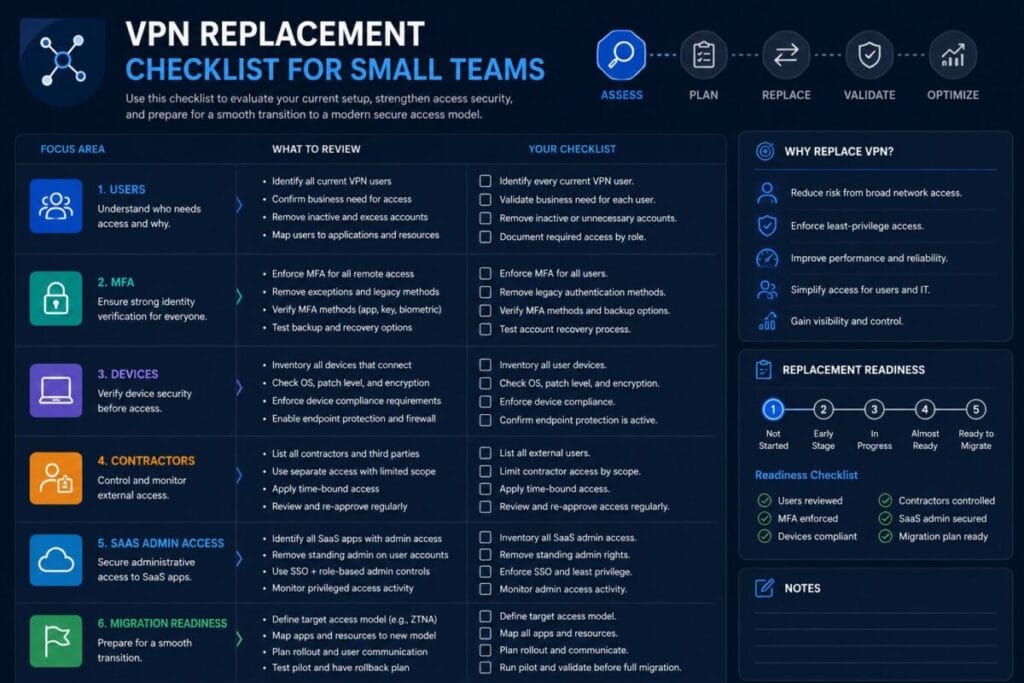
ToggleUse this VPN replacement checklist for small teams before switching tools, changing remote access policies, or moving users into a new access model.
Do not replace VPN before reviewing users, apps, contractors, MFA, password manager readiness, devices, SaaS admin exposure, rollback planning, and post-migration access review.
Decision Snapshot
VPN replacement may not be needed if your current setup can be cleaned up. Some teams do not need a new access platform yet. They need fewer stale users, stronger MFA, better credential control, cleaner contractor access, and a clearer owner for remote access decisions.
ZTNA is worth evaluating when your team needs more precise access control across private apps, contractors, devices, and SaaS administration. But ZTNA is not automatically the answer for every small team.
Review access reality before changing tools.
Check users, apps, contractors, MFA, devices, and rollback first.
The current VPN may only need stronger ownership and review.
ZTNA is worth reviewing only when access needs more precision.
Who Should Use This VPN Replacement Checklist for Small Teams
This VPN replacement checklist for small teams is for operators, founders, remote team leads, IT generalists, finance-aware managers, and small business owners who need to make a practical access decision without turning the process into an enterprise security program.
Small and remote teams
Use it when employees, contractors, or operators need access to private apps, admin systems, or internal resources from different locations.
Teams reviewing VPN replacement
Use it if your current VPN feels messy, slow, hard to manage, or unclear from an ownership perspective.
Teams comparing access models
Use it before deciding whether to keep VPN, improve VPN, evaluate business VPN alternatives, or evaluate ZTNA.
This is not a tool ranking. It is not a vendor list. It is a practical access-control review before making a replacement decision.
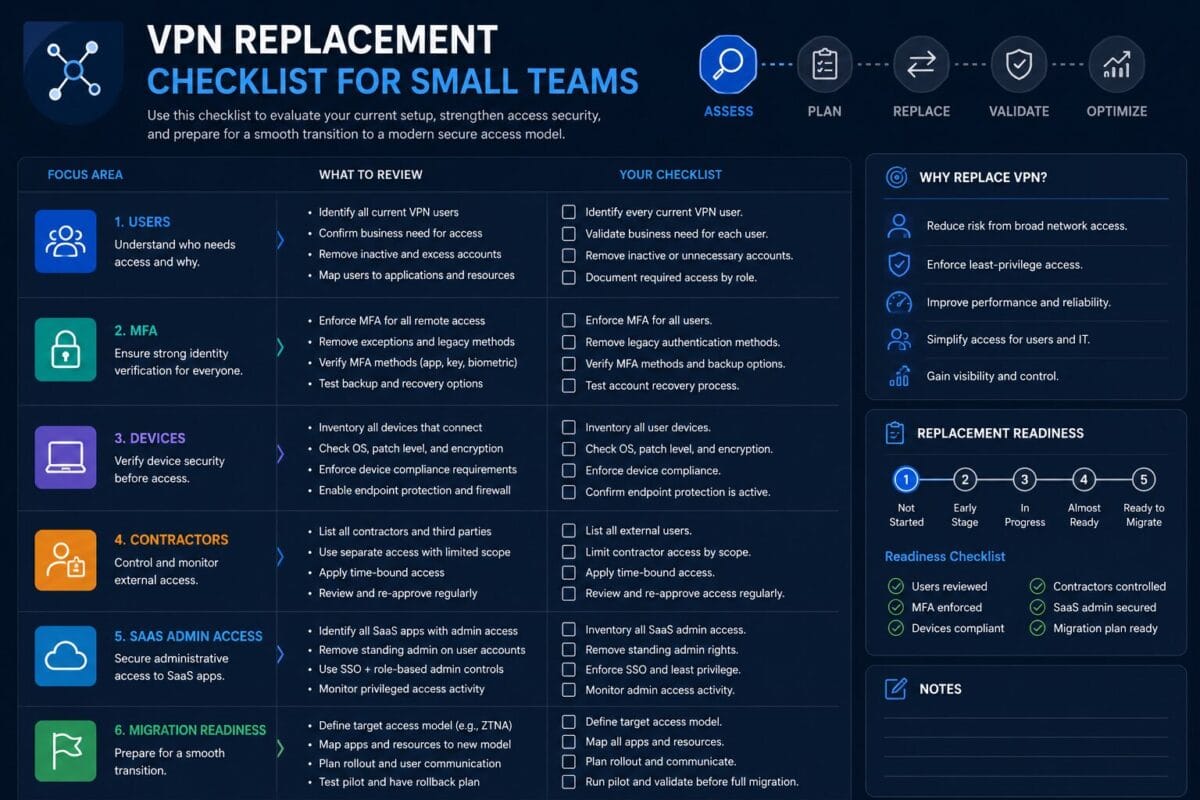
The VPN Replacement Checklist for Small Teams
The goal of this VPN replacement checklist for small teams is not to push every team away from VPN. The goal is to help you decide whether your current VPN should be kept, improved, replaced, or evaluated against business VPN alternatives and Zero Trust access models.
VPN Replacement Checklist for Small Teams: Confirm Why You Want to Replace VPN
Checklist items for VPN replacement reason clarity
- [ ] Identify the main reason the team wants to replace VPN.
- [ ] Separate performance issues from access-control issues.
- [ ] Document whether the problem is speed, reliability, user management, contractor access, device trust, MFA, SaaS exposure, or admin visibility.
- [ ] Confirm whether users are avoiding the VPN because it is slow or confusing.
- [ ] Identify whether the VPN is still protecting resources that should remain private.
- [ ] List the business risk if nothing changes.
- [ ] List the operational risk if the VPN is replaced too quickly.
Why it matters
Many teams say they need to replace VPN when the real problem is inactive users, weak MFA, shared passwords, unmanaged devices, contractor access, or unclear ownership.
What small teams often miss
Small teams often confuse access friction with access risk. A slow VPN is annoying. A VPN with stale users and weak controls is a different problem.
Next action
Write one sentence: “We are reviewing VPN replacement because ____.” If that sentence is vague, do not choose a replacement model yet.
Audit Current VPN Users
Checklist items for VPN user review
- [ ] Identify every current VPN user.
- [ ] Remove inactive VPN users.
- [ ] Flag former employees who still appear in access records.
- [ ] Identify contractors with VPN access.
- [ ] Identify temporary users with permanent access.
- [ ] Review admin-level VPN users separately.
- [ ] Check whether any shared accounts are used for VPN access.
- [ ] Confirm who owns the VPN user list.
- [ ] Export or document the current access list before making changes.
Why it matters
You cannot replace remote access safely if you do not know who currently has access. A VPN replacement project should not carry old access problems into a new system.
What small teams often miss
Small teams often miss users added during emergencies, temporary projects, vendor support sessions, travel situations, or contractor onboarding.
Next action
Create three groups: keep access, remove access, and review access. Do this before evaluating a replacement tool.
Map Apps and Resources Protected by VPN
Checklist items for VPN resource mapping
- [ ] List the apps and systems currently accessed through VPN.
- [ ] Identify private apps, internal tools, dashboards, servers, databases, file shares, and admin panels.
- [ ] Mark which resources are still actively used.
- [ ] Mark which resources are legacy or rarely used.
- [ ] Identify which resources are sensitive.
- [ ] Identify which resources require admin access.
- [ ] Identify whether any SaaS admin areas depend on VPN-based workflows.
- [ ] Document which users or roles need each resource.
- [ ] Separate “everyone needs access” from “specific roles need access.”
Why it matters
VPN replacement is not just about replacing a connection. It is about understanding what that connection protects.
What small teams often miss
Teams often remember obvious systems but miss billing admin panels, internal dashboards, old databases, vendor support access, shared file systems, automation tools, and admin-only SaaS settings.
Next action
Create a simple access map: resource, who uses it, sensitivity, current access method, and future access method.
Review Contractors and Temporary Users
Checklist items for contractor access
- [ ] List all contractors with current or past VPN access.
- [ ] Identify vendors, freelancers, agencies, consultants, and temporary support users.
- [ ] Confirm whether each contractor still needs access.
- [ ] Set expiration dates for temporary access.
- [ ] Remove contractor access that is no longer justified.
- [ ] Review whether contractors use personal devices.
- [ ] Review whether contractors use shared credentials.
- [ ] Confirm who approves contractor access.
- [ ] Confirm who removes contractor access after work ends.
Why it matters
Contractor access is one of the most common weak points in small-team remote access. VPN replacement can make this better only if contractor access is reviewed before migration.
What small teams often miss
Small teams often remember employees but forget contractors. A freelancer or vendor support account may still have access because nobody owned offboarding.
Next action
Create a contractor access rule: no contractor keeps remote access without an owner, expiration date, and approved resource scope.
Check MFA and Password Manager Readiness
Checklist items for MFA and password readiness
- [ ] Confirm MFA is enabled for VPN access.
- [ ] Confirm MFA is enabled for admin accounts.
- [ ] Confirm MFA is enabled for password manager accounts.
- [ ] Review shared passwords used for systems behind VPN.
- [ ] Move shared credentials into a controlled password manager if needed.
- [ ] Review who can see sensitive credentials.
- [ ] Remove saved passwords from unmanaged browser profiles where possible.
- [ ] Check whether backup MFA methods are documented.
- [ ] Confirm the team can recover access without using insecure shared workarounds.
Why it matters
VPN replacement can fail if identity controls are weak. If users still share passwords, skip MFA, or store admin credentials in uncontrolled places, a new access platform will not solve the core problem.
What small teams often miss
Teams often focus on VPN login security while ignoring the credentials used after login. The VPN may protect the door, but shared passwords may still unlock the room.
Next action
Before replacing VPN, confirm that admin credentials and sensitive shared passwords are controlled, assigned, and removable.
Review Device Posture
Checklist items for device posture
- [ ] Identify which devices connect through VPN.
- [ ] Separate company-managed devices from personal devices.
- [ ] Review operating system update status.
- [ ] Check whether lost or retired devices still have access.
- [ ] Review whether contractors use unmanaged devices.
- [ ] Check whether local device passwords are required.
- [ ] Confirm whether device encryption is enabled where appropriate.
- [ ] Identify devices used during travel or on public Wi-Fi.
- [ ] Decide whether unmanaged devices should keep access.
Why it matters
Remote access is not only about users. It is also about the devices those users bring into the access path.
What small teams often miss
Small teams often know who works on the team, but not which laptops, tablets, personal machines, and travel devices still have access to work systems.
Next action
Create a device review list before migration. At minimum, know which devices are trusted, which need review, and which should lose access.
Identify SaaS Admin Exposure
Checklist items for SaaS admin exposure
- [ ] List SaaS admin accounts used by the team.
- [ ] Identify who controls billing, users, integrations, API keys, and security settings.
- [ ] Review admin access for former employees and contractors.
- [ ] Check whether SaaS admins also have VPN access.
- [ ] Review OAuth apps and connected integrations.
- [ ] Check whether admin accounts use MFA.
- [ ] Identify shared admin logins.
- [ ] Remove admin rights that are not required.
- [ ] Document who owns each critical SaaS admin account.
Why it matters
Some of the highest-risk access in a small team is not inside the VPN at all. SaaS admin accounts can control billing, data exports, integrations, user access, automations, and security settings.
What small teams often miss
Teams often treat VPN as the main security boundary while SaaS admin dashboards remain loosely controlled.
Next action
Before migration, review SaaS admin access separately from VPN access.
Decide Whether VPN Improvement Is Enough
Checklist items for VPN improvement review
- [ ] Check whether inactive users can be removed.
- [ ] Check whether MFA can be enforced.
- [ ] Check whether contractor access can be limited.
- [ ] Check whether access groups can be cleaned up.
- [ ] Check whether shared credentials can be removed.
- [ ] Check whether device rules can be improved.
- [ ] Check whether the VPN is still needed for specific private resources.
- [ ] Compare cleanup effort against replacement effort.
- [ ] Decide whether the current VPN should be kept, improved, or replaced.
Why it matters
Not every VPN needs to be replaced. Some teams can reduce risk by cleaning up users, enforcing MFA, limiting contractor access, improving documentation, and creating a regular access review process.
What small teams often miss
Small teams often jump to replacement because the current setup feels messy. But if the mess is caused by poor ownership, a new tool can become messy too.
Next action
Run a cleanup pass before selecting a replacement path. If cleanup solves most of the problem, replacement may not be urgent.
Decide Whether Business VPN Alternatives Should Be Evaluated
Checklist items for business VPN replacement review
- [ ] Identify whether the team still needs VPN-style access.
- [ ] Review whether a managed business VPN platform would reduce operational burden.
- [ ] Check whether user management would be easier.
- [ ] Check whether MFA and access policies would improve.
- [ ] Check whether contractor access would be easier to control.
- [ ] Check whether admin visibility would improve.
- [ ] Confirm whether the team needs network-level access or only app-level access.
- [ ] Compare business VPN alternatives against current access requirements.
Why it matters
Some small teams do not need a full access architecture shift. They may need a cleaner business VPN model with better controls, visibility, and user management.
What small teams often miss
Teams sometimes assume the only choices are keeping the old VPN or moving fully to ZTNA. There may be a middle path if the core need is still controlled VPN-style access.
Next action
Ask: “Do we still need network-level VPN access, or are we mainly protecting specific apps and admin workflows?”
Decide Whether ZTNA Should Be Evaluated
Checklist items for ZTNA evaluation
- [ ] Identify whether users need access to specific apps instead of a broad network.
- [ ] Review whether access should be based on identity, role, device, or context.
- [ ] Check whether contractors need limited app-level access.
- [ ] Identify whether SaaS admin exposure needs stronger controls.
- [ ] Review whether unmanaged devices should be restricted.
- [ ] Confirm whether the team can manage policy complexity.
- [ ] Compare ZTNA against the actual access map.
- [ ] Decide whether ZTNA is worth evaluating now or later.
Why it matters
ZTNA can be useful when a team needs more precise access control than a traditional VPN setup provides. But ZTNA is not automatically the right answer for every small team.
What small teams often miss
Small teams may underestimate the operational work required to define access policies, user groups, device rules, documentation, and review habits.
Next action
Evaluate ZTNA only after the team has mapped users, apps, contractors, devices, and admin exposure.
Plan Migration Safely
Checklist items for migration planning
- [ ] Assign one owner for the VPN replacement project.
- [ ] Define the migration scope.
- [ ] Select a pilot group.
- [ ] Identify high-risk users and systems.
- [ ] Create a rollback plan.
- [ ] Document how users will get help during migration.
- [ ] Freeze unnecessary access changes during migration.
- [ ] Communicate timing to users.
- [ ] Keep the old access path available until the new path is verified.
- [ ] Confirm logging or review visibility after the change.
Why it matters
A rushed remote access migration can break work, lock out users, expose systems, or create parallel access paths that nobody controls.
What small teams often miss
Small teams often skip rollback planning because the project feels simple. Then a key user, contractor, or admin workflow gets blocked during a time-sensitive task.
Next action
Write a one-page migration plan with owner, pilot group, timeline, rollback path, and post-migration review date.
Post-Replacement Access Review
Checklist items for post-replacement review
- [ ] Review all users after migration.
- [ ] Remove access from users who no longer need it.
- [ ] Confirm old VPN access has been disabled where appropriate.
- [ ] Review contractors again after migration.
- [ ] Check admin accounts.
- [ ] Check SaaS admin exposure.
- [ ] Review failed login or access issue patterns.
- [ ] Confirm devices are still aligned with access rules.
- [ ] Schedule the next access review.
- [ ] Document exceptions and owners.
Why it matters
Replacement is not done when users can log in. A post-replacement review catches leftover access, duplicate access paths, temporary exceptions, contractor gaps, and admin rights that should have been removed.
What small teams often miss
Teams often launch the new access method and stop there. The cleanup after migration is where many of the actual risk reductions happen.
Next action
Schedule a post-replacement access review before migration starts.
Replacement Readiness Score
Use this score to decide whether your team is ready to plan replacement or needs to clean up access first. The purpose of this VPN replacement checklist for small teams is to prevent rushed tool changes that carry old access problems into a new system.
0 = Not ready
The area has not been reviewed, ownership is unclear, or access risk is unknown.
1 = Partially ready
The area has been reviewed, but gaps, exceptions, or unclear ownership remain.
2 = Ready / controlled
The area is reviewed, documented, owned, and ready for migration planning.
Score: 0 / 1 / 2
Score: 0 / 1 / 2
Score: 0 / 1 / 2
Score: 0 / 1 / 2
Score: 0 / 1 / 2
Score: 0 / 1 / 2
Score: 0 / 1 / 2
Score: 0 / 1 / 2
Score: 0 / 1 / 2
Score: 0 / 1 / 2
16–20
Ready to plan replacement. Your access map is clear enough to begin controlled migration planning.
9–15
Fix access gaps before replacement. Some review work is done, but key migration risks remain.
0–8
Do not replace yet; audit access first. A tool change may carry old risk into a new setup.
When Not to Replace VPN Yet
Do not replace VPN yet if your team cannot answer basic access questions.
- [ ] You do not know who currently uses VPN.
- [ ] You have not reviewed former employees or contractors.
- [ ] You do not know which apps and resources the VPN protects.
- [ ] MFA is inconsistent.
- [ ] Shared passwords are still common.
- [ ] SaaS admin accounts are not reviewed.
- [ ] Personal or unmanaged devices are not understood.
- [ ] No one owns the migration.
- [ ] There is no rollback plan.
- [ ] You cannot explain what problem replacement is supposed to solve.
In these cases, the next move is not a tool change. The next move is an access audit.
When to Evaluate Business VPN Alternatives
Evaluate business VPN alternatives when your team still needs VPN-style access but wants better control, visibility, and management.
Still need network-level access
A managed business VPN model may fit when users still need controlled VPN-style access.
Current VPN is hard to manage
Review alternatives if user management, contractor access, or admin visibility is becoming too messy.
ZTNA feels heavier than needed
Some teams need better VPN operations, not a full access model shift.
When to Evaluate ZTNA
Evaluate ZTNA when your team needs more precise access than a traditional VPN model can provide.
App-level access matters
ZTNA may fit when users need specific app access instead of broad network access.
Contractor access needs tighter scope
ZTNA may help when contractors need limited access to narrow resources.
Identity and device context matter
Evaluate ZTNA when access should depend on role, identity, device posture, or context.
Do not evaluate ZTNA only because it sounds newer. Evaluate it because your access map shows that the team needs more precise control.
What to Fix Before Migration
Before replacing VPN, fix the access issues that can damage any remote access model.
A VPN migration checklist is only useful if the team is willing to clean the access environment before switching tools.
Migration Safety Checklist
Use this section as a short remote access replacement checklist before changing tools.
- [ ] Name the migration owner.
- [ ] Define the replacement reason.
- [ ] Confirm the current VPN user list.
- [ ] Confirm the resources protected by VPN.
- [ ] Review contractor and temporary access.
- [ ] Review admin users separately.
- [ ] Confirm MFA readiness.
- [ ] Confirm password manager readiness.
- [ ] Review devices and unmanaged endpoints.
- [ ] Identify SaaS admin exposure.
- [ ] Choose the replacement model.
- [ ] Select a pilot group.
- [ ] Communicate the migration date.
- [ ] Prepare user support instructions.
- [ ] Prepare rollback instructions.
- [ ] Keep old access available until the new path is verified.
- [ ] Remove old access after successful migration.
- [ ] Review access after migration.
- [ ] Schedule the next access review.
Service Categories Mentioned in This Checklist
This section is not a ranking and not a vendor list. These are service categories that may appear during a practical VPN replacement review.
Business VPN / Managed VPN Platforms
Example only: NordLayer.
This category may appear when a team still needs VPN-style access but wants a cleaner management layer, stronger user controls, and simpler operations.
ZTNA / Zero Trust Access Platforms
Examples only: Cloudflare Zero Trust, Twingate.
This category may appear when a team needs app-level access, identity-aware policies, contractor-specific controls, or more precise access than a broad VPN tunnel.
Password Managers
Examples only: 1Password, Bitwarden.
This category appears because VPN replacement does not fix shared credentials by itself.
Hardware Security Keys
Example only: YubiKey.
This category may appear when teams want stronger MFA for admin users or sensitive access paths.
Device Posture / Endpoint Readiness
No vendor pitch needed now.
This category appears because users and devices both affect remote access risk.
Access Review / Offboarding Workflow
No vendor pitch needed now.
This category appears because many VPN problems are workflow problems.
Where This Fits Inside ToolRelief
This asset is part of ToolRelief’s External Service Demand Engine. It supports users who are moving from general remote access research into replacement planning.
Model comparison
Replacement options
Access cleanup
Current VPN review
Security routing
Travel access context
Device context
Software trend monitoring
Parent decision system
Review Your VPN Replacement Plan Before Changing Tools
Use ToolRelief’s VPN Subscription Review Checklist to decide whether your current VPN should be kept, improved, or replaced.