Updated: August 22, 2026
TOOLRELIEF DECISION INTELLIGENCE
- Decision
- Use MCP Security Tools: Gateways, Scanners and Controls to evaluate the software or technology question investigated on this page before taking the next material action.
- Evidence Basis
- Documented product information, published evidence, comparative analysis, direct observation, and clearly labeled models where applicable.
- Best Used For
- Reducing uncertainty before taking the next material action.
- Decision Boundary
- This page provides independent decision support rather than a guaranteed outcome. Product capabilities, pricing, third-party terms, and operating conditions can change.
MCP Security Tools: Gateways, Scanners and Controls
Quick Navigation ✔
ToggleMCP security tools are becoming a real software category, but the category is easy to misunderstand.
An MCP gateway, a server scanner, a runtime security layer, an identity platform, a DLP control, and an MCP registry can all be marketed as ways to “secure MCP.” They do not solve the same problem.
The right buying question is therefore not:
What is the best MCP security tool?
It is:
Which MCP trust boundary are we failing to control, and what type of security tool can actually enforce that control?
That distinction matters because a gateway cannot necessarily detect a poisoned package before installation, a static scanner cannot enforce runtime permissions, an identity system does not automatically inspect sensitive tool outputs, and observability alone does not stop a dangerous action.
This guide separates the current MCP security market into functional categories so teams can evaluate products based on what they actually need.
If you are still defining the underlying risk model, start with MCP Security: Risks and Controls for AI Agents in 2026.
Quick Answer: What Types of MCP Security Tools Exist?
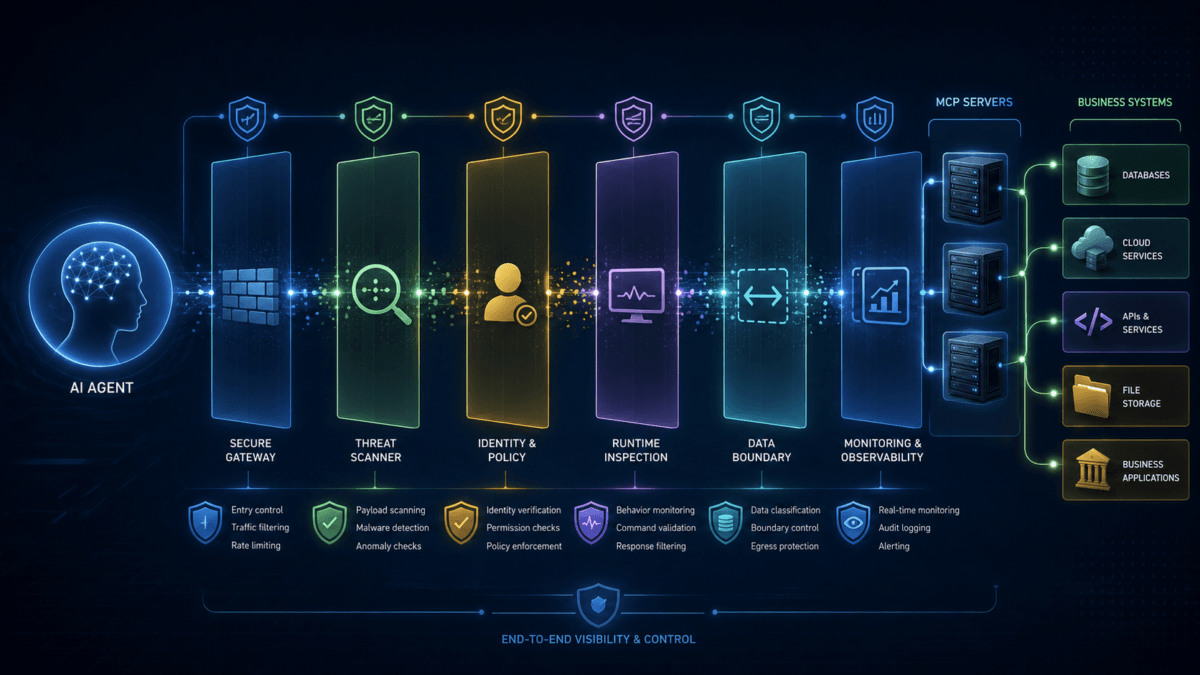
The current MCP security tools market can be divided into seven practical control layers:
- MCP gateways — centralize routing, authentication, policy, and traffic control.
- MCP scanners — inspect servers, packages, configurations, or tool definitions for known risk patterns.
- Runtime security — inspect or block dangerous tool calls while agents are operating.
- Identity and authorization — control which agents, users, and tools can access specific resources.
- Data-loss prevention — detect or prevent sensitive information from leaving through agent and tool workflows.
- Registries and governance — maintain approved inventories of MCP servers, tools, agents, and ownership.
- Observability and audit — reconstruct which agent called which tool, under which identity, and what happened next.
A mature enterprise environment may eventually use several of these layers.
A smaller deployment may need none of them as standalone products if existing identity, network, endpoint, cloud, and logging controls already cover the required trust boundaries.
MCP Security Tools Comparison by Control Layer
| Tool Category | Main Job | Best Fit | What It Does Not Automatically Solve |
|---|---|---|---|
| MCP gateway | Central policy and traffic enforcement | Multiple servers, agents, and enterprise systems | Package provenance or every semantic poisoning attack |
| MCP scanner | Inspect servers, code, configuration, and tool definitions | Pre-deployment review and inventory triage | Runtime enforcement or post-install changes unless continuously rescanned |
| Runtime security | Inspect live tool calls, inputs, and outputs | Sensitive production workflows | Publisher provenance or organizational ownership |
| Identity / authorization | Authenticate actors and enforce permissions | Enterprise and regulated access | Malicious content inside an otherwise authorized tool call |
| DLP | Detect or block sensitive data movement | PII, financial data, source code, secrets | Whether the server itself is trustworthy |
| Registry / governance | Track approved servers, tools, owners, and versions | Organizations with growing MCP inventories | Runtime attack prevention by itself |
| Observability | Record and correlate agent and tool activity | Investigation, compliance, and change monitoring | Blocking dangerous actions unless paired with enforcement |
1. MCP Gateways
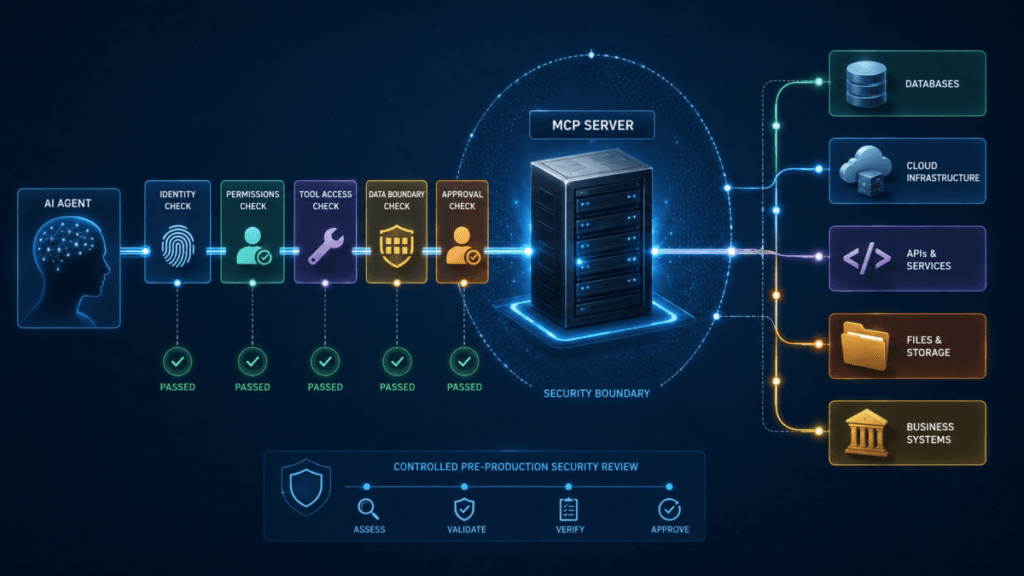
An MCP security gateway sits between MCP clients or AI agents and the MCP servers they want to reach.
Its job is to turn multiple individual MCP connections into a controlled enforcement point.
Depending on the product, a gateway may provide:
- authentication;
- OAuth token validation;
- scope enforcement;
- fine-grained authorization;
- server allowlists and blocklists;
- request validation;
- rate limiting;
- routing;
- token transformation;
- audit logging;
- policy enforcement;
- traffic observability.
This category becomes particularly valuable when an organization moves from one or two MCP integrations to dozens of agents and servers.
Without a central control layer, each server can end up implementing authentication, logging, rate limits, and policy differently.
Current Example: PingGateway and Agent Gateway
Ping Identity currently documents MCP-aware gateway capabilities that can validate MCP requests, audit actors, throttle requests, enforce OAuth controls, apply fine-grained access policies, and transform tokens.
Its Agent Gateway positioning extends that model into runtime access enforcement for AI agents and MCP-based architectures.
This is a good example of a product whose primary security question is:
Is this agent authorized to perform this request against this protected MCP resource right now?
That is an identity and policy problem more than a static server-scanning problem.
Current Example: NetScaler MCP Gateway
Citrix announced NetScaler MCP Gateway capabilities in July 2026 to provide centralized routing, governance, authentication controls, server allow/block lists, rate limiting, monitoring, and visibility for MCP traffic.
The timing is important because it shows that MCP gateway functionality is no longer limited to experimental security startups. Established enterprise infrastructure vendors are adding MCP-specific controls to existing application delivery and security platforms.
This does not automatically make a gateway necessary for every organization.
It does confirm that centralized MCP governance has become a distinct enterprise infrastructure problem.
2. MCP Security Scanners
An MCP security scanner typically evaluates a server, package, configuration, source repository, or tool definition before or during deployment.
Depending on the scanner, it may inspect for:
- dangerous installation scripts;
- known vulnerable dependencies;
- unexpected network behavior;
- credential exposure;
- dangerous filesystem access;
- tool-poisoning patterns;
- suspicious tool descriptions;
- excessive permissions;
- package provenance;
- configuration weaknesses.
Scanners are useful because an organization cannot manually reverse-engineer every community MCP package it encounters.
But they have an important limitation:
A scanner result is evidence, not proof that a server is safe or unsafe.
Why MCP Scanner Results Need Context
Research published during summer 2026 has highlighted a major problem with simplistic MCP scanning: false positives and snapshot-based conclusions.
A scanner may detect a suspicious string in:
- a Dockerfile;
- documentation;
- a CI configuration;
- an example file;
- code that is never executed;
- or another non-runtime artifact.
That does not mean the finding should be ignored.
It means the finding needs to be connected to actual runtime behavior.
Recent academic work has also started examining MCP scanner reliability rather than assuming scanner output is ground truth.
For buyers, this creates a useful evaluation rule:
Prefer scanners that can explain why a finding matters, show the affected execution path, track changes over time, and distinguish static suspicion from runtime exposure.
3. Runtime MCP Security
Runtime security asks a different question from scanning.
Instead of asking:
“Does this server contain something suspicious?”
it asks:
“Is this specific tool invocation dangerous right now?”
A runtime layer may inspect:
- tool descriptions;
- tool inputs;
- tool outputs;
- agent context;
- sensitive data;
- URLs;
- malicious code;
- prompt-injection patterns;
- credential leakage;
- tool chaining.
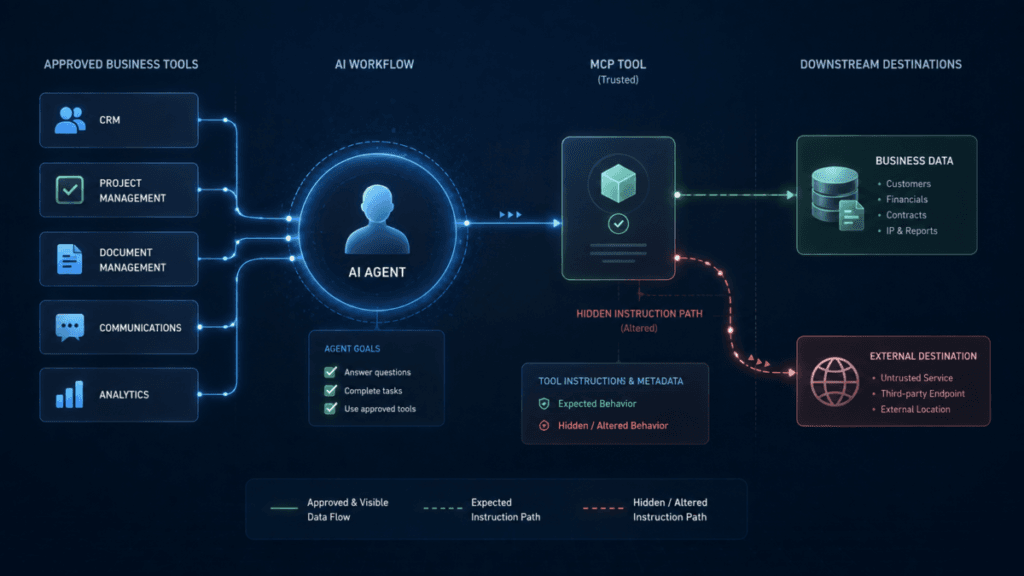
This is especially important for MCP tool poisoning, where a tool can remain familiar while its metadata or behavior changes.
Current Example: Prisma AIRS
Palo Alto Networks currently documents MCP threat detection within Prisma AIRS AI Runtime Security.
Its MCP-specific detection capabilities include identifying context poisoning through manipulated tool definitions and detecting exposed credentials or identity leakage in MCP tool communications.
The platform can inspect tool inputs and outputs and produce allow or block decisions based on configured security policies.
This illustrates the main strength of runtime security:
It evaluates what the agent and tool are actually doing, not just what the package looked like before installation.
That is a materially different control from a gateway that primarily handles identity and routing or a scanner that primarily evaluates code and configuration.
4. Identity and Authorization Controls
MCP infrastructure should not create a separate identity universe disconnected from the rest of the business.
Strong identity controls should answer:
- Which user owns the request?
- Which agent is acting?
- Which client is connected?
- Which MCP server is the protected resource?
- Which scopes are required?
- Which tool is permitted?
- Does the current request match that authorization?
Authentication alone is not enough.
The important control is authorization at the moment the agent attempts to act.
A valid identity should not automatically receive access to every tool exposed by every server.
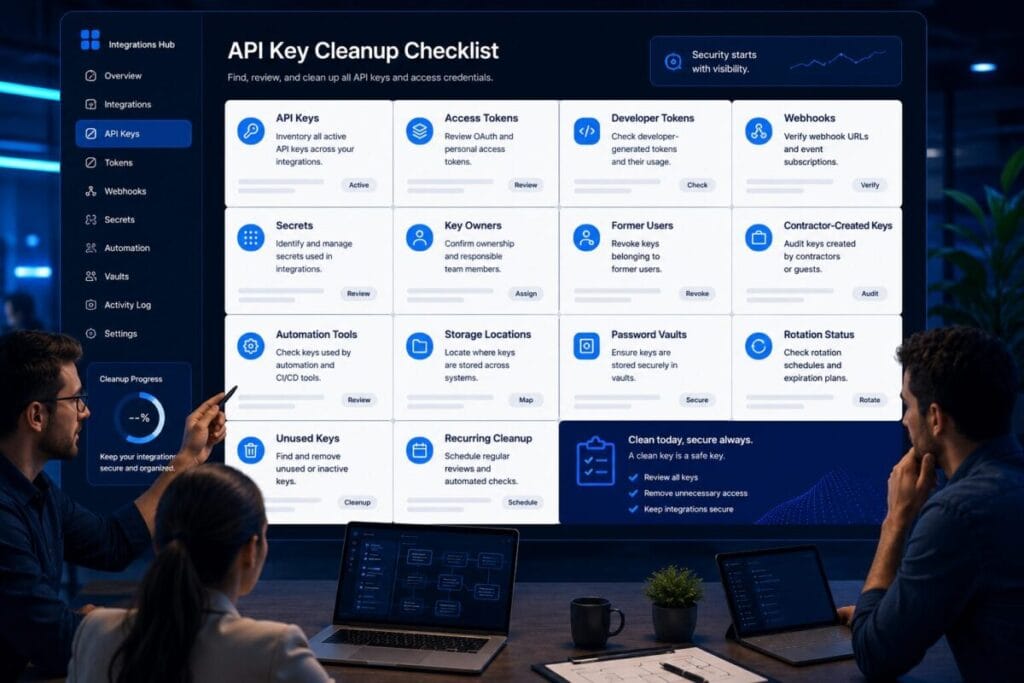
If your main gap is OAuth scope hygiene rather than MCP traffic inspection, review ToolRelief's OAuth App Review Checklist before buying another MCP-specific product.
5. Data-Loss Prevention for MCP Workflows
An agent can use a legitimate tool and still send information somewhere it should not go.
This is why DLP becomes relevant to MCP environments.
Potentially sensitive payloads include:
- credentials;
- API keys;
- customer records;
- financial data;
- employee information;
- private documents;
- source code;
- contracts;
- database output;
- regulated data.
A useful DLP control should operate close enough to the tool call to understand what is leaving and where it is going.
But DLP does not answer every MCP security question.
It can block sensitive data while still knowing nothing about whether the MCP package itself has a trustworthy publisher.
This is why ToolRelief treats MCP security as multiple layers rather than one product category.
6. MCP Registries and Governance
A registry becomes useful when the problem is no longer “How do we connect this server?” but “Which servers are our employees and agents allowed to discover and use?”
A mature registry or governance layer may track:
- approved MCP servers;
- approved tools;
- publishers;
- owners;
- versions;
- permissions;
- last review dates;
- risk status;
- allowed environments;
- deprecated or blocked servers.
AWS published an open-source MCP Gateway and Registry approach in June 2026 focused on discovering and governing MCP servers, agents, skills, and other AI assets at scale.
The enterprise analogy is useful:
An MCP registry can become the software catalog for resources that AI agents are allowed to discover.
That is governance, not necessarily threat detection.
7. MCP Observability and Audit
Security teams need to reconstruct more than an individual API request.
For agentic workflows, useful observability should help answer:
- Which user started the task?
- Which agent interpreted it?
- Which MCP server was selected?
- Which tool was invoked?
- Which internal resource was accessed?
- What information entered the tool call?
- What destination received it?
- What action resulted?
The ideal trace is not:
Request → response.
It is:
User intent → agent decision → MCP server → tool → data → action → result.
This becomes particularly important when investigating cross-tool attacks where each isolated event looks legitimate.
MCP Gateway vs MCP Scanner: Which One Do You Need?
This is one of the most important distinctions in the current market.
| Question | MCP Gateway | MCP Scanner |
|---|---|---|
| Who can reach the server? | Strong fit | Usually not the main function |
| Which requests are allowed? | Strong fit | Limited |
| Can traffic be throttled? | Often yes | No |
| Can server code be inspected before deployment? | Usually limited | Strong fit |
| Can suspicious packages be flagged? | Usually limited | Strong fit |
| Can permissions be enforced at runtime? | Often yes | Usually no |
| Can malicious behavior after an update be detected? | Depends on inspection capabilities | Only if rescanned or continuously monitored |
| Best primary use | Runtime control and governance | Pre-deployment assessment and change analysis |
Many larger environments will eventually want both capabilities.
They simply address different stages of the risk lifecycle.
MCP Gateway vs API Gateway
An existing API gateway may already provide valuable controls such as authentication, TLS termination, rate limiting, routing, and logging.
That does not automatically mean it understands MCP-specific behavior.
An MCP-aware gateway may additionally understand:
- MCP protocol semantics;
- tool discovery;
- tool-level policies;
- agent identities;
- MCP-specific OAuth resource behavior;
- server and tool catalogs;
- agent-to-tool observability.
Before replacing an existing gateway, ask whether the missing control genuinely requires MCP awareness.
Do not add another infrastructure layer simply because a vendor has added “AI” or “MCP” to its product name.
Do You Need a Dedicated MCP Security Product?
Not necessarily.
A small deployment may already have enough control if it has:
- one or two approved MCP servers;
- verified publishers;
- narrow identities and scopes;
- read-only access where possible;
- human approval for sensitive actions;
- restricted network access;
- central logging;
- an established change-review process.
In that environment, buying a separate security platform may add cost and complexity without closing a meaningful gap.
A dedicated MCP security layer becomes easier to justify when you have:
- many MCP servers;
- many agents;
- multiple development teams;
- third-party MCP servers;
- sensitive enterprise systems;
- regulated data;
- high-impact autonomous actions;
- inconsistent authorization;
- weak visibility across tool calls;
- or rapidly changing server inventories.
The ToolRelief MCP Security Tools Buying Framework
Before evaluating vendors, score the requirement across eight control areas.
| Control Area | Question to Ask |
|---|---|
| Discovery | Can we identify every MCP server and tool in use? |
| Trust | Can we verify publishers, versions, and meaningful changes? |
| Identity | Can we identify the user, agent, and client behind every request? |
| Authorization | Can we enforce least privilege at server and tool level? |
| Runtime | Can dangerous tool inputs, outputs, or call sequences be blocked? |
| Data | Can sensitive information be detected before it leaves? |
| Change | Will we know if a trusted tool or server changes? |
| Audit | Can we reconstruct the full agent-to-tool action chain? |
Do not compare vendors until you know which of these controls you actually need.
How to Evaluate MCP Security Tools Before Buying
1. Ask What the Product Actually Enforces
“MCP security” is too broad to be a useful feature description.
Ask exactly what the product can block or control.
For example:
- Can it deny access to an MCP server?
- Can it deny a specific tool?
- Can it restrict a tool by user?
- Can it detect tool metadata changes?
- Can it block sensitive data in an outbound call?
- Can it detect context poisoning?
- Can it inspect tool chaining?
- Can it revoke access immediately?
2. Separate Detection From Enforcement
A dashboard that detects a problem after the action is useful for investigation.
It is not the same as stopping the action.
Ask whether each control operates as:
- inventory only;
- alert only;
- approval gate;
- policy enforcement;
- or automatic block.
3. Test MCP-Specific Controls
Do not assume a general AI security platform provides mature MCP protection because its marketing page mentions agents.
Ask for evidence around:
- tool discovery;
- tool-level authorization;
- MCP OAuth behavior;
- context or tool poisoning;
- server change detection;
- MCP request logging;
- tool input and output inspection.
4. Measure False Positives
This is especially important for MCP scanners and semantic threat detectors.
A scanner that labels large numbers of harmless files or packages as dangerous can create a different security problem: teams start ignoring alerts.
Evaluate:
- why the finding was generated;
- whether the affected code executes;
- whether the finding is reachable;
- whether the product provides evidence;
- how exceptions are handled;
- and whether the detection survives real adversarial testing.
5. Test Change Detection
A server that passes today may change tomorrow.
Ask whether the product can identify:
- new tools;
- changed tool descriptions;
- changed schemas;
- changed dependencies;
- changed permissions;
- changed publishers;
- changed endpoints.
This matters directly for MCP tool poisoning and other trust-after-approval attacks.
6. Check Deployment Architecture
Understand where the security control sits.
Possible deployment models include:
- gateway or reverse proxy;
- agent-side middleware;
- MCP server wrapper;
- API intercept;
- cloud service;
- endpoint agent;
- CI/CD scanner;
- registry;
- security-as-code integration.
The position determines what the product can actually observe and enforce.
7. Check Latency and Failure Behavior
A runtime security product becomes part of the agent's action path.
Ask:
- How much latency does inspection add?
- What happens if the security service is unavailable?
- Does the system fail open or fail closed?
- Can policies be enforced locally?
- How are long-running or streaming MCP calls handled?
Security architecture should not create an invisible reliability dependency that nobody planned for.
8. Check Data Handling
If a security vendor inspects tool inputs and outputs, the security platform itself may receive highly sensitive information.
Review:
- data retention;
- logging;
- encryption;
- regional processing;
- tenant isolation;
- training or model-use policies;
- subprocessors;
- redaction options.
Do not solve one MCP data-exposure problem by creating another.
Current MCP Security Product Examples in 2026
The following products and projects are examples of different approaches currently documented in the market. This is not a ranking, endorsement, or claim that every product fits every MCP deployment.
| Example | Primary Control Layer | Current MCP-Relevant Capability |
|---|---|---|
| PingGateway / Ping Agent Gateway | Identity-aware gateway | MCP request validation, OAuth enforcement, policies, throttling, token handling, and audit |
| NetScaler MCP Gateway | Gateway and governance | Central MCP routing, authentication, server control, rate limiting, and observability |
| Prisma AIRS | Runtime AI security | MCP context-poisoning and credential-leakage detection with tool input/output inspection |
| AWS MCP Gateway & Registry | Governance and registry | Discovery, approved asset management, gateway controls, and observability |
| Cloudflare Agents security controls | Platform-level implementation controls | OAuth support, MCP URL validation, SSRF protections, tool-exposure controls, and human-in-the-loop denial paths |
Feature sets are changing quickly. Verify current documentation, supported MCP specification versions, licensing, deployment requirements, and actual enforcement behavior before selecting a product.
When You Should Not Buy Another MCP Security Tool
Adding security software is not automatically security progress.
Do not buy another platform merely because:
- MCP is trending;
- a vendor renamed an existing AI feature;
- your team wants a security score;
- you have not yet inventoried the servers you use;
- you have not defined the missing control;
- your existing identity or gateway stack already solves the problem.
Start with the MCP Server Security Checklist.
If the checklist exposes a control gap that cannot be enforced reliably with your current stack, then evaluate a dedicated product.
This follows ToolRelief's broader software decision principle:
Buy a tool to close a measurable control gap, not to add another dashboard.
MCP Security Tools: Buyer Shortlist Questions
Before requesting a demo or approving a purchase, ask the vendor these questions:
- Which MCP specification versions do you currently support?
- Do you discover servers, tools, or both?
- Can you identify individual users and agents?
- Can policies be applied to individual tools?
- Can you enforce least-privilege OAuth scopes?
- Can you detect changes to tool descriptions and schemas?
- Can you detect MCP tool poisoning?
- Can you inspect tool inputs and outputs?
- Can you detect or block sensitive data?
- Can you detect tool chaining across multiple servers?
- Can you require human approval for selected actions?
- Can you block a server or tool immediately?
- How are third-party MCP servers evaluated?
- What data does your platform retain?
- What happens if your security service becomes unavailable?
- Can logs reconstruct the complete user-to-agent-to-tool chain?
- How are false positives investigated and tuned?
- Can the product export evidence to our existing SIEM or security stack?
If a vendor cannot clearly explain which layer it controls, it should not move into the final shortlist yet.
Which MCP Security Tool Category Should You Choose?
| Your Main Problem | Start With |
|---|---|
| Too many unmanaged MCP endpoints | Registry / governance |
| Inconsistent authentication and access rules | MCP gateway + identity controls |
| Unknown third-party server quality | Scanner + provenance review |
| Tool poisoning or malicious tool calls | Runtime inspection + change detection |
| Sensitive information leaving through tools | DLP + runtime policy |
| Cannot reconstruct agent actions | Observability / audit |
| Dangerous autonomous actions | Authorization + policy + human approval |
| All of the above at enterprise scale | Layered gateway, identity, runtime, DLP, governance, and observability architecture |
Where This Fits in the MCP Security Cluster
This guide owns the commercial-investigation layer of ToolRelief's MCP security cluster.
- MCP Security: Risks and Controls for AI Agents in 2026 — understand the full trust model.
- MCP Server Security Checklist: 15 Controls Before Production — identify the control gaps before deployment.
- MCP Tool Poisoning: How Trusted AI Tools Leak Data — understand the threat created when trusted tool context changes.
For broader security decisions, continue to the ToolRelief Cybersecurity Hub.
If your next question is which software category fits your environment, use the ToolRelief Software Decision Finder before adding another product to the stack.
Final Decision on MCP Security Tools
The market for MCP security tools is real, but it is not one product category.
Gateways control access and traffic.
Scanners inspect servers and packages.
Runtime security examines live behavior.
Identity systems determine who can act.
DLP controls sensitive data.
Registries govern what is approved.
Observability explains what happened.
The strongest architecture is not the one with the largest number of products.
It is the one where every important trust boundary has one clear control and one accountable owner.
Define the MCP risk first. Identify the missing control second. Buy software only if it closes that gap better than the controls you already have.
Sources and Verification
Information reviewed: August 22, 2026.
The product capabilities described in this guide were checked against current vendor and platform documentation. Features can change quickly as MCP implementations mature.
- Ping Identity — MCP Security Gateway Documentation
- Ping Identity — Agent Gateway
- Citrix — NetScaler MCP Gateway Announcement
- Palo Alto Networks — MCP Threat Detection
- AWS — MCP Gateway and Registry
- Cloudflare — Securing MCP Servers
Named products are included as current examples of different MCP security control approaches. Their inclusion is not a ToolRelief endorsement, ranking, partnership claim, or guarantee that they are appropriate for a specific environment.