TOOLRELIEF DECISION INTELLIGENCE
- Decision
- Use VPN vs ZTNA for Remote Teams in 2026 to compare the documented alternatives and understand the costs, constraints, and trade-offs that materially affect the choice.
- Evidence Basis
- Comparative analysis of the capabilities, costs, constraints, limitations, and trade-offs documented for the options evaluated on this page.
- Best Used For
- Shortlisting alternatives and identifying the trade-offs that materially affect the final choice.
- Decision Boundary
- The better option depends on the requirements and constraints of the actual use case. Product capabilities, pricing, contracts, implementation conditions, and third-party terms can change.
VPN vs ZTNA for Remote Teams in 2026
Quick Navigation ✔
ToggleDecision Snapshot: Keep VPN, Evaluate ZTNA, or Fix the Access Stack First?
Remote teams do not need to replace every VPN just because Zero Trust access is getting more attention.
But they also should not assume a VPN is enough when the real risk is no longer just “remote connection.” For many small teams, the bigger problem is who can access which apps, from what devices, under what conditions, and what happens when a contractor leaves.
Use this snapshot before you compare tools.
Your access model is simple
Your team has simple private network access needs, few users, known devices, limited sensitive apps, and basic MFA already in place.
This usually fits small teams with straightforward access, no heavy contractor workflow, and no broad SaaS admin exposure.
Access needs more precision
Access needs to be controlled by user, app, device, role, or risk level instead of giving broad network access after connection.
This often applies to remote teams with contractors, client systems, internal dashboards, admin panels, or sensitive SaaS tools.
The credential layer is weak
The team still shares passwords, lacks consistent MFA, has weak offboarding, or does not know who has access to key tools.
In that case, the access problem may be credential hygiene, not the VPN itself.
The devices are part of the risk
People work from personal laptops, travel devices, unmanaged phones, shared networks, or machines with inconsistent updates.
This is common for remote, hybrid, travel-heavy, or contractor-heavy teams.
The goal is not to choose the most advanced security label. The goal is to choose the access model that fits your team’s real exposure.
If your team is unsure where to start, review your current remote access stack before adding another security tool. Use ToolRelief’s VPN Subscription Review Checklist to decide whether your current VPN still fits your team’s access model.
Why Remote Teams Are Comparing VPN and ZTNA in 2026
The search demand around VPN vs ZTNA is not only about security theory.
It is coming from practical operational pressure:
- Small teams are working across home networks, public Wi-Fi, coworking spaces, and travel devices.
- Contractors and freelancers often need temporary access to specific systems.
- SaaS admin panels can expose billing, customer data, files, automations, and internal workflows.
- Shared passwords and weak offboarding create access risk even when a VPN exists.
- Remote teams want business VPN alternatives, but they do not always need an enterprise security overhaul.
- Founders and operators need a clear way to decide whether VPN is still enough or whether Zero Trust access is worth evaluating.
This is why “VPN vs ZTNA for remote teams” should not be treated as a simple definition article. The real question is:
Does your team need a private tunnel, or does it need more precise control over users, apps, devices, and access conditions?
That decision connects directly to remote operations, cybersecurity, device readiness, and software stack management. It also belongs inside the broader ToolRelief decision system, alongside Travel Ops, Cybersecurity Hub, Tech Radar, Device Intel, and Intel Hub.
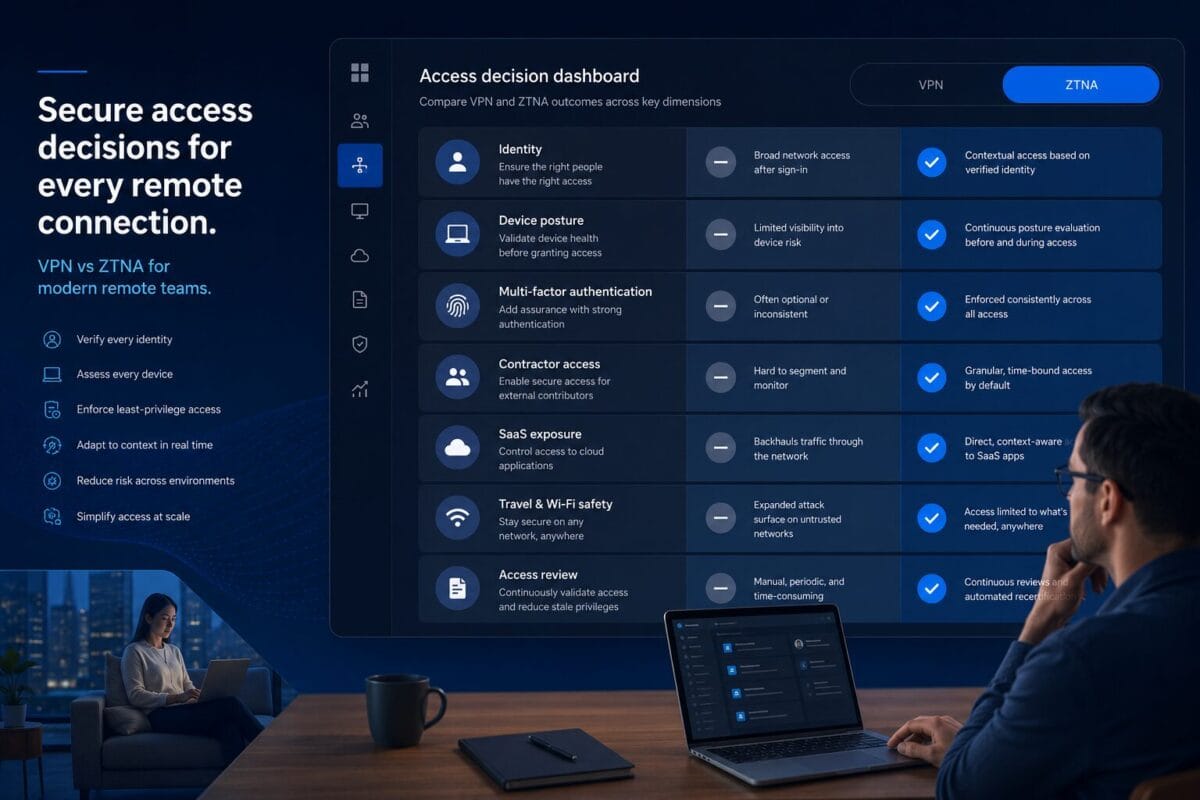
VPN vs ZTNA: Comparison by Decision Factor
A VPN and ZTNA can both support remote access, but they approach the problem differently.
A VPN usually gives a user a secure tunnel into a network or environment. ZTNA usually focuses on giving specific users access to specific resources based on identity, policy, and sometimes device context.
For small teams, the comparison should be practical.
User access
User connects, then may have broader network-level access depending on setup.
User access is usually more specific and policy-based.
Does every connected user need broad access, or only access to certain apps?
App access
Access may be network-based rather than app-specific.
Access can be shaped around individual apps or resources.
Which apps would create real damage if exposed too broadly?
Contractor access
Temporary users may be harder to isolate unless policies are well-managed.
Contractors can often be limited to specific apps or roles.
Can you remove contractor access cleanly when the work ends?
Device posture
VPN may not always account for whether the device is trusted, updated, or managed.
Some ZTNA setups can include device context or posture checks.
Are people accessing sensitive systems from unmanaged devices?
SaaS exposure
VPN may help with private access but does not automatically solve SaaS account hygiene.
ZTNA can be part of a broader app-access strategy, but it still does not replace good identity hygiene.
Are SaaS admin accounts protected with MFA and proper permissions?
Travel work
Useful for secure access while traveling, depending on the setup.
Useful when travel access should depend on identity, device, and app sensitivity.
Do team members work from hotels, airports, coworking spaces, or client locations?
Admin overhead
Can be simpler if the team and access needs are simple.
Can require more planning and policy management.
Does the team have someone who can maintain access rules?
Implementation complexity
Often easier to understand and deploy for simple use cases.
Can be more precise, but may add complexity if the team is not ready.
Are you solving a real access problem or adding a system nobody will maintain?
The practical takeaway:
VPN may still fit simple remote access. ZTNA becomes more relevant when access risk depends on user role, app sensitivity, device trust, contractor status, or SaaS exposure.
When a VPN May Still Be Enough
A VPN is not automatically outdated. For many small teams, a business VPN or secure access platform may still be the right fit.
A VPN may still be enough when your access model is simple.
Your team is small and stable
If you have a small group of known users, known devices, and limited internal systems, a VPN may still support your workflow without adding unnecessary complexity.
This is especially true if your team already has:
- MFA enabled.
- No shared admin passwords.
- Clear offboarding.
- Few sensitive internal tools.
- No large contractor access problem.
- A small number of people who need remote access.
You only need private access to a limited system
Some teams need remote access to one private dashboard, one internal environment, one file server, or one operational system.
If access is narrow and users are trusted, a VPN can still be reasonable.
The key question is not “Is VPN modern enough?”
The better question is:
Does this VPN give too much access to too many people, or is the access already limited and controlled?
Your password and MFA hygiene is already strong
A VPN cannot compensate for weak credentials everywhere else.
If your team already uses a password manager, has MFA on important accounts, avoids shared passwords, and removes old users quickly, your VPN decision becomes easier.
If those basics are missing, replacing the VPN may not solve the real problem.
Your team does not have a contractor access issue
Contractors change the access equation.
If you rarely work with freelancers, vendors, temporary team members, external developers, agencies, or client-side collaborators, your access model may remain simple enough for VPN.
But if contractors are common, ZTNA or more granular access controls may become worth evaluating.
You can manage the VPN cleanly
A simple tool that is actually maintained can be safer operationally than a complex system nobody owns.
If your team knows:
- who has VPN access,
- why they have it,
- which resources it opens,
- how MFA is enforced,
- how access is removed,
- and when reviews happen,
then a VPN may still fit your current stage.
When ZTNA Becomes Worth Evaluating
ZTNA becomes more relevant when the access problem is not just “connect to the network.”
It becomes more relevant when the question becomes:
Who should access which specific resource, from which device, under which conditions, and for how long?
Contractors need limited access
A contractor usually does not need broad network access.
They may need:
- one project dashboard,
- one staging environment,
- one documentation space,
- one client portal,
- one admin panel,
- or one internal app.
If your current VPN gives contractors wider access than needed, ZTNA deserves evaluation.
This does not mean you need a complex enterprise rollout. It means you should review whether your current access model is too broad for temporary users.
Sensitive apps should not be exposed to every connected user
Small teams often underestimate how sensitive their SaaS apps are.
A billing dashboard, CRM, cloud console, analytics account, email admin panel, automation tool, password vault, or support inbox can carry serious operational risk.
If VPN access effectively opens the path to too many internal systems, the team should review app-level access.
ZTNA may help when access needs to be narrower and more intentional.
Device trust matters
A remote access decision changes when people use:
- personal laptops,
- old devices,
- shared family machines,
- unmanaged contractor laptops,
- phones used while traveling,
- devices without consistent updates.
This is where Device Intel becomes relevant. The access model should account for the device, not just the username and password.
If a device is unknown, unmanaged, or risky, the team may need stronger controls before allowing access to sensitive resources.
Travel work increases exposure
Travel does not automatically make a user unsafe. But it does change the environment.
A founder or operator working from hotels, airports, cafés, coworking spaces, client offices, or unfamiliar networks has a different access profile than someone working from a controlled office.
That is why secure access belongs inside Travel Ops, not only inside a cybersecurity checklist.
If travel work is common, the team should review:
- VPN use,
- MFA reliability,
- password manager access,
- device lock settings,
- recovery codes,
- hardware security keys,
- public Wi-Fi behavior,
- and access to SaaS admin tools.
SaaS admin exposure is becoming the real risk
Many small teams do not have a traditional internal network. Their business runs on SaaS.
That means the risk may not be “someone entered the network.” The risk may be:
- someone accessed billing,
- exported customer data,
- changed automations,
- entered the password manager,
- accessed the cloud console,
- modified DNS,
- removed users,
- or entered a client account.
ZTNA can help with some access patterns, but it must be paired with credential hygiene, MFA, offboarding, and SaaS permission reviews.
This is why the decision should route into Cybersecurity Hub instead of stopping at VPN vs ZTNA.
The Remote Access Stack Around VPN and ZTNA
Remote access is not one tool.
For small teams, the access stack usually includes several layers. A VPN or ZTNA platform may be one layer, but it should not be the whole plan.
1. Business VPN / Secure Access
A business VPN or secure access platform can still be useful when the team needs private access, controlled connectivity, and a manageable way to support remote work.
Examples teams may encounter in this category include NordLayer.
That does not make any one tool the right choice. The team should compare:
- user management,
- MFA support,
- admin controls,
- device compatibility,
- access visibility,
- ease of rollout,
- contractor handling,
- and whether the tool fits the team’s actual workflow.
For teams already paying for a VPN, the next step is not to buy another tool immediately. The next step is to review whether the current subscription still fits. Use ToolRelief’s VPN Subscription Review Checklist before adding or replacing secure access software.
2. ZTNA / Zero Trust Access
ZTNA platforms are worth evaluating when access should be more precise than network-level connectivity.
Examples teams may encounter in this category include Cloudflare Zero Trust and Twingate.
Small teams should compare:
- app-level access,
- identity-based rules,
- temporary user handling,
- device context,
- private app access,
- access logs,
- admin overhead,
- and ease of maintenance.
The key is operational fit.
A small team does not need to copy enterprise security architecture. It needs an access model it can actually run.
3. Password Managers
A password manager is not a VPN replacement, but it may be the missing layer in the access stack.
Examples teams may encounter in this category include 1Password and Bitwarden.
Before replacing VPN, ask:
- Are passwords shared in chat?
- Are old contractors still in shared vaults?
- Are admin credentials separated from daily-use accounts?
- Is MFA enabled on the password manager?
- Does the team know who can access sensitive credentials?
- Can access be removed quickly?
If the answer is unclear, credential hygiene may be the first fix.
4. MFA and Hardware Security Keys
MFA should not be treated as a checkbox.
Authenticator apps, passkeys, backup codes, and hardware security keys can play different roles depending on the account and risk level.
Examples teams may encounter in hardware security keys include YubiKey.
For small teams, hardware security keys may be worth considering for:
- founders,
- administrators,
- finance accounts,
- password manager accounts,
- cloud consoles,
- email admin accounts,
- domain/DNS accounts,
- and high-risk client systems.
Do not treat hardware keys as magic protection. Treat them as one layer in a stronger access model.
5. Device Posture
Device posture means the condition and trust level of the device trying to access work systems.
For small teams, this can be simple:
- Is the device known?
- Is the operating system updated?
- Is disk encryption enabled?
- Is the device shared?
- Is it protected with a strong login?
- Is it used while traveling?
- Is it a contractor-owned machine?
- Can access be removed if the device is lost?
This is where secure access connects to Device Intel.
A team cannot make a good VPN vs ZTNA decision if it ignores the devices being used.
6. Access Review
Access review means checking who can access what.
This should happen before tool changes and after team changes.
Review:
- current users,
- old users,
- contractors,
- admin accounts,
- shared credentials,
- SaaS permissions,
- VPN access,
- ZTNA policies,
- password vault access,
- and device access.
This is not glamorous, but it is often where the biggest risk is found.
7. Offboarding
Offboarding is where many remote access models fail.
A strong access stack should answer:
- What happens when a contractor leaves?
- Who removes their VPN or ZTNA access?
- Who removes password manager access?
- Who rotates shared credentials if needed?
- Who removes SaaS permissions?
- Who checks client systems?
- Who confirms device return or access removal?
If offboarding is weak, changing from VPN to ZTNA will not fix the whole problem.
Service Categories to Monitor
This section is not a vendor ranking. It is a category map for teams reviewing secure remote access.
Business VPN / Secure Access Platforms
Monitor this category if your team still needs private connectivity, simple remote access, or a managed business VPN experience.
Example only: NordLayer.
Compare based on remote team fit, access visibility, MFA support, admin controls, device support, contractor handling, and whether it reduces operational friction.
Avoid choosing only because the product is familiar. The real question is whether it fits your access model.
Zero Trust / ZTNA Platforms
Monitor this category if access needs to be more specific than network-level connectivity.
Examples only: Cloudflare Zero Trust and Twingate.
Compare based on app-specific access, identity rules, device context, contractor restrictions, logging, admin usability, and implementation effort.
Do not evaluate ZTNA just because it sounds more modern. Evaluate it when your current access model is too broad or too difficult to control.
Password Managers / Credential Hygiene
Monitor this category if shared passwords, weak offboarding, or scattered credentials are part of your access problem.
Examples only: 1Password and Bitwarden.
Compare based on team vaults, admin controls, MFA support, recovery process, access removal, browser/device coverage, and adoption by non-technical users.
If passwords are still shared manually, this may be more urgent than replacing VPN.
Hardware Security Keys / MFA Readiness
Monitor this category when admin accounts, founder accounts, finance accounts, cloud consoles, or password manager accounts need stronger login protection.
Example only: YubiKey.
Compare based on account compatibility, backup key process, user onboarding, lost-key handling, travel practicality, and which accounts truly need hardware-backed protection.
Do not roll this out randomly. Start with the accounts where account takeover would hurt the most.
Device Posture / Endpoint Readiness
Monitor this category if people access work systems from unmanaged laptops, travel devices, personal phones, or contractor machines.
This category does not need a vendor pitch inside this article.
Compare based on known vs unknown devices, update status, encryption, browser profile separation, remote wipe needs, contractor device policy, and travel risk.
If device posture matters, the VPN vs ZTNA decision becomes more than a software comparison.
Questions Before Switching from VPN to ZTNA
Before replacing a VPN or adding a Zero Trust access platform, answer these questions.
Access Scope
- What systems are we protecting?
- Which apps are sensitive?
- Which resources should not be visible to every remote user?
- Does VPN access currently open too much?
User Roles
- Who needs access daily?
- Who needs temporary access?
- Do contractors need different rules from employees?
- Do founders or admins need stronger controls?
SaaS Exposure
- Which SaaS tools have admin-level access?
- Who can access billing, customer data, automations, or integrations?
- Are SaaS permissions reviewed regularly?
- Are old users still active?
Credential Hygiene
- Are passwords shared in chat, email, spreadsheets, or documents?
- Does the team use a password manager?
- Is MFA enabled on the password manager?
- Are shared vaults reviewed?
- Are recovery codes stored safely?
MFA Readiness
- Which accounts require MFA?
- Are admin accounts protected differently?
- Are authenticator apps enough for the highest-risk accounts?
- Should founders or admins use hardware security keys?
- What is the backup process?
Device Posture
- Are devices managed or personal?
- Are contractor devices allowed?
- Are laptops encrypted?
- Are operating systems updated?
- Are people working while traveling?
- What happens if a device is lost?
Admin Overhead
- Who will own the new access system?
- Can the team maintain policies?
- Will users actually follow the process?
- Is the new system simpler or just more advanced?
- What will be reviewed every quarter?
Migration Risk
- What breaks if VPN access changes?
- Which users need training?
- Which apps need testing?
- What is the rollback plan?
- Can this be piloted with a small group first?
The point is not to delay action forever. The point is to avoid buying a tool before defining the access problem.
A Simple Decision Framework for Small Teams
Keep VPN if:
- Access is simple.
- Users are known.
- Devices are known.
- Sensitive apps are limited.
- Contractors are rare.
- MFA is already enforced.
- Password hygiene is strong.
- The VPN is actively managed.
Evaluate ZTNA if:
- Contractors need limited access.
- App-level access matters.
- VPN access is too broad.
- SaaS admin exposure is high.
- Device trust matters.
- Travel work is common.
- The team needs better access visibility.
- Offboarding needs stronger control.
Fix password and MFA first if:
- Passwords are shared manually.
- MFA is inconsistent.
- Old users still have access.
- Admin accounts are not separated.
- Password manager access is unclear.
- Recovery processes are weak.
Review devices first if:
- People work from personal laptops.
- Contractors use unmanaged machines.
- Travel access is common.
- Phones are used for sensitive access.
- Lost-device risk is not planned for.
- Device updates are inconsistent.
Where This Fits Inside ToolRelief
This VPN vs ZTNA decision is not isolated.
It touches several ToolRelief decision areas:
- Use Travel Ops when remote access depends on travel, public Wi-Fi, mobile work, and operating from different locations.
- Use the VPN Subscription Review Checklist when reviewing whether the current VPN still fits.
- Use Cybersecurity Hub when the decision expands into access control, password hygiene, MFA, offboarding, and security workflows.
- Use Tech Radar to monitor how secure access categories are shifting across VPN, ZTNA, identity, and remote work tools.
- Use Device Intel when laptops, phones, hardware keys, travel devices, and endpoint readiness affect the decision.
- Use Intel Hub when this becomes part of a broader software decision intelligence process.
A small team does not need to chase every new security category. It needs a clear operating model for access.
Final Takeaway
VPN vs ZTNA is not a trend debate.
It is an access-risk decision.
A VPN may still be enough when your remote access needs are simple, your users are known, your devices are controlled, and your credential hygiene is strong.
ZTNA becomes worth evaluating when access needs to depend on identity, app sensitivity, device trust, contractor status, travel context, and least-privilege access.
But before switching tools, review the stack around the decision:
- password manager,
- MFA,
- hardware security keys,
- device posture,
- SaaS permissions,
- access review,
- and offboarding.
Review Your Remote Access Stack Before Adding Another Security Tool
Before replacing your VPN, adding ZTNA, or comparing another secure access platform, review whether your current VPN still fits your team’s users, apps, contractors, devices, and SaaS exposure.