TOOLRELIEF DECISION INTELLIGENCE
- Decision
- Use SaaS Admin Offboarding Checklist to verify the important conditions that should be checked before commitment, implementation, renewal, or another material action.
- Evidence Basis
- A structured verification checklist based on the decision conditions and risk signals documented on this page.
- Best Used For
- Checking whether the important decision conditions have been considered before commitment or implementation.
- Decision Boundary
- This page provides independent decision support rather than a guaranteed outcome. Product capabilities, pricing, third-party terms, and operating conditions can change.
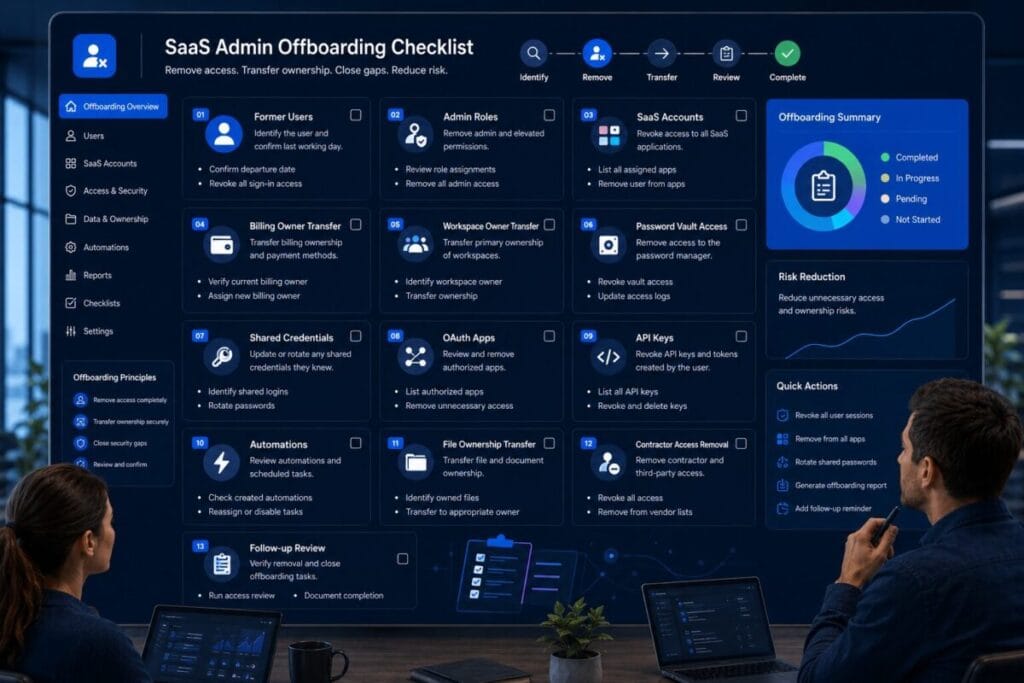
SaaS Admin Offboarding Checklist
Quick Navigation ✔
ToggleUse this SaaS admin offboarding checklist before marking an employee, contractor, agency user, vendor, consultant, temporary user, or former admin as fully removed from your software stack.
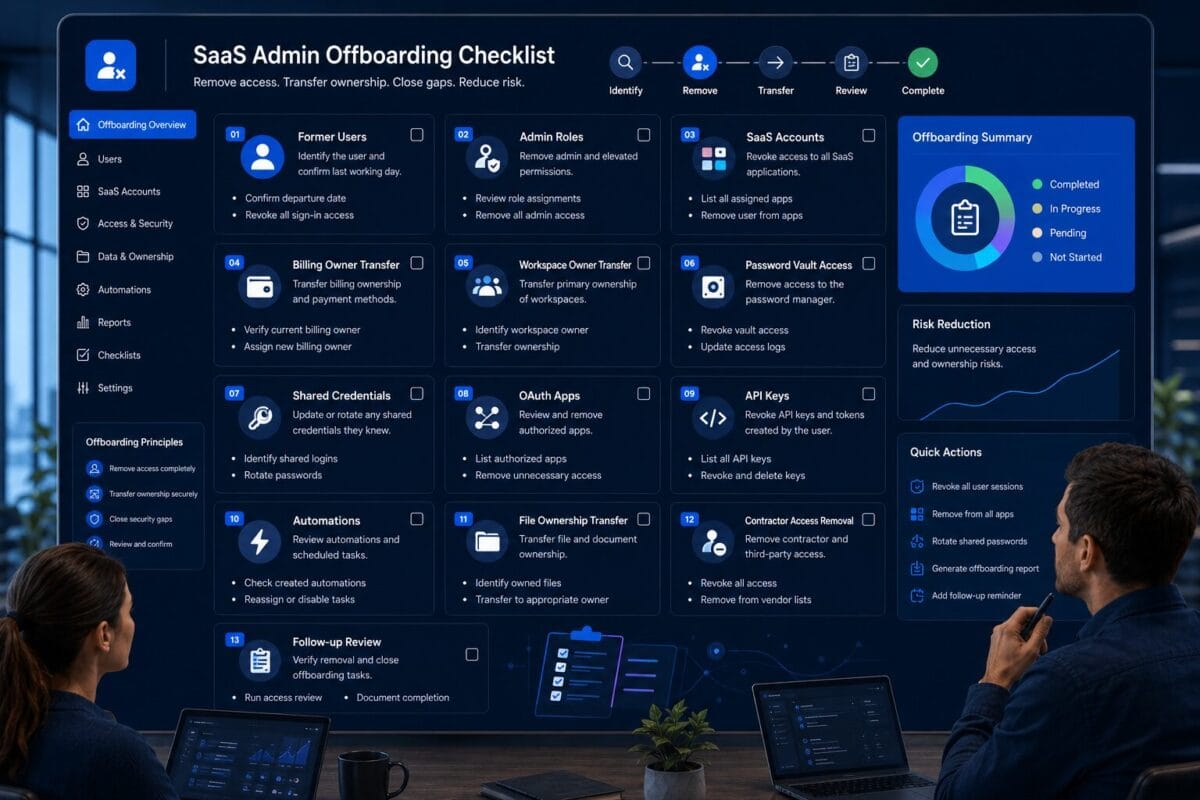
SaaS offboarding is not complete when one account is deleted. A former user may still own billing, control a workspace, have admin roles, appear in password manager vaults, own OAuth apps, hold API keys, run automations, control dashboards, or remain inside contractor and agency access paths.
Decision Snapshot
The goal is not just to remove a login. The goal is to remove leftover access, transfer ownership, rotate shared credentials where needed, review connected apps, and schedule a follow-up check so the team does not carry old access into daily operations.
Use this checklist when someone leaves, changes roles, finishes a project, loses admin responsibility, or no longer needs access to critical SaaS tools.
Remove SaaS user accounts, admin roles, password vault access, and external access paths.
Transfer workspace, billing, files, dashboards, workflows, and automation ownership before closing the task.
Review OAuth apps, API keys, automations, integrations, and connected workflows.
Schedule follow-up review so leftover access does not remain hidden.
Who Should Use This SaaS Admin Offboarding Checklist
This SaaS admin offboarding checklist is for small teams, remote teams, lean operators, solo founders, founders, managers, and small businesses that use multiple SaaS tools without a dedicated access-management team.
Teams removing people from SaaS tools
Use it when offboarding employees, contractors, freelancers, agencies, vendors, consultants, temporary users, former admins, billing owners, workspace owners, external support users, or remote collaborators.
Teams with scattered access paths
Use it when the person may have had access to admin dashboards, billing settings, password manager vaults, shared credentials, OAuth apps, API keys, automations, files, reports, or customer data.
Teams that need worksheet-ready offboarding
Use it as the foundation for a future SaaS offboarding worksheet, access removal template, or completion score calculator.
This is not a buying guide. It is not a SaaS management sales page. It is not a comparison article. It is an access removal checklist for small teams that need to make SaaS offboarding complete enough to reduce leftover access.
The SaaS Admin Offboarding Checklist
The purpose of this SaaS admin offboarding checklist is to make offboarding operational. A weak process says “remove the user.” A stronger process asks which tools, admin roles, billing ownership, shared credentials, OAuth apps, API keys, automations, files, dashboards, reports, and external access paths must be removed, transferred, rotated, verified, or reviewed again.
SaaS Admin Offboarding Checklist: Confirm Who Is Being Offboarded
SaaS admin offboarding checklist identity and scope
- [ ] Confirm the full name of the person being offboarded.
- [ ] Confirm whether the person is an employee, contractor, agency user, vendor, consultant, temporary user, or former admin.
- [ ] Confirm the final working date.
- [ ] Confirm the internal owner responsible for offboarding.
- [ ] Confirm whether the person had admin access.
- [ ] Confirm whether the person had billing access.
- [ ] Confirm whether the person owned any workspace.
- [ ] Confirm whether the person created integrations, automations, OAuth apps, or API keys.
- [ ] Confirm whether the person had access to password manager vaults.
- [ ] Confirm whether the person managed other external users.
- [ ] Confirm whether the offboarding is urgent, planned, or role-change related.
- [ ] Document the offboarding reason and date.
Why it matters
Offboarding starts with knowing exactly who is being removed and what kind of access they may have had. A full-time employee, external agency user, temporary contractor, and billing owner can all leave different access footprints.
What small teams often miss
Small teams often remove a user from the most visible tool but do not classify the person’s access type. A former billing owner, former workspace owner, or former contractor with admin access may need more steps than a basic user.
Next action
Create an offboarding record with name, role type, final date, internal owner, admin access, billing access, workspace ownership, integrations, password vault access, and follow-up date.
List Every SaaS Tool the Person Can Access
Checklist items for SaaS tool access removal
- [ ] List every SaaS tool the person can access.
- [ ] Check collaboration tools.
- [ ] Check project management tools.
- [ ] Check CRM and customer data tools.
- [ ] Check finance, accounting, and billing tools.
- [ ] Check analytics and reporting tools.
- [ ] Check marketing and automation tools.
- [ ] Check password manager and identity tools.
- [ ] Check file storage and document tools.
- [ ] Check developer, code, deployment, or support tools if used.
- [ ] Check design tools and documentation spaces.
- [ ] Check tools used by agencies or contractors.
- [ ] Mark which tools contain sensitive data.
- [ ] Mark which tools require admin removal.
Why it matters
You cannot remove access from tools you do not list. Small teams often rely on memory during offboarding, but SaaS access is usually spread across workspaces, dashboards, billing portals, automations, integrations, and shared credentials.
What small teams often miss
Small teams often remove access from email or the main workspace and forget analytics tools, shared drives, CRM systems, billing apps, design tools, automation platforms, developer tools, old project boards, reporting dashboards, agency-managed tools, and documentation spaces.
Next action
Create a SaaS access removal list with tool, access type, admin status, billing status, ownership status, removal status, transfer status, and follow-up status.
Remove Admin Roles First
Checklist items for admin role removal
- [ ] Identify all admin roles held by the person.
- [ ] Identify super admin or workspace owner roles.
- [ ] Identify billing admin roles.
- [ ] Identify security admin roles.
- [ ] Identify user management roles.
- [ ] Identify integration admin roles.
- [ ] Identify export or reporting admin roles.
- [ ] Remove or downgrade admin roles before closing offboarding.
- [ ] Confirm another active internal owner can manage the tool.
- [ ] Document which admin roles were removed.
- [ ] Confirm the person no longer appears in active admin lists.
Why it matters
Admin roles often control users, billing, integrations, exports, settings, and security options. In some tools, deleting a user before transferring admin responsibilities can create operational problems.
What small teams often miss
Small teams often remove a user account without checking whether that person owned admin responsibilities or held temporary admin access from setup, import, troubleshooting, or billing changes.
Next action
Before removing the user, check every critical SaaS tool for admin roles. If the person is the only admin, assign another active internal admin first.
Remove Workspace and Billing Ownership
Checklist items for workspace and billing ownership transfer
- [ ] Identify workspaces owned by the person.
- [ ] Identify billing accounts owned by the person.
- [ ] Identify payment methods controlled by the person.
- [ ] Identify invoice access controlled by the person.
- [ ] Identify subscription settings controlled by the person.
- [ ] Identify recovery email addresses tied to the person.
- [ ] Transfer workspace ownership before removing the user.
- [ ] Transfer billing ownership before removing the user.
- [ ] Transfer recovery contact details where needed.
- [ ] Confirm invoices and payment settings remain accessible.
- [ ] Confirm subscription controls remain accessible.
- [ ] Document the new workspace owner and billing owner.
Why it matters
Billing and workspace ownership are control points. If the person being offboarded owns billing, payment, invoices, workspace recovery, or subscription controls, removing their account without transfer may create disruption.
What small teams often miss
Small teams often discover ownership problems later, when they need to change payment, add seats, retrieve invoices, update billing, or recover a workspace.
Next action
For each critical SaaS tool, confirm the current workspace owner, new workspace owner, current billing owner, new billing owner, and transfer completion status.
Remove SaaS User Accounts
Checklist items for SaaS account removal
- [ ] Remove or deactivate the user from critical SaaS tools.
- [ ] Remove the user from collaboration workspaces.
- [ ] Remove the user from project management tools.
- [ ] Remove the user from CRM tools.
- [ ] Remove the user from finance and billing tools.
- [ ] Remove the user from analytics and reporting tools.
- [ ] Remove the user from marketing and automation tools.
- [ ] Remove the user from file storage and document tools.
- [ ] Remove the user from developer or code tools if used.
- [ ] Remove the user from support or customer data tools if used.
- [ ] Remove the user from internal documentation spaces.
- [ ] Remove pending invitations sent to the user.
- [ ] Confirm the user no longer appears in active user lists.
Why it matters
Account removal is the visible part of SaaS offboarding. It is not the entire process, but it is still essential. Former users should not remain active inside tools they no longer need.
What small teams often miss
Small teams often remove the user from one main tool and assume offboarding is complete. SaaS access is usually distributed across multiple systems, and one forgotten account can keep access alive.
Next action
Go tool by tool. Remove the user, document completion, and flag anything that requires ownership transfer or follow-up.
Remove Password Manager and Shared Credential Access
Checklist items for password manager access removal
- [ ] Remove the user from password manager vaults.
- [ ] Remove the user from shared folders or collections.
- [ ] Remove access to admin credentials.
- [ ] Remove access to shared SaaS passwords.
- [ ] Remove access to recovery credentials.
- [ ] Remove access to API secrets where stored.
- [ ] Review whether the user copied shared credentials.
- [ ] Rotate shared credentials if needed.
- [ ] Confirm MFA is enabled for remaining password manager admins.
- [ ] Confirm the user no longer appears in vault access lists.
- [ ] Document credential rotation decisions.
Why it matters
Password manager access can outlive SaaS account removal. A former user may no longer appear inside a SaaS tool but may still know or have copied a shared credential.
What small teams often miss
Small teams often remove the person from the SaaS app but forget the password manager. They may also forget that a shared password was used by several people, including the person being offboarded.
Next action
Review password manager access every time SaaS admin offboarding happens. If the person had access to shared admin credentials, decide whether rotation is needed before closing offboarding.
Review Shared Credentials
Checklist items for shared credential cleanup
- [ ] Identify shared SaaS admin logins known to the person.
- [ ] Identify shared recovery credentials known to the person.
- [ ] Identify shared API secrets known to the person.
- [ ] Identify shared billing credentials known to the person.
- [ ] Identify shared contractor or agency credentials known to the person.
- [ ] Rotate shared passwords where needed.
- [ ] Replace shared admin accounts with named accounts where possible.
- [ ] Update password manager records after rotation.
- [ ] Confirm current users know the new credential process.
- [ ] Document which credentials were rotated and why.
Why it matters
Shared credentials make offboarding harder. If a person knows a shared password, removing their named account may not remove their practical access.
What small teams often miss
Small teams often treat password rotation as optional. It may be unnecessary for low-risk cases, but it becomes important when the person had access to sensitive admin passwords, billing credentials, customer data tools, shared vendor logins, or API secrets.
Next action
Create a rotation decision for each shared credential: rotate now, rotate later, no rotation needed, or replace with named account. Document the reason.
Review OAuth Apps, API Keys, and Automations
Checklist items for OAuth, API, and automation cleanup
- [ ] Review OAuth apps connected by the person.
- [ ] Review API keys created by the person.
- [ ] Review automation workflows created by the person.
- [ ] Review integrations owned by the person.
- [ ] Review reporting connectors created by the person.
- [ ] Review CRM, analytics, email, billing, or spreadsheet syncs created by the person.
- [ ] Identify whether each connection is still used.
- [ ] Identify what data each connection can access.
- [ ] Disable unused OAuth apps.
- [ ] Revoke unused API keys.
- [ ] Transfer ownership of active automations.
- [ ] Replace personal credentials in active workflows.
- [ ] Document which integrations were removed, kept, or transferred.
Why it matters
A user can be removed while the apps, API keys, and automations they created continue to run. The visible account may be gone, but connected access may remain active through tokens, keys, integrations, or workflow ownership.
What small teams often miss
Small teams often forget that SaaS access is not only a user list. Access may continue through OAuth apps, API keys, automation tools, reporting connectors, spreadsheet syncs, billing integrations, CRM integrations, webhook connections, and developer tokens.
Next action
Build an integration cleanup list with connection, creator, current owner, data access, usage status, and whether to revoke, transfer, or keep it.
Transfer Files, Dashboards, Workflows, and Ownership
Checklist items for file and workflow transfer
- [ ] Transfer ownership of important files.
- [ ] Transfer ownership of dashboards.
- [ ] Transfer ownership of reports.
- [ ] Transfer ownership of automations.
- [ ] Transfer ownership of workflows.
- [ ] Transfer ownership of project boards.
- [ ] Transfer ownership of shared folders.
- [ ] Transfer ownership of forms or intake tools.
- [ ] Transfer ownership of calendars or scheduling assets if relevant.
- [ ] Transfer ownership of documentation spaces where needed.
- [ ] Confirm critical assets are not tied only to the former user.
- [ ] Document the new owner for each asset.
Why it matters
Offboarding should remove access without breaking operations. If a former user owns dashboards, workflows, reports, files, or automations, removing the account without transfer may break processes or make important assets harder to manage.
What small teams often miss
Small teams often focus only on removing access and forget that the person may own assets the team still needs.
Next action
Before removing the user from a critical tool, ask what the person owns that the team still needs. Transfer those assets before final removal.
Remove Contractor, Agency, and Vendor Access
Checklist items for contractor, agency, and vendor offboarding
- [ ] Identify whether the person belongs to a contractor, agency, vendor, or consulting group.
- [ ] Remove the individual external user.
- [ ] Review whether the agency or vendor still has other active users.
- [ ] Remove external users who no longer need access.
- [ ] Review agency admin roles.
- [ ] Review contractor SaaS app access.
- [ ] Review vendor support access.
- [ ] Review temporary user access.
- [ ] Review password manager access for external users.
- [ ] Review OAuth apps or integrations created by external users.
- [ ] Review whether agency staff changed while access stayed active.
- [ ] Confirm the internal owner approved continued access for any remaining external users.
Why it matters
Contractor, agency, and vendor offboarding often requires more than removing one user. If an agency relationship ends, several users may need removal. If a vendor relationship remains, access may need reassignment.
What small teams often miss
Small teams often remove the person they know and forget related external users, vendor support accounts, agency staff changes, or integrations created by external users.
Next action
When offboarding an external user, review the entire external access group. Do not assume removing one account removes the full relationship.
Confirm MFA and Recovery Settings
Checklist items for MFA and recovery cleanup
- [ ] Confirm the former user is not listed as a recovery contact.
- [ ] Confirm the former user is not the backup MFA owner.
- [ ] Confirm recovery email addresses are updated.
- [ ] Confirm backup codes are controlled by current owners.
- [ ] Confirm remaining admins have MFA enabled.
- [ ] Confirm password manager admins have MFA enabled.
- [ ] Confirm security key ownership if used.
- [ ] Confirm the former user cannot reset access.
- [ ] Confirm recovery paths are documented.
- [ ] Update admin recovery notes where needed.
Why it matters
Offboarding can fail through recovery paths. A former user may not have an active account but could still be tied to recovery email, backup MFA, billing recovery, workspace recovery, or password manager recovery.
What small teams often miss
Small teams often remove the visible account but leave backup recovery tied to the former user’s email, phone, device, or security key.
Next action
Review recovery settings for critical SaaS tools and password manager accounts. Make sure current internal owners control recovery.
Schedule a Follow-Up SaaS Access Review
Checklist items for follow-up access review
- [ ] Schedule a follow-up SaaS access review.
- [ ] Recheck active user lists after offboarding.
- [ ] Recheck admin lists after offboarding.
- [ ] Recheck billing ownership after offboarding.
- [ ] Recheck workspace ownership after offboarding.
- [ ] Recheck password manager vault access.
- [ ] Recheck OAuth apps and API keys.
- [ ] Recheck automations and workflow ownership.
- [ ] Recheck contractor, agency, and vendor access.
- [ ] Recheck shared credential rotation decisions.
- [ ] Recheck files, dashboards, reports, and project ownership.
- [ ] Document any leftover access found during follow-up.
- [ ] Close offboarding only after follow-up items are resolved or assigned.
Why it matters
SaaS offboarding may not be completed in one pass. Some tools may require ownership transfer first. Some integrations may need review. Some credentials may need rotation. Follow-up catches leftover access that was not obvious during the first pass.
What small teams often miss
Small teams often finish offboarding too quickly. They delete the main account and move on while leftover access remains in vaults, integrations, dashboards, file ownership, billing settings, or external user groups.
Next action
Schedule a follow-up review 7, 14, or 30 days after offboarding, depending on how complex the user’s access was.
SaaS Offboarding Completion Score
Use this score to decide whether SaaS offboarding is mostly complete or still needs follow-up. The purpose of this SaaS admin offboarding checklist is to make leftover access paths visible before the team closes the offboarding task.
0 = Not removed / unknown
The access path has not been reviewed, removal is unknown, or ownership is unclear.
1 = Partially removed
Some removal or transfer work is complete, but gaps or follow-up items remain.
2 = Removed / verified
The access path is removed, transferred, rotated, or verified with documented ownership.
Score: 0 / 1 / 2
Score: 0 / 1 / 2
Score: 0 / 1 / 2
Score: 0 / 1 / 2
Score: 0 / 1 / 2
Score: 0 / 1 / 2
Score: 0 / 1 / 2
Score: 0 / 1 / 2
Score: 0 / 1 / 2
Score: 0 / 1 / 2
16–20
SaaS offboarding is mostly complete. Main access paths are removed, transferred, rotated, or verified.
9–15
SaaS offboarding needs follow-up. Some work is complete, but leftover access paths may remain.
0–8
High leftover access risk; do not mark offboarding complete yet. Continue review before closing the task.
When SaaS Offboarding Is High Risk
SaaS offboarding is higher risk when the person being removed had broad control, unclear ownership, external relationships, or connected apps.
A high-risk offboarding case needs more than basic account removal. It needs removal, transfer, rotation where needed, review, verification, and follow-up.
What to Remove Before Marking Offboarding Complete
Do not mark offboarding complete just because one login was removed. Close the task only when remaining access paths are removed, transferred, or assigned for follow-up.
Former Employee SaaS Access Checklist
Use this section when an employee leaves the team or changes roles and no longer needs previous SaaS access.
- [ ] Confirm the employee’s final date or role-change date.
- [ ] List all SaaS tools the employee accessed.
- [ ] Remove admin roles.
- [ ] Remove user accounts that are no longer needed.
- [ ] Transfer workspace ownership.
- [ ] Transfer billing ownership.
- [ ] Transfer reports, dashboards, files, workflows, and automations.
- [ ] Remove password manager vault access.
- [ ] Rotate shared credentials if needed.
- [ ] Review OAuth apps created by the employee.
- [ ] Review API keys created by the employee.
- [ ] Review automations created by the employee.
- [ ] Review pending invitations sent by the employee.
- [ ] Confirm the employee is not a recovery contact.
- [ ] Confirm active internal owners control the tools.
- [ ] Schedule a follow-up SaaS access review.
Former employee SaaS access should be reviewed even if the departure was friendly, planned, or internal role-change related. The goal is operational clarity, not suspicion.
Contractor and Agency SaaS Offboarding Checklist
Use this section when a contractor, freelancer, agency user, vendor, consultant, or temporary external collaborator stops working with the team.
- [ ] Confirm the external work has ended.
- [ ] Confirm whether the agency or vendor relationship continues.
- [ ] List all SaaS tools the contractor or agency user accessed.
- [ ] Remove the individual external user.
- [ ] Review other users from the same agency or vendor.
- [ ] Remove contractor admin roles.
- [ ] Remove contractor billing access if any.
- [ ] Remove contractor workspace ownership if any.
- [ ] Remove password manager vault access.
- [ ] Rotate shared credentials if needed.
- [ ] Review OAuth apps created by the contractor.
- [ ] Review API keys created by the contractor.
- [ ] Review automations or workflows created by the contractor.
- [ ] Transfer files, dashboards, reports, or project assets.
- [ ] Review vendor support accounts.
- [ ] Review temporary users linked to the same project.
- [ ] Confirm the internal owner approved continued access for any remaining external users.
- [ ] Schedule a follow-up access review.
Contractor and agency offboarding often fails when teams remove one known person but forget the broader external access group. Review the relationship, not just the individual user.
Service Categories Mentioned in This Checklist
This section is not a ranking and not a vendor list. These are service categories that may appear during a practical SaaS admin offboarding review.
Password Managers
Examples only: 1Password, Bitwarden.
This category appears because SaaS admin offboarding often includes password vault access, shared credentials, recovery credentials, admin passwords, API secrets, and contractor credential access.
ZTNA / Zero Trust Access Platforms
Examples only: Cloudflare Zero Trust, Twingate.
This category may appear when SaaS or app-level access is controlled through identity-aware policies or app-level access rules.
Business VPN / Managed VPN Platforms
Example only: NordLayer.
This category may appear when admin workflows, private apps, or internal tools still depend on controlled remote access.
Hardware Security Keys
Example only: YubiKey.
This category may appear when offboarding involves high-risk admin accounts, recovery paths, or MFA ownership.
SaaS Access Review / Admin Ownership Workflow
No vendor pitch needed now.
This category appears because SaaS offboarding depends on ownership transfer, admin review, and access removal evidence.
Offboarding / Access Removal Workflow
No vendor pitch needed now.
This category is the core of this checklist: former employees, former contractors, agency users, vendor accounts, old admins, vault access, shared credentials, OAuth apps, API keys, automations, billing ownership, and follow-up review.
Where This Fits Inside ToolRelief
This asset is part of ToolRelief’s External Service Demand Engine. It supports users who need to remove SaaS access, transfer ownership, clean up former users, and reduce leftover access after employees, contractors, agencies, or vendors leave.
SaaS exposure review
Contractor access review
Broader remote access cleanup
App-level access readiness
VPN replacement review
Model comparison
Replacement paths
Current VPN review
Security routing
Software trend monitoring
Device context
Parent decision system
Review SaaS Offboarding Before Marking Access Removal Complete
Use ToolRelief’s SaaS Admin Access Exposure Checklist and Contractor Access Security Checklist to decide which accounts, admin roles, billing ownership, integrations, password vault access, and leftover permissions still need removal, transfer, rotation, or follow-up.