Writing & Content
82- Multiple assistants used for writing
- No primary writing workflow owner
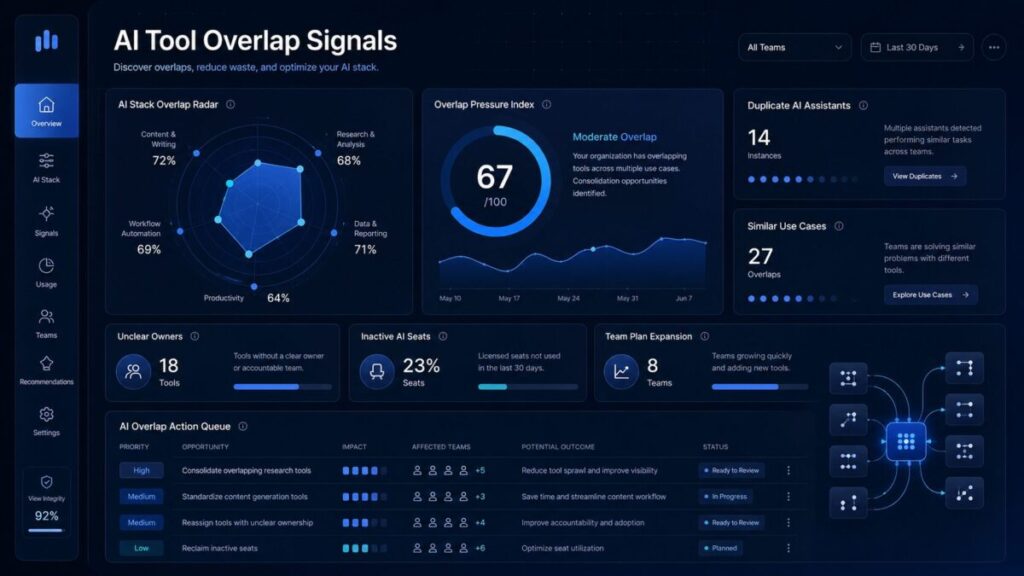
help teams identify when multiple AI subscriptions, assistants, seats, or add-ons are solving the same job.
These signals can include duplicate writing tools, overlapping research assistants, unclear AI spend owners, inactive AI seats,
personal plans beside team plans, and similar AI use cases across marketing, sales, operations, and engineering.
Start with the AI Stack Overlap Radar, review the active overlap signals, then use the related ToolRelief tools to map your AI stack,
estimate subscription waste, and decide whether to keep, consolidate, downgrade, or remove tools.
ToolRelief AI Overlap Model
Use this planning model to review duplicate AI assistants, unclear owners, inactive seats, similar use cases, and expanding AI subscriptions before adding more paid tools to your stack.
AI Stack Overlap Radar
5 AI overlap signals visible
Sample signal model
ToolRelief AI overlap model
Role ownership
Decision matrix
usage is strong, owner is clear, use case is unique
two tools solve the same workflow
features are unused or team seats are inactive
no owner, no usage, or strong overlap exists
AI overlap review
If several AI tools solve the same job, review your stack before expanding team seats or renewing individual AI subscriptions.
This AI overlap radar is a ToolRelief planning model, not live vendor data, financial advice, legal advice, or official vendor analysis. Confirm current pricing, seat usage, plan limits, ownership, privacy requirements, and vendor terms directly before making AI subscription decisions.
ToolRelief Signal Screens
Choose the right ToolRelief calculator or template based on the software spend signal you need to review.
Review ToolRelief research paths for pricing evidence, renewal risk, AI subscription waste, and SaaS waste patterns.
Start with the pages that explain the ToolRelief system, spend signals, audit path, and software cost vocabulary.
ToolRelief is building software spend visibility assets for founders, operators, finance teams, and small business owners.
Advertising or partnership placement does not imply sponsorship, endorsement, or formal partnership unless clearly stated.
ToolRelief is independent. Listings and links are editorial navigation unless a sponsorship or partnership is clearly disclosed.
This page is part of ToolRelief’s software spend signals system.
For broader software cost warning signs across renewals, unused licenses, pricing evidence, vendor review gaps,
and AI subscription overlap, visit the Software Spend Signals Center.
If your AI overlap signals are concentrated around duplicate assistants, inactive seats, unclear owners,
or expanding team plans, use the AI Tool Stack Builder before adding more paid seats. If multiple AI tools are solving the same job, review possible AI subscription waste before renewing or expanding your stack.
ToolRelief’s AI overlap models are designed for practical planning, not legal, financial, procurement, privacy, or vendor-specific advice.
Confirm current pricing, usage exports, seat assignments, plan limits, privacy requirements,
and vendor terms directly before making AI subscription decisions.
If AI overlap also includes inactive team seats or former users, review unused license signals before expanding AI subscriptions or renewing team plans.
AI tool overlap signals are warning signs that a team may be paying for multiple AI tools that solve the same workflow.
These signals can appear when different departments use separate AI assistants for writing, research, coding, meetings, sales follow-ups,
or creative work without a clear owner or review process.
By reviewing AI tool overlap signals before adding seats or renewing subscriptions, teams can identify duplicate use cases,
reduce inactive AI licenses, clarify ownership, and decide which tools should be kept, consolidated, downgraded, or removed.

ToolRelief uses essential technologies to operate this website. With your permission, we also use analytics, embedded media, and other optional technologies to understand usage, improve content, and measure performance. Choose Accept all, Reject optional, or Manage preferences. You can change your choice at any time.