TOOLRELIEF DECISION INTELLIGENCE
- Decision
- Use Business VPN Alternatives for Remote Teams: 2026 Guide to evaluate the software or technology question investigated on this page before taking the next material action.
- Evidence Basis
- Documented product information, published evidence, comparative analysis, direct observation, and clearly labeled models where applicable.
- Best Used For
- Reducing uncertainty before taking the next material action.
- Decision Boundary
- This page provides independent decision support rather than a guaranteed outcome. Product capabilities, pricing, third-party terms, and operating conditions can change.
Business VPN Alternatives for Remote Teams in 2026
Quick Navigation ✔
ToggleDecision Snapshot: Keep, Improve, Replace, or Support Your VPN?
Business VPN alternatives are not only about finding another tool.
For remote teams, the real question is whether the current access model still fits the way people work, the apps they use, the devices they trust, and the contractors who come in and out of the business.
Use this decision snapshot before replacing anything.
Your access need is narrow and stable
Your team is small, stable, and using the VPN for a narrow access need.
- Users are known and rarely change.
- Devices are mostly known.
- Contractors are not a major access issue.
- Sensitive apps are limited.
- MFA is already enforced.
- Passwords are managed properly.
- Offboarding is clean.
- The VPN is actively reviewed.
In this case, replacing the VPN may add complexity without solving a real problem.
The VPN still fits, but the process is weak
The VPN may still fit, while the surrounding access process needs cleanup.
- MFA is inconsistent.
- Old users still have access.
- VPN access has not been reviewed recently.
- Passwords are shared manually.
- Device rules are unclear.
- Contractors are not removed quickly.
- Admin accounts are not protected differently.
Sometimes the right move is not a VPN replacement. It is a cleaner access review, better MFA, stronger password hygiene, and clearer offboarding.
Your current VPN no longer matches the work
Your current VPN may be difficult to manage, too broad, or no longer aligned with how your remote team works.
- You need better user management.
- Contractors need limited access.
- Remote users work from many locations.
- You need stronger admin visibility.
- The current setup is hard to maintain.
- The team has outgrown a simple VPN workflow.
- Access decisions now involve users, apps, devices, and SaaS exposure.
A business VPN alternative may still be a managed VPN platform, or it may be a different access model entirely.
The issue is precision, not only connection
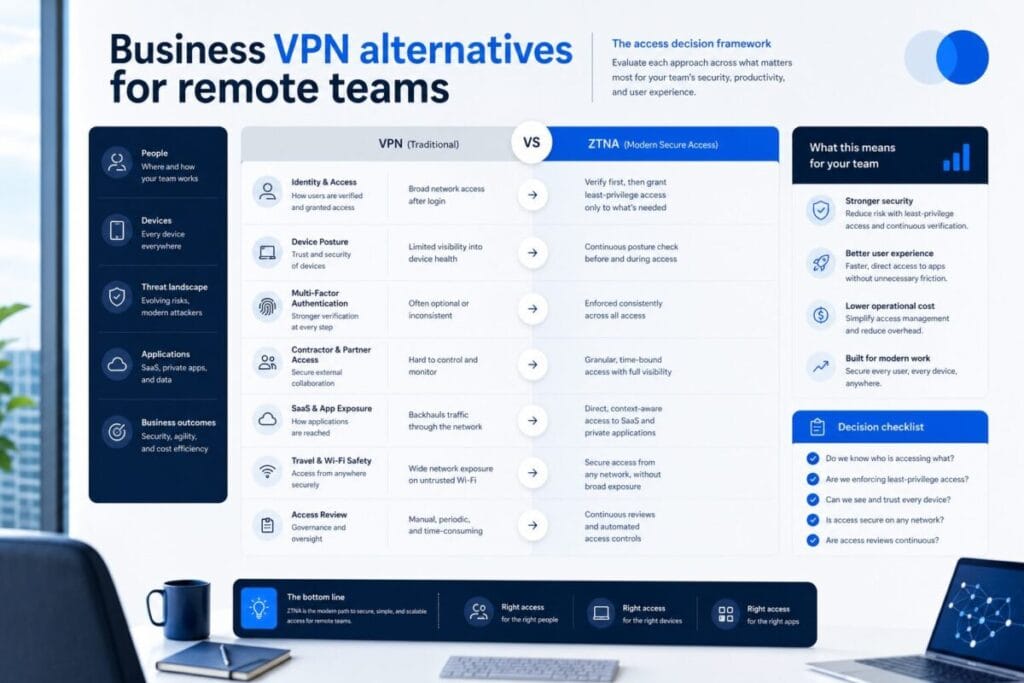
ZTNA, or Zero Trust Network Access, becomes worth evaluating when:
- Users should access only specific apps.
- Contractors should not receive broad access.
- Device context matters.
- SaaS admin exposure is high.
- Access should depend on role, app, device, or risk level.
- The team needs tighter control than traditional network-level access.
ZTNA is not automatically the right answer. It is one access model to evaluate when the problem is too specific for a traditional VPN setup.
The credential layer is the bigger issue
The team’s access risk may start with credentials, not the VPN.
- Passwords are reused.
- Passwords are shared in chat or documents.
- MFA is missing on important accounts.
- Old contractors still have access to shared vaults.
- Recovery codes are not stored safely.
- Admin accounts are not separated from daily-use accounts.
In that situation, password manager and MFA readiness may matter more than changing remote access tools.
The access risk depends on who connects and from where
The access risk may be tied to who is connecting and what they are connecting from.
- Contractors use unmanaged laptops.
- Team members work while traveling.
- Devices are not consistently updated.
- Personal phones access work tools.
- Lost-device processes are unclear.
- Contractor offboarding is manual or inconsistent.
For remote teams, devices and contractors often decide whether the current VPN model still makes sense.
Why Remote Teams Look for Business VPN Alternatives
Remote teams usually do not search for business VPN alternatives because they want a trendy security label.
They search because something about the current access model feels off.
The VPN may still connect people, but the team is now dealing with a different set of problems:
- More SaaS apps.
- More contractors.
- More remote locations.
- More travel work.
- More admin panels.
- More personal devices.
- More password and MFA gaps.
- More uncertainty about who still has access.
For small teams, the VPN question often starts as an operational question:
Can the right people access the right systems without giving too much access to the wrong people?
That is why this topic is broader than VPN software.
A business VPN alternative might be:
- a managed business VPN platform,
- a ZTNA access model,
- a stronger password manager process,
- better MFA,
- hardware security keys for sensitive accounts,
- device posture rules,
- or a cleaner access review and offboarding workflow.
The goal is not to replace a VPN just because alternatives exist.
The goal is to understand whether the current access model matches the team’s real risk.
When a Business VPN Alternative Is Actually Needed
A business VPN alternative becomes worth evaluating when the current VPN creates more operational risk or friction than it solves.
Your VPN gives too much access
A traditional VPN can be useful when a user needs private access to a network or system.
The problem starts when every connected user receives access that is broader than necessary.
For example, a contractor may need one internal dashboard, not a path into every private resource. A support worker may need one client system, not access to technical infrastructure. A founder may need admin panels, but a temporary user probably does not.
When access needs to be more specific, alternatives become more relevant.
Contractors come and go
Contractor access is one of the strongest reasons small teams review VPN alternatives.
Contractors often need temporary, limited, project-specific access.
The access model should answer:
- What does the contractor need?
- What should they not see?
- How long should access last?
- Who removes access?
- What happens when the project ends?
- Are shared passwords rotated if needed?
- Are SaaS permissions reviewed after the contractor leaves?
If the VPN makes contractor access too broad or difficult to remove, the team should evaluate another access model.
SaaS admin exposure is growing
Many small businesses do not run on internal servers anymore. They run on SaaS.
That means the real exposure may be inside:
- billing systems,
- CRM platforms,
- support inboxes,
- automation tools,
- analytics dashboards,
- cloud consoles,
- email admin panels,
- password managers,
- domain and DNS accounts,
- client portals,
- and shared file systems.
A VPN does not automatically solve SaaS permissions, shared passwords, or weak MFA.
If SaaS exposure is the real issue, the team may need a broader remote access stack, not just a VPN replacement.
Travel work changes the access environment
Remote work from home is one situation.
Remote work from airports, hotels, cafés, coworking spaces, client sites, and public Wi-Fi is another.
Travel work does not mean every connection is unsafe. But it does increase the importance of:
- device security,
- MFA reliability,
- password manager access,
- recovery codes,
- hardware security keys,
- VPN behavior,
- SaaS admin permissions,
- and lost-device planning.
This is where remote access connects naturally with ToolRelief’s Travel Ops.
Your team needs visibility
Some teams do not know who has access, why they have it, or when it was last reviewed.
That is not only a VPN issue. It is an access management issue.
A business VPN alternative may be needed when the team needs better visibility into:
- active users,
- old users,
- contractor accounts,
- app access,
- admin roles,
- login behavior,
- device usage,
- and access removal.
Visibility matters because small teams often move quickly. Without review, access can accumulate silently.
When Improving Your Current VPN May Be Enough
Not every team needs to replace its VPN.
Sometimes the VPN is not the root problem.
The access model is still simple
If your team only needs private access to a small number of resources, and the users are known, the current VPN may still fit.
This is especially true if:
- access is narrow,
- users are stable,
- contractors are rare,
- MFA is enforced,
- devices are known,
- and offboarding is handled quickly.
Replacing a simple system with a more complex one can create new operational problems.
The VPN is poorly managed, not structurally wrong
A weak VPN setup does not always mean the VPN category is wrong.
It may mean:
- user access has not been reviewed,
- MFA was never enforced properly,
- old accounts still exist,
- device rules are unclear,
- contractors were added without a removal plan,
- or nobody owns the access process.
If the issue is management, fix the process before replacing the tool.
Password hygiene is the real issue
If passwords are shared in chat, spreadsheets, email, or documents, a VPN replacement will not fix the most obvious access gap.
Before changing remote access software, check whether the team has:
- a password manager,
- separate admin credentials,
- MFA on important accounts,
- access removal for old users,
- clean shared vaults,
- and a recovery process.
Examples teams may encounter in the password manager category include 1Password and Bitwarden. Those names are examples only. The decision should be based on the team’s access process, not vendor familiarity.
MFA is inconsistent
If MFA is missing on email, password managers, finance tools, cloud consoles, or admin accounts, that may deserve attention before a VPN replacement.
For sensitive accounts, some teams may also evaluate hardware security keys. YubiKey is one example teams may encounter in that category.
Hardware keys are not magic protection. They are one possible layer for accounts where account takeover would create serious damage.
Offboarding is weak
If old users still have access, replacing VPN may not solve the problem.
The team should first review:
- VPN users,
- SaaS users,
- shared vault access,
- admin roles,
- contractor accounts,
- client systems,
- recovery emails,
- and device access.
A stronger access review may produce more value than a new remote access platform.
Alternative Access Models to Evaluate
Business VPN alternatives should be evaluated as access models, not as a random list of tools.
Managed business VPN
A managed business VPN may fit teams that still need private connectivity but want better administration than a basic or consumer-style setup.
This model may be useful when:
- private access is still needed,
- user management matters,
- MFA support is required,
- access should be easier to administer,
- remote users need consistent connectivity,
- and the team does not need app-level Zero Trust controls yet.
Example only: NordLayer.
What to compare:
- user management,
- MFA support,
- admin controls,
- access visibility,
- device support,
- contractor handling,
- ease of rollout,
- and whether the setup fits the team’s workflow.
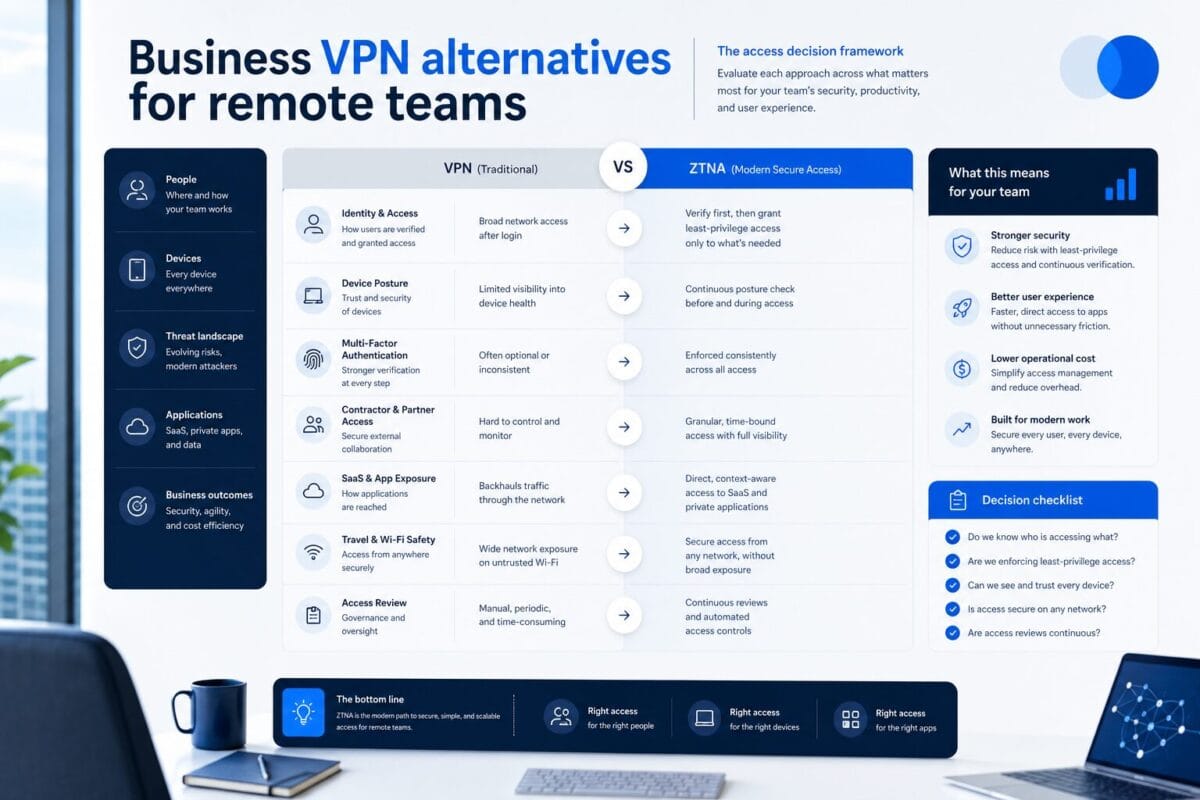
ZTNA / Zero Trust access
ZTNA is worth evaluating when access should be based on identity, app, role, device, or policy instead of broad network access.
This model may be useful when:
- contractors need limited access,
- users should only access specific apps,
- SaaS exposure is high,
- device posture matters,
- private apps need tighter controls,
- and VPN access feels too broad.
Examples only: Cloudflare Zero Trust and Twingate.
What to compare:
- app-level access,
- identity rules,
- device context,
- contractor restrictions,
- access logs,
- admin overhead,
- private app support,
- and setup complexity.
ZTNA is not automatically necessary. It becomes relevant when precision matters more than simple connectivity.
Password manager + MFA readiness
Sometimes the alternative to replacing VPN is strengthening the credential layer.
This model may be useful when:
- passwords are shared,
- MFA is inconsistent,
- access removal is slow,
- admin credentials are not separated,
- contractors still have vault access,
- or the team cannot clearly see who has access to sensitive logins.
Examples only: 1Password and Bitwarden.
What to compare:
- team vaults,
- admin controls,
- MFA support,
- account recovery,
- access removal,
- ease of adoption,
- browser and device coverage,
- and support for sensitive accounts.
Hardware security keys
Hardware security keys may be useful for accounts where login protection needs to be stronger than a basic MFA setup.
This model may be useful for:
- founders,
- administrators,
- finance accounts,
- cloud consoles,
- domain and DNS accounts,
- email admin accounts,
- password manager accounts,
- and high-risk client systems.
Example only: YubiKey.
What to compare:
- account compatibility,
- backup key process,
- user onboarding,
- lost-key handling,
- travel practicality,
- and which accounts actually need this layer.
Device posture process
Device posture means checking whether the device accessing work systems is known, updated, protected, and appropriate for the task.
This model may be useful when:
- people use personal laptops,
- contractors use unmanaged machines,
- phones access work systems,
- travel devices connect to sensitive apps,
- device updates are inconsistent,
- or lost-device planning is weak.
What to compare:
- known vs unknown devices,
- managed vs unmanaged devices,
- operating system updates,
- encryption,
- screen lock behavior,
- browser profile separation,
- travel use,
- and device removal process.
This connects directly with ToolRelief’s Device Intel.
Access review / offboarding workflow
Some teams do not need a new tool first. They need a repeatable access review.
This model may be useful when:
- old users remain active,
- contractors are not removed cleanly,
- SaaS permissions are unclear,
- shared credentials are not rotated,
- admin roles are not reviewed,
- and no one owns the offboarding process.
What to compare:
- who has access,
- what they can access,
- why they need it,
- when it was last reviewed,
- who removes it,
- and what happens after a user leaves.
This is not a software category only. It is an operating discipline.
Remote Access Stack Checklist
Before choosing business VPN alternatives, map the full access stack.
Users
- Who needs remote access?
- Who needs admin access?
- Who needs temporary access?
- Who no longer needs access?
- Are founders, employees, contractors, and vendors treated differently?
Apps
- Which apps are sensitive?
- Which apps contain customer data?
- Which apps control billing?
- Which apps control automations?
- Which apps control infrastructure?
- Which apps should not be broadly exposed?
Contractors
- What do contractors need access to?
- How long should access last?
- Who approves contractor access?
- Who removes it?
- Are contractor credentials separated?
- Are shared credentials rotated after contractor work ends?
SaaS admin accounts
- Who can access admin panels?
- Is MFA enforced?
- Are admin roles separated?
- Are billing and account-owner permissions reviewed?
- Are old admin users removed?
- Are integrations checked?
Password manager
- Does the team use one?
- Are vaults organized?
- Are shared credentials reviewed?
- Are admin credentials separated?
- Is MFA enabled?
- Are old users removed?
- Are recovery procedures documented?
MFA
- Which accounts require MFA?
- Are high-risk accounts protected differently?
- Are backup codes stored safely?
- Are authenticator apps enough for the account risk?
- Should hardware security keys be evaluated for founders or admins?
Devices
- Are work devices known?
- Are contractor devices allowed?
- Are personal devices allowed?
- Are laptops updated?
- Are phones used for work access?
- Are travel devices handled differently?
- Is there a lost-device process?
Travel work
- Do users work from public Wi-Fi?
- Do they access admin panels while traveling?
- Do they use VPN consistently?
- Can they access MFA while abroad?
- Are recovery methods available without weakening security?
- Are hardware keys practical for the people who need them?
Access review
- When was access last reviewed?
- Who owns the review?
- Are users removed quickly?
- Are contractors reviewed separately?
- Are permissions adjusted after role changes?
- Are SaaS admin accounts reviewed?
Offboarding
- Is there a checklist?
- Are VPN users removed?
- Are ZTNA users removed?
- Are password manager users removed?
- Are SaaS accounts removed?
- Are shared credentials rotated if needed?
- Are client systems checked?
- Are devices returned or access-blocked?
Questions Before Replacing Your VPN
Before replacing your current VPN, answer these questions.
What problem are we solving?
Are you replacing the VPN because:
- access is too broad,
- contractors need limited access,
- users need app-specific permissions,
- remote work has expanded,
- devices are unmanaged,
- MFA is weak,
- passwords are messy,
- or the VPN is simply inconvenient?
A clear problem prevents a messy tool decision.
Is the VPN too broad or just poorly managed?
A VPN may feel risky because it is giving too much access.
But it may also feel risky because no one has reviewed users, devices, MFA, or offboarding.
Before replacing it, decide whether the issue is the access model or the operating process.
Are credentials the real issue?
If credentials are shared, weak, reused, or poorly removed, a VPN replacement will not solve the full problem.
Ask:
- Do we use a password manager?
- Is MFA required?
- Are admin accounts separated?
- Are old users removed?
- Are contractors removed from vaults?
- Are recovery codes handled safely?
Are contractors the real issue?
If contractor access is the pressure point, the team may need limited, temporary, app-specific access.
Ask:
- What should contractors access?
- What should they not access?
- How long should access last?
- Who removes access?
- How do we confirm removal?
Are devices the real issue?
If users are connecting from unmanaged, outdated, shared, or travel-heavy devices, the VPN may not be the only concern.
Ask:
- Are devices known?
- Are they updated?
- Are they encrypted?
- Are phones used for work?
- Are contractor laptops allowed?
- What happens if a laptop is lost?
Which apps need tighter access?
Not every app deserves the same level of protection.
Prioritize:
- email admin,
- password manager,
- billing systems,
- cloud consoles,
- domain and DNS accounts,
- CRM,
- support inbox,
- automation tools,
- customer data systems,
- and client portals.
Who will manage the new access model?
A more advanced access model can fail if nobody maintains it.
Ask:
- Who owns user access?
- Who reviews permissions?
- Who removes users?
- Who handles contractors?
- Who manages MFA?
- Who updates device rules?
- Who checks access after team changes?
What could break during migration?
Before changing access tools, identify:
- apps that depend on VPN,
- users who need training,
- contractors who need temporary access,
- admin accounts that need protection,
- recovery paths,
- and rollback steps.
Changing access is not only a security decision. It is an operations decision.
Service Categories to Monitor
This is not a vendor ranking. It is a category map for remote teams reviewing business VPN alternatives.
Business VPN / Managed VPN Platforms
What problem it solves: A managed business VPN can help teams that still need private connectivity but want better user management, MFA support, and admin control than a basic VPN setup.
When to evaluate: Evaluate this category if your current VPN still solves the right problem but feels hard to manage, too informal, or not built for team administration.
What to compare:
- user management,
- MFA support,
- access visibility,
- admin controls,
- device support,
- contractor handling,
- ease of rollout,
- and fit for remote team workflows.
Examples only: NordLayer.
ZTNA / Zero Trust Access Platforms
What problem it solves: ZTNA can help when users should access specific apps or resources instead of receiving broad network-level access.
When to evaluate: Evaluate this category if access needs to depend on identity, app sensitivity, contractor role, device context, or policy.
What to compare:
- app-level access,
- identity-based rules,
- device context,
- private app support,
- contractor restrictions,
- access logs,
- admin usability,
- and implementation complexity.
Examples only: Cloudflare Zero Trust and Twingate.
Password Managers and MFA Readiness
What problem it solves: This category helps teams clean up shared credentials, weak login practices, inconsistent MFA, and messy access removal.
When to evaluate: Evaluate this category before replacing VPN if the team still shares passwords, lacks MFA, or cannot easily remove old users from sensitive accounts.
What to compare:
- team vaults,
- admin controls,
- MFA support,
- recovery process,
- offboarding,
- account ownership,
- browser and device coverage,
- and adoption by non-technical users.
Examples only: 1Password and Bitwarden.
Hardware Security Keys
What problem it solves: Hardware security keys can strengthen login protection for high-risk accounts.
When to evaluate: Evaluate this category for founders, administrators, finance users, password manager accounts, cloud consoles, domain accounts, and other sensitive systems.
What to compare:
- account compatibility,
- backup keys,
- lost-key process,
- onboarding,
- travel practicality,
- and which accounts need stronger MFA.
Examples only: YubiKey.
Device Posture and Endpoint Readiness
What problem it solves: Device posture helps teams account for the trust level of the device accessing work systems.
When to evaluate: Evaluate this category if users work from personal laptops, contractor devices, phones, travel devices, or machines that are not consistently updated.
What to compare:
- known vs unknown devices,
- managed vs unmanaged devices,
- update status,
- encryption,
- screen lock behavior,
- device loss process,
- contractor device rules,
- and travel use.
Examples only: No vendor examples needed at this stage.
Access Review and Offboarding Workflows
What problem it solves: Access review and offboarding workflows reduce the risk of old users, contractors, and unused permissions staying active.
When to evaluate: Evaluate this category if your team is not sure who has access, why they have it, or when it was last reviewed.
What to compare:
- user lists,
- contractor access,
- SaaS permissions,
- shared credentials,
- admin roles,
- offboarding steps,
- review frequency,
- and ownership.
Examples only: No vendor examples needed at this stage.
Where This Fits Inside ToolRelief
Business VPN alternatives are not a standalone tool decision. They sit inside a broader access, security, device, and operations system.
Use these ToolRelief pages as next steps:
- Use the VPN vs ZTNA article when you need to compare traditional VPN access with Zero Trust access models.
- Use ToolRelief’s VPN Subscription Review Checklist before replacing your current VPN.
- Use Travel Ops when remote access depends on travel, public Wi-Fi, mobile work, and operating from different locations.
- Use Cybersecurity Hub when the decision expands into password hygiene, MFA, access review, offboarding, and security workflows.
- Use Tech Radar to monitor secure access category shifts across VPN, ZTNA, identity, and remote work tools.
- Use Device Intel when laptops, phones, security keys, travel devices, and endpoint readiness affect the access decision.
- Use Intel Hub when this becomes part of a broader software decision intelligence process.
The right next step depends on what is actually broken.
If the current VPN is still aligned with your team’s access model, improve the process around it.
If the current VPN gives too much access, creates contractor risk, lacks visibility, or no longer fits the team’s SaaS-heavy workflow, evaluate alternatives.
If password, MFA, device, and offboarding processes are weak, fix those layers before assuming a new access platform will solve the problem.
Final Takeaway
Business VPN alternatives are not just replacement tools.
They are different ways to manage remote access risk.
A remote team may need:
- a cleaner VPN setup,
- a managed business VPN,
- ZTNA,
- better password manager adoption,
- stronger MFA,
- hardware security keys,
- device posture rules,
- access reviews,
- or better offboarding.
The right answer depends on the access problem.
Do not replace your VPN only because alternatives exist.
Review Your Current VPN Before Replacing It
Before changing tools, review whether your current access model should be kept, improved, or replaced.