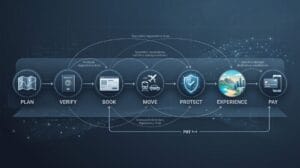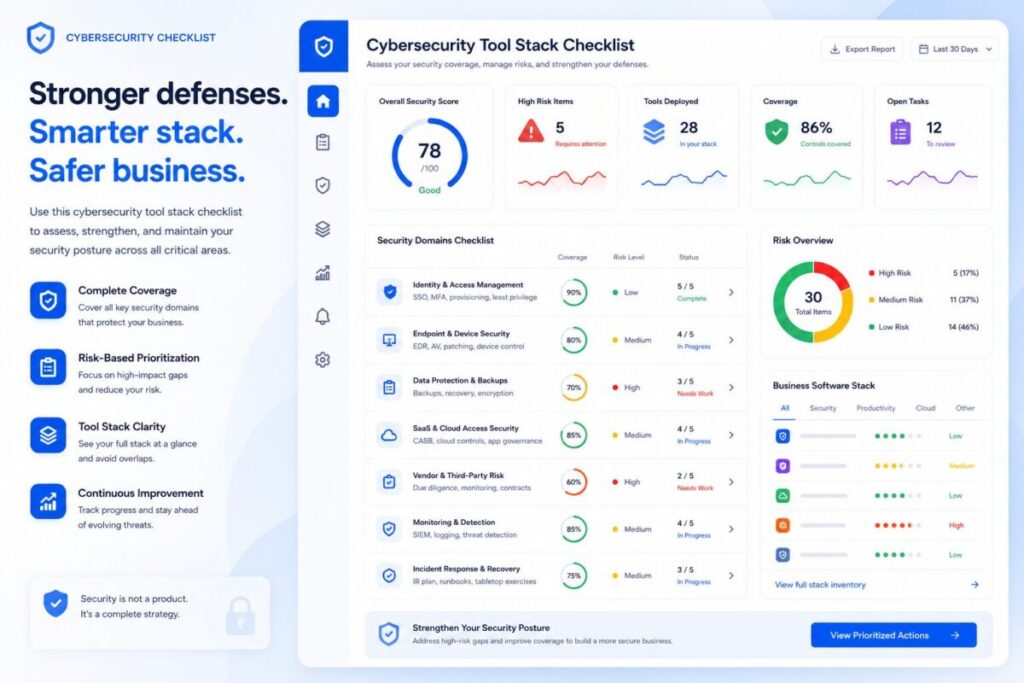
Cybersecurity tool stack checklist dashboard showing identity, devices, backups, SaaS access, vendor risk, monitoring, and incident response categories.

Cybersecurity Tool Stack Checklist

A cybersecurity tool stack can protect your business, but it can also become confusing, expensive, duplicated, or incomplete.

Many small teams add security tools one at a time: a password manager, VPN, antivirus, backup tool, endpoint protection, cloud security setting,
or monitoring service.
Over time, nobody is fully sure what is covered, what overlaps, what is missing, and what still creates risk.

This Cybersecurity Tool Stack Checklist helps you review the security tools your business uses and identify gaps before they become expensive problems.

Use it to check whether your current stack covers the basics:
identity, access, devices, data, backups, network protection, vendor risk, monitoring, and incident response.

For a broader security resource path, use the Cybersecurity Hub after completing this checklist. 

TOOLRELIEF DECISION RESOURCES

Latest ToolRelief Guides, Hubs, and Decision Tools

Explore the newest ToolRelief resources for AI tools, cybersecurity, VPN decisions, hosting deals, software risk, and smarter tool stack choices.

AI Hub AI Tools Hub Compare AI calculators, buyer guides, stack tools, and workflow decisions. Framework AI Tools Decision Framework Choose AI tools by cost, privacy, workflow fit, quality, and overlap. Calculator AI Search Visibility Calculator Check whether your content is ready for AI-driven search discovery. Security Hub Cybersecurity Hub Review software access, VPNs, SaaS risk, AI privacy, hosting, and vendors. Checklist Cybersecurity Tool Stack Checklist Review identity, devices, backups, VPNs, SaaS access, and incident response. Threat Guide Cloudflare 2026 Threat Report Guide Turn threat intelligence into practical security and tool stack decisions. Hosting VPS Deal Tracker Review VPS deals by renewal price, backups, support, security, and risk. VPN VPN Deal Watch Check VPN discounts, privacy claims, renewal prices, device limits, and support. AI Hub AI Tools Hub Compare AI calculators, buyer guides, stack tools, and workflow decisions. Framework AI Tools Decision Framework Choose AI tools by cost, privacy, workflow fit, quality, and overlap. Calculator AI Search Visibility Calculator Check whether your content is ready for AI-driven search discovery. Security Hub Cybersecurity Hub Review software access, VPNs, SaaS risk, AI privacy, hosting, and vendors. Checklist Cybersecurity Tool Stack Checklist Review identity, devices, backups, VPNs, SaaS access, and incident response. Threat Guide Cloudflare 2026 Threat Report Guide Turn threat intelligence into practical security and tool stack decisions. Hosting VPS Deal Tracker Review VPS deals by renewal price, backups, support, security, and risk. VPN VPN Deal Watch Check VPN discounts, privacy claims, renewal prices, device limits, and support.

Latest from ToolRelief

Fresh guides, research notes, and practical SaaS waste insights.

Explore ToolRelief

Calculators, audits, templates, playbooks, and decision tools.

What This Cybersecurity Tool Stack Checklist Helps You Review

This checklist helps you answer practical questions:

  • Do we know which security tools we actually use?
  • Are passwords and accounts protected?
  • Do we have multi-factor authentication where it matters?
  • Are employee devices protected?
  • Are backups working and tested?
  • Are remote work tools creating risk?
  • Do VPN, endpoint, and identity tools overlap or leave gaps?
  • Are admin accounts reviewed regularly?
  • Do we know who owns each security tool?
  • Do we have a simple response plan if something goes wrong?

A security stack does not need to be complicated to be effective. It needs to be clear, maintained, and owned.

Why Security Tool Stacks Become Messy

Security tools often accumulate slowly.

A company may add one tool after a phishing scare, another after hiring remote employees, another after moving files to the cloud,
and another after a vendor requirement.
Each decision may make sense alone, but the full stack can become hard to manage.

Common problems include:

  • duplicated tools
  • unused security subscriptions
  • missing MFA coverage
  • unclear admin ownership
  • old employee access
  • weak device protection
  • untested backups
  • unmanaged browser extensions
  • VPN confusion
  • no incident response process
  • too many alerts and no owner

A messy stack can create a false sense of safety.

If you want to understand why identity, AI, DDoS, SaaS exposure, and vendor risk matter now, read the Cloudflare 2026 Threat Report Cybersecurity Guide

Cybersecurity Tool Stack Checklist

Use the checklist below to review your current security setup.

1. Identity and Access

Check whether your team has basic identity protections in place.

  • Password manager is used by the team.
  • Multi-factor authentication is enabled for important accounts.
  • Admin accounts are limited.
  • Shared passwords are removed or controlled.
  • Former employees and contractors are removed from tools.
  • Account access is reviewed regularly.
  • Emergency recovery access is documented.

If this area is weak, start here. Identity gaps are often the easiest way for attackers or mistakes to create damage.


2. Device Protection

Review the laptops, desktops, and mobile devices used for work.

  • Work devices have screen locks.
  • Devices are updated regularly.
  • Antivirus or endpoint protection is active where needed.
  • Lost-device procedures are clear.
  • Personal devices used for work are controlled.
  • Browser extensions are reviewed.
  • Sensitive work is not stored only on local devices.

For remote teams, device risk can grow quietly because employees may use different networks, locations, and personal workflows.


3. Network and Remote Work

Review the tools and habits used when employees work outside the office.

  • VPN use is defined where appropriate.
  • Public Wi-Fi risk is understood.
  • Remote access tools are limited and reviewed.
  • Shared accounts are avoided.
  • Admin dashboards are protected by MFA.
  • Remote work policies are documented.
  • Travel and public network risks are addressed.

If your team works remotely, this section should connect naturally to your broader software and access review.


4. Data and File Protection

Check how important files, customer data, financial documents, and internal assets are handled.

  • Sensitive files are stored in approved systems.
  • File sharing permissions are reviewed.
  • Public sharing links are controlled.
  • Customer data access is limited.
  • Important data has backup coverage.
  • Data deletion procedures are documented.
  • AI tools are not used casually with sensitive data.

Data risk is not only about hackers. It can also come from accidental sharing, old permissions, or unclear workflows.


5. Backups and Recovery

Backups matter only if they work when needed.

  • Critical data is backed up.
  • Backup ownership is assigned.
  • Backup frequency is known.
  • Recovery has been tested.
  • Backup access is protected.
  • Cloud tools are not assumed to be a complete backup.
  • Recovery steps are documented.

A backup that has never been tested is not a reliable recovery plan.


6. SaaS and Cloud Tool Access

Most companies rely on cloud tools, SaaS platforms, and shared workspaces.

  • Admins know which SaaS tools are active.
  • High-risk tools are reviewed regularly.
  • Unused user accounts are removed.
  • Integrations and connected apps are reviewed.
  • Billing owners and security owners are identified.
  • Shadow IT is documented or reduced.
  • Renewal periods trigger access reviews.

If this section reveals tool sprawl, use ToolRelief’s SaaS Cost Optimization Tools to review cost and access risk together.

SaaS Cost Optimization Tools 


7. Vendor and Third-Party Risk

Vendors can create security exposure even when your internal setup is strong.

  • Critical vendors are listed.
  • Vendors with access to sensitive data are reviewed.
  • Security pages or documentation are checked.
  • Contracts and renewal dates are tracked.
  • Vendor admin access is limited.
  • Offboarding vendors is documented.
  • High-risk vendors have an owner.

This is especially important for AI tools, automation platforms, finance tools, HR tools, and customer support tools.

AI Tool Buyer Guide


8. Monitoring and Alerts

Security alerts are useful only if someone reads and acts on them.

  • Critical alerts have an owner.
  • Email security alerts are reviewed.
  • Admin login alerts are enabled where possible.
  • Suspicious activity alerts are not ignored.
  • Too many noisy alerts are reduced.
  • Security reports are reviewed on a schedule.
  • Escalation steps are clear.

A tool that produces alerts nobody checks is not real protection.


9. Incident Response

Even small teams need a simple plan.

  • Team knows who to contact during a security issue.
  • Password reset process is clear.
  • Device loss process is clear.
  • Vendor compromise process is clear.
  • Customer notification responsibility is known.
  • Backup recovery steps are documented.
  • A short incident checklist exists.

The plan does not need to be complex. It needs to be usable under pressure.


10. Ownership and Review Cadence

Every security tool should have an owner.

  • Each security tool has an internal owner.
  • Renewal dates are tracked.
  • Usage is reviewed.
  • Access is reviewed.
  • Cost is reviewed.
  • Gaps are documented.
  • Next review date is scheduled.

Security tools lose value when nobody owns them.

Cybersecurity Tool Stack Scorecard

Score each area from 0 to 5.

AreaQuestionScore
Identity and AccessAre accounts, passwords, MFA, and admin roles controlled?0–5
Device ProtectionAre work devices protected and updated?0–5
Remote WorkAre VPN, remote access, and public network risks managed?0–5
Data ProtectionAre sensitive files and customer data protected?0–5
BackupsAre backups working, protected, and tested?0–5
SaaS AccessAre SaaS tools, users, and integrations reviewed?0–5
Vendor RiskAre critical vendors and third-party access reviewed?0–5
MonitoringAre alerts owned and reviewed?0–5
Incident ResponseDoes the team know what to do if something goes wrong?0–5
OwnershipDoes each security tool have an owner and review cadence?0–5

Maximum score: 50


Score Interpretation

0–20: High Risk

Your security tool stack may have major gaps. Start with identity, MFA, backups, admin access, and device protection.

21–35: Basic Coverage

You have some security foundations, but there may be important gaps, unclear ownership, or untested recovery steps.

36–44: Managed Stack

Your stack is reasonably organized, but should be reviewed for overlap, stale access, vendor risk, and alert ownership.

45–50: Strong Stack

Your stack appears well managed. Continue regular reviews, access audits, backup tests, and vendor checks.

Common Security Tool Stack Mistakes

Mistake 1: Buying Tools Without Assigning Owners

A security tool without an owner becomes shelfware.

Mistake 2: Assuming Cloud Tools Are Automatically Backed Up

Cloud storage and SaaS tools may not provide the recovery coverage your business expects.

Mistake 3: Ignoring Former Employee Access

Old accounts are one of the simplest risks to overlook.

Mistake 4: Using AI Tools With Sensitive Data Without Rules

AI tools can create data exposure if employees paste customer data, internal files, code, or confidential plans without review.

AI Tool Buyer Guide

Mistake 5: Confusing VPN With Complete Security

A VPN can help in some situations, but it does not replace identity security, endpoint protection, backups, or access reviews.

Mistake 6: Letting Alerts Pile Up

If nobody owns alerts, the business may miss early signs of compromise.

Mistake 7: Reviewing Cost Without Reviewing Risk

Security and software cost should be reviewed together. A tool can be expensive, unused, and still leave critical gaps.

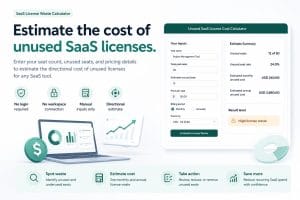
Unused SaaS License Cost Calculator

How To Use This Checklist

Use this checklist during:

  • quarterly security reviews
  • SaaS renewals
  • remote team audits
  • vendor reviews
  • onboarding/offboarding cleanup
  • incident response planning
  • AI tool policy reviews
  • software stack simplification projects

For small teams, start with the highest-risk areas first:

  1. MFA
  2. admin access
  3. backups
  4. former employee access
  5. device protection
  6. sensitive data handling
  7. vendor access
  8. incident response

Need Help Reviewing Your Software and Security Stack?

Cybersecurity tools, SaaS subscriptions, AI tools, and vendor access are connected.
A tool stack can look safe while still hiding cost waste, stale access, and security gaps.

ToolRelief helps teams review tools, reduce waste, identify overlap, and make clearer software decisions.

FAQ

What is a cybersecurity tool stack checklist?

A cybersecurity tool stack checklist is a practical review of the tools, accounts, policies, and processes a business uses to protect access,
devices, data, backups, vendors, and remote work.

Who should use this checklist?

Small businesses, remote teams, founders, operators, agencies, consultants, and teams that rely on SaaS tools, cloud software,
AI tools, and remote work should use this checklist.

Is this checklist only for cybersecurity experts?

No. It is written for business and operations teams that need a practical way to review security basics without becoming security specialists.

What is the most important security tool?

There is no single tool that solves everything.
For many teams, the highest-impact basics are MFA, password management, device updates, backups, and access reviews.

Does a VPN replace other security tools?

No. A VPN can help in specific situations, but it does not replace identity security, endpoint protection, backups, access reviews, or incident response.

How often should we review our security tool stack?

Review it at least quarterly, and also during renewals, team changes, vendor changes, remote work changes, or after a security incident.

Should security and SaaS cost be reviewed together?

Yes. Software cost, access, usage, and risk are connected.
A tool can be expensive, underused, and still leave important security gaps.

What should we do first if our score is low?

Start with MFA, admin access, backups, device protection, former employee access, and sensitive data handling.

Can this checklist help with AI tool risk?

Yes. AI tools can create data and workflow risk.
This checklist helps identify whether sensitive data, access, ownership, and vendor review practices are clear.

Does ToolRelief provide cybersecurity services?

ToolRelief provides decision-support resources, calculators, checklists, and review paths for software and tool decisions.
It does not replace professional security, legal, or compliance advice.

```
ToolRelief software spend decision system logo
ToolRelief System Page Independent Review Layer
Built and maintained by ToolRelief

This page is part of ToolRelief’s software spend decision system. ToolRelief builds practical calculators, signal boards, templates, and review paths that help teams evaluate SaaS waste, renewal pressure, unused licenses, AI tool overlap, pricing evidence, and software cost visibility before making buying or renewal decisions.

ToolRelief is founded by Waleed Al-Qasem, founder of Nexio Global. The platform is designed to support clearer software decisions for founders, operators, finance teams, and small businesses.

```
ToolRelief is independent. References to tools, vendors, or software categories are for editorial, educational, and decision-support purposes only. No sponsorship, endorsement, or formal partnership is implied unless clearly stated.
ToolRelief Articles Read SaaS waste, AI tools, pricing, workflow, and research guides
Scroll to Top