AI Tools Decision Framework for Small Teams

AI Tools Decision Framework for Small Teams

Choosing AI tools is no longer just a software buying decision. It is a workflow, cost, privacy, and productivity decision.

This AI tools decision framework helps small teams compare AI software before they buy, upgrade, replace, or cancel another subscription.

AI tools are everywhere, but choosing the right ones is getting harder.

Some tools save time. Some create more subscriptions, more overlap, more risk, and more confusion.
The real question is not “What is the best AI tool?” The better question is:

Which AI tool actually fits your workflow, budget, team, risk level, and business goal?

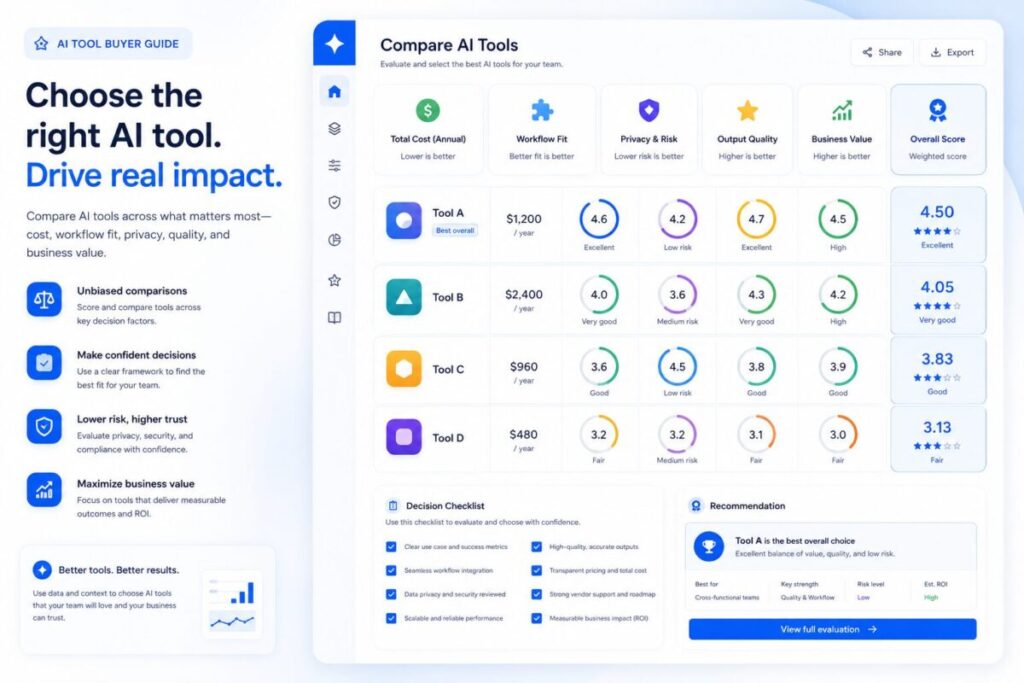
The ToolRelief AI Tool Buyer Guide helps you evaluate AI tools before you buy, upgrade, replace, or cancel them.

This guide is built for business owners, founders, operators, marketers, content teams, developers, consultants,
and small teams that want better AI decisions without wasting money on overlapping tools.

For a broader view of ToolRelief’s AI calculators, buyer guides, and workflow resources, start from the AI Tools Hub

TOOLRELIEF DECISION RESOURCES

Latest ToolRelief Guides, Hubs, and Decision Tools

Explore the newest ToolRelief resources for AI tools, cybersecurity, VPN decisions, hosting deals, software risk, and smarter tool stack choices.

AI Hub AI Tools Hub Compare AI calculators, buyer guides, stack tools, and workflow decisions. Framework AI Tools Decision Framework Choose AI tools by cost, privacy, workflow fit, quality, and overlap. Calculator AI Search Visibility Calculator Check whether your content is ready for AI-driven search discovery. Security Hub Cybersecurity Hub Review software access, VPNs, SaaS risk, AI privacy, hosting, and vendors. Checklist Cybersecurity Tool Stack Checklist Review identity, devices, backups, VPNs, SaaS access, and incident response. Threat Guide Cloudflare 2026 Threat Report Guide Turn threat intelligence into practical security and tool stack decisions. Hosting VPS Deal Tracker Review VPS deals by renewal price, backups, support, security, and risk. VPN VPN Deal Watch Check VPN discounts, privacy claims, renewal prices, device limits, and support. AI Hub AI Tools Hub Compare AI calculators, buyer guides, stack tools, and workflow decisions. Framework AI Tools Decision Framework Choose AI tools by cost, privacy, workflow fit, quality, and overlap. Calculator AI Search Visibility Calculator Check whether your content is ready for AI-driven search discovery. Security Hub Cybersecurity Hub Review software access, VPNs, SaaS risk, AI privacy, hosting, and vendors. Checklist Cybersecurity Tool Stack Checklist Review identity, devices, backups, VPNs, SaaS access, and incident response. Threat Guide Cloudflare 2026 Threat Report Guide Turn threat intelligence into practical security and tool stack decisions. Hosting VPS Deal Tracker Review VPS deals by renewal price, backups, support, security, and risk. VPN VPN Deal Watch Check VPN discounts, privacy claims, renewal prices, device limits, and support.

Latest from ToolRelief

Fresh guides, research notes, and practical SaaS waste insights.

Explore ToolRelief

Calculators, audits, templates, playbooks, and decision tools.

What This AI Tool Buyer Guide Helps You Decide

Use this guide to answer practical questions:

  • Do we really need this AI tool?
  • What problem does it solve?
  • Does it replace another tool we already pay for?
  • Is it useful every week or just impressive once?
  • Is the pricing clear?
  • Is the output reliable enough for our use case?
  • Does it create privacy, compliance, or data risks?
  • Can the team actually adopt it?
  • Is there a cheaper or simpler alternative?
  • Should we buy, test, wait, replace, or cancel?

AI Tool Buyer Guide Decision Framework

ToolRelief evaluates AI tools across seven decision areas.

1. Use Case Fit

A strong AI tool should solve a specific problem.

Weak reason to buy:

“This tool looks impressive.”

Strong reason to buy:

“This tool reduces research time, improves support quality, speeds up content production, helps developers ship faster,
or automates a repeated workflow.”

Before choosing an AI tool, define the job:

  • writing
  • coding
  • research
  • design
  • customer support
  • SEO
  • analytics
  • automation
  • meeting notes
  • sales workflows
  • document review
  • internal knowledge

If the use case is vague, the purchase usually becomes waste.


2. Workflow Fit

A tool can be powerful and still fail if it does not fit how your team works.

Ask:

  • Does it work inside tools we already use?
  • Does it require a new habit?
  • Does it create extra review work?
  • Does it integrate with our existing stack?
  • Can one person use it, or does the whole team need training?
  • Does it improve the workflow or interrupt it?

A tool that saves five minutes but adds another dashboard may not be worth it.


3. Cost and Subscription Risk

AI tools often start cheap and become expensive as teams add users, usage, credits, add-ons, or premium plans.

Check:

  • monthly price
  • annual commitment
  • user limits
  • usage limits
  • credit limits
  • upgrade triggers
  • cancellation terms
  • duplicated features
  • overlap with existing tools

A tool is not only expensive because of its price. It becomes expensive when it overlaps with tools you already have.


4. Output Quality

AI output should be evaluated by use case.

For example:

  • Writing tools should be judged by accuracy, originality, tone, and editing time.
  • Coding tools should be judged by usefulness, speed, security, and review burden.
  • Design tools should be judged by brand fit and export quality.
  • Research tools should be judged by source quality and reliability.
  • SEO tools should be judged by whether they support better decisions, not just more content.

A good test is simple:

Does the tool reduce work, or does it create more work to verify, fix, and clean up the output?


5. Data and Privacy Risk

AI tools may process sensitive business information, customer data, internal documents, prompts, files, code, or strategy notes.

Before using a tool, ask:

  • What data will we enter?
  • Is the data sensitive?
  • Can the vendor use inputs for training?
  • Are team controls available?
  • Are admin controls available?
  • Can we delete data?
  • Is there an enterprise or privacy-safe mode?
  • Does this tool belong in personal use, team use, or restricted use?

For high-risk data, do not treat AI tools casually.


6. Replacement and Overlap

A new AI tool should be compared against your current stack.

It may replace:

  • writing tools
  • design tools
  • meeting tools
  • research tools
  • support tools
  • SEO tools
  • project tools
  • automation tools
  • developer tools
  • analytics tools

If it does not replace anything and does not create a new valuable workflow, it may simply become another subscription.


7. Business Value

The final question is business value.

A tool should help with at least one of these:

  • save time
  • reduce cost
  • improve quality
  • increase output
  • reduce risk
  • improve decisions
  • speed up delivery
  • increase revenue
  • improve customer experience
  • replace a more expensive tool

If the value is not clear, test before committing.

AI Tool Buyer Scorecard

Use this scorecard before buying or renewing an AI tool.

Score each category from 0 to 5.

CategoryQuestionScore
Use Case FitDoes it solve a clear problem?0–5
Workflow FitDoes it fit how the team works?0–5
Cost ClarityIs pricing and usage easy to understand?0–5
Output QualityIs the output useful with reasonable review?0–5
Privacy FitIs it safe for the data you will use?0–5
Stack OverlapDoes it replace or improve existing tools?0–5
Business ValueDoes it create measurable value?0–5

Maximum score: 35

Score Interpretation

0–12: Do Not Buy Yet

The tool is unclear, risky, overlapping, or not connected to a real workflow.

13–22: Test Carefully

The tool may be useful, but you need a limited trial, clear owner, and defined use case.

23–29: Good Candidate

The tool has a clear use case and may be worth adopting if cost and privacy risks are acceptable.

30–35: Strong Candidate

The tool is likely valuable if it fits your budget, team, and security requirements.

For AI tools that touch files, email, customer data, or internal workflows, review the Cybersecurity Hub before making a final decision. 

AI Tool Categories To Evaluate

AI Writing Tools

Useful for content drafts, outlines, rewriting, summarization, and brainstorming.

Watch for:

  • generic output
  • factual errors
  • brand voice problems
  • overproduction of low-value content

AI Coding Tools

Useful for developers, technical teams, debugging, code explanation, and faster prototyping.

Watch for:

  • insecure code
  • dependency issues
  • overreliance
  • review burden

AI Design Tools

Useful for social graphics, presentations, ads, visual concepts, and creative workflows.

Watch for:

  • brand inconsistency
  • licensing uncertainty
  • low-quality exports
  • generic visuals

AI SEO Tools

Useful for keyword research, content refresh, topical mapping, SERP analysis, and visibility planning.

Watch for:

  • content spam
  • outdated search assumptions
  • weak source support
  • over-automation

AI Automation Tools

Useful for connecting workflows, handling repeated tasks, and reducing manual operations.

Watch for:

  • fragile automations
  • unclear ownership
  • data exposure
  • hidden usage costs

AI Meeting and Productivity Tools

Useful for notes, summaries, follow-ups, and task extraction.

Watch for:

  • privacy concerns
  • poor summaries
  • missed context
  • too many duplicated tools

AI Research Tools

Useful for summarizing sources, exploring topics, and speeding up analysis.

Watch for:

  • hallucinations
  • weak citations
  • outdated data
  • missing source transparency

Buy, Test, Wait, Replace, or Cancel

Use this simple decision model.

Buy

Buy when the tool solves a clear problem, fits the workflow, has acceptable privacy terms, and produces measurable value.

Test

Test when the tool seems promising but the value is not proven.

Wait

Wait when the category is moving fast, the pricing is unclear, or the use case is not urgent.

Replace

Replace when the AI tool can remove two or more weaker tools from your stack.

Cancel

Cancel when the tool is rarely used, overlaps with existing software, creates more work, or has unclear ROI.

You can also use this as an AI tool buyer guide when comparing tools before renewal or purchase.

Common AI Tool Buying Mistakes

Mistake 1: Buying Because of Hype

A tool can be popular and still be wrong for your workflow.

Mistake 2: Ignoring Overlap

Many AI tools repeat features you already have in your current stack.

Mistake 3: Not Assigning an Owner

If nobody owns the tool, nobody measures whether it works.

Mistake 4: Treating AI Output as Final

Most AI output still needs review, editing, checking, or context.

Mistake 5: Forgetting Privacy

Do not paste sensitive data into tools without understanding the data policy.

Mistake 6: Paying Annually Too Early

Avoid annual plans until the tool has proven ongoing value.

Mistake 7: Adding Tools Without Removing Tools

Every new tool should trigger a stack review.

ToolRelief AI Tool Buying Checklist

Before buying an AI tool, confirm:

  • The use case is clear.
  • The team knows who will use it.
  • The tool does not duplicate something already paid for.
  • Pricing is understood.
  • Usage limits are understood.
  • Data risks are acceptable.
  • The output is useful after review.
  • The tool has a measurable success metric.
  • There is a trial or review period.
  • Someone will decide whether to keep or cancel it.

Need Help Reviewing Your AI Tool Stack?

AI tools can save time, but they can also create hidden subscription waste, overlap, and workflow confusion.

ToolRelief helps teams evaluate tools, reduce waste, and make clearer software decisions.

Use the AI Tool Stack Builder, check your AI subscription waste, or request a ToolRelief review before adding more tools.

FAQ

What is an AI tool buyer guide?

An AI tool buyer guide helps you evaluate AI software before buying, upgrading, renewing, or canceling it.
It focuses on use case, cost, workflow fit, privacy, output quality, and business value.

Who should use this guide?

This guide is useful for founders, small businesses, agencies, marketers, developers, consultants, operators,
and teams that want to adopt AI tools without creating unnecessary tool sprawl.

What is the biggest mistake when buying AI tools?

The biggest mistake is buying based on hype instead of workflow fit.
A tool should solve a specific problem and create measurable value.

Should I buy annual AI tool subscriptions?

Avoid annual plans until the tool proves regular usage and value.
Start with a trial or monthly plan when possible.

How do I know if an AI tool is worth keeping?

Keep it if it saves time, improves quality, reduces cost, replaces other tools, or supports a high-value workflow.
Cancel it if usage is low or value is unclear.

Are AI tools risky for business data?

They can be. Before using an AI tool, understand what data you enter, how the vendor handles that data,
and whether admin, privacy, or enterprise controls are available.

Can one AI tool replace multiple tools?

Sometimes. A strong AI tool may replace writing, research, meeting, design, or workflow tools.
But replacement should be tested, not assumed.

How often should I review AI tools?

Review AI tools at least monthly for active teams, especially if new tools are being tested or multiple subscriptions are running at the same time.

Is the cheapest AI tool always the best choice?

No. The best tool is the one that fits the workflow, produces reliable output, manages risk, and creates measurable value at an acceptable cost.

How does this guide connect to ToolRelief?

ToolRelief helps users make better tool decisions through calculators, checklists, buyer guides, deal tracking, and live tool intelligence.

```
ToolRelief software spend decision system logo
ToolRelief System Page Independent Review Layer
Built and maintained by ToolRelief

This page is part of ToolRelief’s software spend decision system. ToolRelief builds practical calculators, signal boards, templates, and review paths that help teams evaluate SaaS waste, renewal pressure, unused licenses, AI tool overlap, pricing evidence, and software cost visibility before making buying or renewal decisions.

ToolRelief is founded by Waleed Al-Qasem, founder of Nexio Global. The platform is designed to support clearer software decisions for founders, operators, finance teams, and small businesses.

```
ToolRelief is independent. References to tools, vendors, or software categories are for editorial, educational, and decision-support purposes only. No sponsorship, endorsement, or formal partnership is implied unless clearly stated.
ToolRelief Articles Read SaaS waste, AI tools, pricing, workflow, and research guides
Scroll to Top