
TOOLRELIEF DECISION INTELLIGENCE
- Decision
- Use Cybersecurity Hub to route the current software or technology decision toward the most relevant ToolRelief intelligence surface.
- Evidence Basis
- Curated ToolRelief research, tools, comparisons, frameworks, and decision surfaces organized around the subject and its related decision paths.
- Best Used For
- Finding the right ToolRelief analysis, tool, calculator, or decision surface when the next route is not yet clear.
- Decision Boundary
- This page provides independent decision support rather than a guaranteed outcome. Product capabilities, pricing, third-party terms, and operating conditions can change.
Cybersecurity Hub for Software, VPN, SaaS, and AI Tool Risk
The modern security problem is no longer limited to firewalls, antivirus software, or one IT checklist.
Most teams now depend on SaaS tools, AI tools, cloud apps, VPNs, hosting providers, browser extensions, automation tools, vendors,
and remote-work systems.
Each one can create access risk, privacy exposure, renewal confusion, duplicated security tools, or gaps nobody owns.
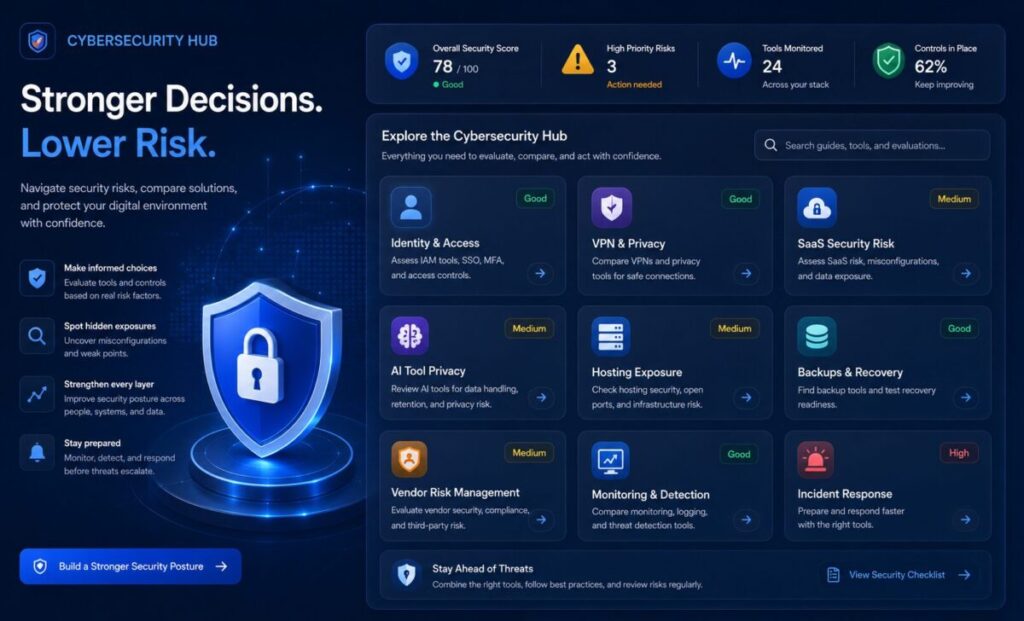
This Cybersecurity Hub helps you review software-related security decisions in one place.
Use it to compare security checklists, VPN decisions, hosting exposure, SaaS access, AI tool privacy risk, vendor risk,
and practical next steps before your tool stack becomes harder to control.
Start here when you want a clearer view of the tools that protect your business, the tools that create risk, and the decisions that need review.
For broader software discovery, explore ToolRelief’s Software Offer Signals, Software Trends Signals, Software Templates, and Software Checklists,ToolRelief Updates
What This Cybersecurity Hub Helps You Do
This Cybersecurity Hub helps you:
- review security tools and software access
- identify gaps in your security stack
- compare VPN and privacy decisions
- understand hosting and infrastructure exposure
- review AI tool privacy and access risk
- connect SaaS cost with security ownership
- check vendor and third-party risk
- organize security resources in one place
- decide which checklist, guide, or tool to use next
Security is not only about buying more tools.
It is about knowing which tools matter, who owns them, what they protect, and where the gaps are.
Start Here: Review Your Security Tool Stack
The best starting point is a practical review of your current tools.
Use the Cybersecurity Tool Stack Checklist to review identity, devices, backups, VPNs, SaaS access, vendor risk, monitoring,
incident response, and ownership.
This is the right starting point if you are asking:
- Which security tools do we actually use?
- Are passwords, accounts, and MFA controlled?
- Are backups working and tested?
- Are VPN, endpoint, and identity tools overlapping?
- Are SaaS users and integrations reviewed?
- Does each security tool have an owner?
- Do we know what to do if something goes wrong?
A security stack that nobody owns can look safe while still hiding risk.
Cybersecurity Threat Intelligence
Security reports can be useful, but only if they turn into action.
The Cloudflare 2026 Threat Report Cybersecurity Guide helps translate modern threat intelligence into practical software and tool stack questions.
Use it when you want to understand how identity risk, AI-assisted threats, DDoS activity, SaaS exposure, vendor access,
and incident response connect to everyday software decisions.
Threat intelligence should not only create fear.
It should help teams decide what to review, what to protect, and what to simplify.
VPN and Privacy Decisions
VPN tools are often treated like simple privacy subscriptions, but they are part of a larger security decision.
Use VPN Deal Watch before buying or renewing a VPN plan.
It helps review VPN discounts, renewal prices, privacy claims, device limits, security features, support, speed, cancellation rules, and long-term value.
For a more specific remote-work angle, review Best VPN for Remote Teams when VPN decisions are connected to distributed teams,
travel, client work, or remote access.
A VPN can help with privacy and access, but it does not replace MFA, password managers, endpoint protection, backups, monitoring,
or clear security ownership.
Remote Team Security
Remote work increases the number of places where security can fail.
A team may use personal devices, shared Wi-Fi, browser extensions, file-sharing tools, cloud apps, VPNs, AI tools, and multiple SaaS platforms.
If access and ownership are unclear, risk spreads across the stack.
Use Remote Team Security Risks when you need to understand where remote-work exposure often starts.
Use Shadow IT Remote Teams Security when employees or contractors use tools outside approved workflows.
Remote security is not only a people problem.
It is a tool visibility problem.
SaaS Access and Security Risk
SaaS tools can create security exposure even when they are useful.
Risk often appears through:
- old employee accounts
- shared logins
- weak MFA coverage
- unmanaged integrations
- unused paid seats
- vendor access
- unclear admin roles
- forgotten automation tools
- sensitive data in too many apps
- tools nobody reviews before renewal
Use SaaS Cost Optimization Tools when software spend, unused tools, and tool ownership are connected to security decisions.
Use the Unused SaaS License Cost Calculator when you need to estimate whether unused seats may also represent stale access or unnecessary risk.
Cost waste and security risk often appear together because both come from poor visibility.
AI Tool Privacy and Security Risk
AI tools add a new layer to security reviews.
Employees may paste sensitive data into AI tools, connect AI apps to files or email, use browser extensions, test unapproved tools,
or create workflows that nobody audits.
AI risk questions include:
- What data goes into the AI tool?
- Does the vendor store prompts?
- Can submitted data be used for training?
- Does the tool connect to files, email, CRM, code, or customer data?
- Are admin controls available?
- Can access be removed when someone leaves?
- Are outputs reviewed before use?
- Is the tool duplicating another paid AI subscription?
Use the AI Tools Hub to review AI decision resources, calculators, and frameworks.
Use the AI Tools Decision Framework when choosing whether an AI tool is worth buying, replacing, or canceling.
Hosting and Infrastructure Security
Hosting, VPS, DNS, CDN, backups, and website security are part of the cybersecurity picture.
A cheap hosting or VPS deal can create hidden risk if backups, support, migration, server management, uptime, or DDoS protection are unclear.
Use the VPS Deal Tracker when reviewing hosting offers, renewal pricing, backups, security features, support quality, and technical responsibility.
Hosting decisions affect performance, uptime, security, recovery, and business continuity.
They should not be treated as random discount purchases.
Cybersecurity Tool Categories to Review
Use this section as a practical map of what to check.
Identity and Access
Review:
- password manager
- MFA
- admin roles
- old users
- shared accounts
- vendor access
- OAuth apps
- login alerts
Identity is often the front door to the software stack.
Device Protection
Review:
- endpoint protection
- device updates
- disk encryption
- lost device process
- work vs personal devices
- remote access rules
Devices are often where software access becomes physical risk.
VPN and Network Access
Review:
- VPN plan
- device coverage
- privacy claims
- business-use fit
- cancellation and renewal rules
- remote-work access
- network exposure
A VPN should support security strategy, not replace it.
SaaS and Cloud Tools
Review:
- users
- integrations
- admin roles
- billing owners
- renewal dates
- sensitive data
- unused seats
- offboarding process
SaaS security depends on visibility and ownership.
AI Tools
Review:
- data entered into tools
- prompt storage
- vendor controls
- team policies
- account access
- integrations
- output review
- subscription overlap
AI tools should be reviewed as software vendors, not just productivity experiments.
Backups and Recovery
Review:
- backup schedule
- restore process
- offsite copies
- access controls
- testing cadence
- recovery owners
- critical systems
A backup that has never been tested is not a reliable recovery plan.
Vendor and Third-Party Risk
Review:
- critical vendors
- contracts
- data access
- support channels
- admin access
- cancellation terms
- security documentation
- renewal dates
Vendor risk grows when third-party tools become invisible.
Monitoring and Incident Response
Review:
- alerts
- owners
- escalation paths
- contact list
- incident steps
- recovery plan
- customer communication
- legal or compliance needs
A team does not need a massive security department to define what happens when something breaks.
Cybersecurity Hub Scorecard
Score each area from 0 to 5.
| Area | Question | Score |
|---|---|---|
| Identity | Are accounts, MFA, admins, and old users controlled? | 0–5 |
| Devices | Are work devices protected, updated, and recoverable? | 0–5 |
| VPN and Access | Are VPN, remote access, and network risks reviewed? | 0–5 |
| SaaS Tools | Are users, integrations, vendors, and sensitive data reviewed? | 0–5 |
| AI Tools | Are AI tools reviewed for privacy, access, and data exposure? | 0–5 |
| Hosting | Are hosting, DNS, backups, uptime, and DDoS exposure understood? | 0–5 |
| Backups | Are backups protected, tested, and owned? | 0–5 |
| Vendor Risk | Are critical third-party tools reviewed? | 0–5 |
| Monitoring | Are alerts owned and checked? | 0–5 |
| Incident Response | Does the team know what to do during a security incident? | 0–5 |
Maximum score: 50
Cybersecurity Score Interpretation
0–20: High Exposure
Your security stack may have major visibility, ownership, access, or recovery gaps. Start with identity, backups, SaaS access, and incident response.
21–35: Basic Control
Some protections exist, but the stack may still have weak ownership, unclear vendor access, AI tool risk, or poor review cadence.
36–44: Managed Risk
Your team has reasonable controls, but should continue reviewing VPN, SaaS, hosting, AI tools, vendors, and recovery processes.
45–50: Strong Control
Your tool stack appears well managed. Keep reviewing access, vendor changes, AI usage, backups, and incident response on a regular schedule.
Recommended Cybersecurity Review Workflow
Use this workflow when you are not sure where to start:
- List the tools your team uses.
- Mark tools that hold sensitive data.
- Identify admins and owners.
- Review MFA and password practices.
- Check old users and contractors.
- Review VPN, remote access, and device coverage.
- Check backups and recovery steps.
- Review AI tools and data exposure.
- Review hosting and infrastructure risk.
- Assign next actions: keep, restrict, review, replace, consolidate, cancel, or monitor.
This workflow turns the Cybersecurity Hub into a practical review path instead of a reading list.
ToolRelief Cybersecurity Decision Path
If you need a practical checklist
Start with the Cybersecurity Tool Stack Checklist.
If you want threat context
Read the Cloudflare 2026 Threat Report Cybersecurity Guide.
If you are reviewing VPN cost and privacy
Use VPN Deal Watch.
If your team works remotely
Review Best VPN for Remote Teams and Remote Team Security Risks.
If SaaS access may be stale
Use the Unused SaaS License Cost Calculator.
If hosting is part of the risk
Use the VPS Deal Tracker.
If AI tools touch sensitive data
Start with the AI Tools Hub and the AI Tools Decision Framework.
Common Cybersecurity Stack Mistakes
Mistake 1: Buying Tools Without Assigning Owners
A tool without an owner can become a false sense of security.
Mistake 2: Treating VPN as Complete Security
A VPN can help, but it does not replace identity controls, backups, device protection, monitoring, or incident response.
Mistake 3: Ignoring Old SaaS Access
Old users, unused seats, forgotten integrations, and abandoned tools can create both cost waste and access risk.
Mistake 4: Reviewing AI Tools Only for Productivity
AI tools should also be reviewed for privacy, data handling, access, integrations, and vendor risk.
Mistake 5: Forgetting Hosting and Backups
A business website depends on hosting, DNS, backups, uptime, recovery, and support. These are security decisions.
Mistake 6: Keeping Security Reviews Too Technical
Security reviews should be understandable to founders, operators, finance teams, creators, and small business owners, not only technical teams.
How ToolRelief Uses Cybersecurity Signals
ToolRelief treats cybersecurity updates, VPN deals, hosting changes, SaaS access issues, AI privacy risks, vendor exposure,
and software stack confusion as practical decision signals.
Those signals can become:
- checklists
- calculators
- buyer guides
- deal watch pages
- report guides
- refresh briefs
- internal link updates
- sponsor opportunities
- affiliate opportunities
- software decision frameworks
That is part of The ToolRelief System: turning market, security, software, and tool signals into practical decision support.
Need Help Reviewing Your Security and Software Stack?
Cybersecurity decisions now connect to SaaS tools, VPNs, AI tools, hosting, vendors, backups, and recurring software cost.
ToolRelief helps users compare tools, reduce waste, review software decisions, and identify better next steps before committing to another platform or subscription.
Request a review through Contact ToolRelief if you want help thinking through your software, security, privacy, hosting, or tool stack decisions.
FAQ
What is the Cybersecurity Hub?
The Cybersecurity Hub is ToolRelief’s central page for software-related security decisions, including security checklists,
VPN decisions, SaaS access, AI tool risk, hosting exposure, vendor risk, and threat intelligence.
Who should use this Cybersecurity Hub?
This hub is for small teams, founders, operators, freelancers, creators, remote teams, and business owners who use multiple software tools
and want a clearer way to review security risk.
Is this Cybersecurity Hub only for technical teams?
No. This hub is designed for practical software and tool decisions.
It helps non-technical and technical users review access, ownership, vendors, VPNs, backups, AI tools, and hosting risk.
What should I review first?
Start with identity, MFA, old users, admin accounts, backups, SaaS access, VPN usage, AI tools, hosting, and incident response steps.
Does a VPN replace cybersecurity tools?
No. A VPN can support privacy and remote access, but it does not replace MFA, password managers, endpoint protection,
backups, monitoring, vendor review, or incident response.
Why are SaaS tools part of cybersecurity?
SaaS tools hold accounts, files, customer data, integrations, workflows, and admin access.
If SaaS users and permissions are not reviewed, they can create security exposure.
Should AI tools be reviewed for security?
Yes. AI tools should be reviewed for data handling, prompt storage, training policies, integrations, admin controls, sensitive information, and user access.
How does hosting affect cybersecurity?
Hosting affects uptime, backups, recovery, DDoS exposure, server management, SSL, support, and website security.
A weak hosting setup can create business risk.
How often should a security tool stack be reviewed?
Review the security stack at least quarterly, and always before renewals, team changes, new vendors, new AI tools, hosting changes,
or major workflow changes.
Does ToolRelief provide cybersecurity services?
ToolRelief provides decision-support resources, calculators, guides, checklists, and review paths for software and tool decisions.
It does not replace professional security, legal, or compliance advice.